Solar Lead Return Policy: What You Can Return, How to Dispute, and What It Really Costs
How a solar lead return policy works in 2026: what's returnable, how to document a lead dispute, contract language, templates and how return terms change real cost.
Updated · 82 min read
In this guide (32 sections)
- What a solar lead return policy is
- Why return policies exist at all
- What is typically returnable
- What is typically not returnable
- Our return policy, in our own words
- How long return windows are and when they start
- How to document a lead dispute so it gets approved
- How return terms change the real cost of a lead
- Contract language to look for and ask for
- Templates you can copy
- How return policies differ by lead type
- Scenarios by installer size
- Scenarios by market and state
- Building a returns workflow inside your CRM
- Using return data to judge a lead vendor
- How to negotiate better return terms
- Handling the hardest disputes
- Common mistakes buyers make with return policies
- Troubleshooting: when returns keep getting denied
- Running a test batch with returns built in
- Reconciling credits: a worked month-end example
- Return policies and compliance: where they overlap
- Return policies for installers who also resell or share leads
- Questions to ask on a vendor call about returns
- Who on your team owns which part of returns
- How volume and seasonality affect returns
- Case-style walkthroughs of real dispute types
- Writing your own internal return standard
- One-page return policy checklist
- Glossary of return-policy terms
- FAQ
- Where to go next
A solar lead return policy is the written rule that decides which purchased leads you can send back for a credit or a replacement, how fast you must report them, what proof you need, and what happens after you report. It is the part of a lead deal most installers skim and later regret skimming. This guide covers it end to end as of October 2026: what is typically returnable, how to document a dispute so it gets approved, contract language worth asking for, templates you can copy, and the math that shows how return terms change the real cost of every lead you buy.

A disclosure first. We sell solar leads, and we have a return policy of our own, which we describe in one clearly marked section below using our published terms and nothing else. Everything else in this guide is method: definitions, process, documentation habits, worked math and templates you can use with any vendor, including us. We do not describe other vendors' return terms here, because those terms change often and we would rather you read them in the vendor's own contract. Where we use numbers to show how the math works, they are labelled as illustrative examples. They are not market prices and they are not our prices; our pricing is confirmed by ZIP on your call.
Key takeaways
- A return policy answers five questions: what counts as a bad lead, how long you have to report it, what evidence you need, who decides, and whether you get a credit, a replacement or cash back. Get all five in writing before the first batch.
- Returns cover lead defects (wrong number, wrong person, outside your filters, duplicates). They almost never cover lead outcomes (no answer, not interested, financing declined, didn't buy). Mixing these up is the root of most disputes.
- The return window is only useful if your team works leads fast enough to discover defects inside it. A short window plus slow follow-up is the same as no policy.
- Documentation wins disputes. A call log with timestamps, a disposition code, and the lead ID turns a "he said, she said" argument into a two-minute approval.
- Return terms change your effective cost per valid lead and your cost per sale. Model them before comparing vendors on price.
- Nothing here is legal advice. Contract terms and consent questions should be reviewed with counsel.
What a solar lead return policy is
A solar lead return policy is the section of a lead purchase agreement that defines an invalid lead, sets a deadline for reporting it, lists the evidence required, and states the remedy, usually a credit toward future leads or a replacement lead. It protects the buyer from paying for records that could never be worked, and protects the seller from paying for normal sales losses.
People in the industry use several names for the same thing: return policy, replacement policy, credit policy, refund policy, scrub policy, bad lead policy, dispute policy. Some vendors fold it into the "terms of service" page; some put it in an insertion order or a master services agreement; some only explain it on the phone. The name matters less than the content. If the rules exist only in a sales rep's verbal promise, you do not have a return policy. You have a hope.
The five questions every return policy must answer
Every functional return policy answers the same five questions. When you read a vendor's terms, or draft your own requirements, check for each one.
| Question | What a clear answer looks like | What a vague answer looks like |
|---|---|---|
| What counts as a bad lead? | A list of specific defects: disconnected number, wrong person, outside agreed filters, duplicate of a lead already sent | "Leads that don't meet quality standards" |
| How long do I have to report it? | A fixed window with a start point: "7 days from delivery" | "Report promptly" or "within a reasonable time" |
| What evidence do I need? | Named items: lead ID, reason code, call attempt timestamps | "Reasonable documentation" |
| Who decides, and how fast? | A named reviewer or team and a response time | Silence |
| What is the remedy? | Credit to account, replacement lead, or refund, and when it applies | "We'll make it right" |
If one of the five is missing, ask for it before you buy. A missing start point on the window ("seven days" from what? delivery? first call? invoice?) causes as many arguments as a missing window.
Return, replacement, credit and refund are different remedies
These words get used interchangeably, but they are different things, and the difference shows up on your books.
- Return describes the act: you send the lead back and say it is defective. It says nothing yet about what you get in exchange.
- Replacement means the vendor delivers a different lead in place of the bad one. You get another record, usually matching the same filters.
- Credit means the vendor reduces what you owe, typically on the next invoice or next batch. You get value back, but only if you keep buying.
- Refund means money goes back to your card or bank account. This is the rarest remedy in lead buying, and when it exists it is often limited to the end of a relationship or to billing errors.
A credit and a replacement are close in value if you plan to keep buying. They are worth much less if you plan to stop. That matters for test batches: if a vendor's test batch performs badly and the only remedy for bad leads is a credit against your next order, you may be stuck choosing between buying again or writing off the credit. Ask how credits are handled if you end the relationship.
Where the return policy lives in a lead deal
The return policy usually sits in one of four places:
- The vendor's published terms of service. Easy to find, but often generic and sometimes overridden by the order you sign.
- The insertion order (IO) or order form. The document that sets volume, price, filters and territory for a specific campaign. If it contains return terms, those usually control for that campaign.
- A master services agreement (MSA). The umbrella contract for the relationship. Return terms here apply unless an IO says otherwise.
- An email or a sales deck. The weakest place for terms to live. Ask for them to be moved into one of the documents above.
When documents disagree, the contract usually says which one wins (an "order of precedence" clause). If it does not say, that is a question for counsel before you sign, not after the first dispute.
Why return policies exist at all
Return policies exist because a purchased lead has two kinds of risk: defects in the record itself, which the seller controls, and conversion risk after a valid contact, which the buyer controls. A good policy draws a clean line between them, so the seller is accountable for data quality and the buyer is accountable for selling.
Think about what you are buying when you buy a raw solar lead. You are paying for an introduction: a homeowner's name, a way to reach them, their answers to some qualifying questions, and a record that they agreed to be contacted. The seller can control whether that information is accurate, current, unique to you and inside your filters. The seller cannot control whether you call in two minutes or two days, whether your setter is good on the phone, whether your price is competitive, or whether the homeowner's roof and credit work out.
A return policy is the agreement about where that line falls. Draw it too far toward the buyer and the seller ends up refunding normal sales losses, which forces prices up for everyone. Draw it too far toward the seller and the buyer pays for phone numbers that ring to a fax machine. Most friction in lead buying comes from not drawing it at all.
Defects vs outcomes: the most useful distinction in this guide
If you remember one idea, make it this one. A defect is a problem with the lead record that existed at the moment of delivery. An outcome is what happened after you worked it.
| Defect (seller's responsibility) | Outcome (buyer's responsibility) |
|---|---|
| Phone number is disconnected or not in service | Homeowner doesn't answer after several attempts |
| Number belongs to someone who never heard of the inquiry | Homeowner answers and says they're not interested anymore |
| Address is outside the ZIP codes you bought | Homeowner gets a quote and chooses a competitor |
| Homeowner is a renter when you filtered for owners | Homeowner's financing application is declined |
| Lead is a duplicate of one already sent to you | Homeowner's roof needs replacing first |
| Contact details are obviously fake or garbled | Homeowner says the price is too high |
Almost every reasonable return policy covers defects and excludes outcomes. Most disputes happen when one side treats an outcome as a defect. "He said he never filled out a form" can be either one, which is why evidence matters so much (we cover that in the documentation section).
What sellers worry about
It helps to understand the seller's side, because it explains why policies have the shape they do.
- Late discovery. A lead that was valid at delivery can go stale. A number that worked on Monday can be disconnected by the end of the month. Sellers set windows to separate "bad at delivery" from "went bad while sitting in your CRM".
- Remorse returns. A homeowner who filled out a form on Tuesday and says "not interested" on Thursday was a real lead with real intent that faded. Sellers exclude these because intent decay is the buyer's speed problem.
- Bulk returns. A buyer who returns a large share of a batch without evidence looks, to a seller, like a buyer trying to get leads for free. Sellers respond by requiring proof and sometimes capping returns.
- Cherry-picking. A buyer who works the best leads and returns the rest is shifting conversion risk. Evidence requirements (call attempts, dispositions) exist to prevent this.
What buyers worry about
- Paying for unreachable records. Wrong numbers and fake entries cost dial time and setter morale on top of the lead price.
- Recycled or shared leads sold as exclusive. A homeowner who says "you're the fifth company to call me today" on an exclusive lead is a serious problem, and it can be hard to prove.
- Filter drift. Leads that fall outside agreed ZIP codes, homeowner status, utility bill thresholds or roof criteria.
- Opaque decisions. Returns submitted and never answered, or denied without a reason.
- Credits that expire or can't be used. Value that exists on paper only.
A good policy answers both sets of worries in writing. When you read terms, you are checking whether both sides' concerns have a clear rule.
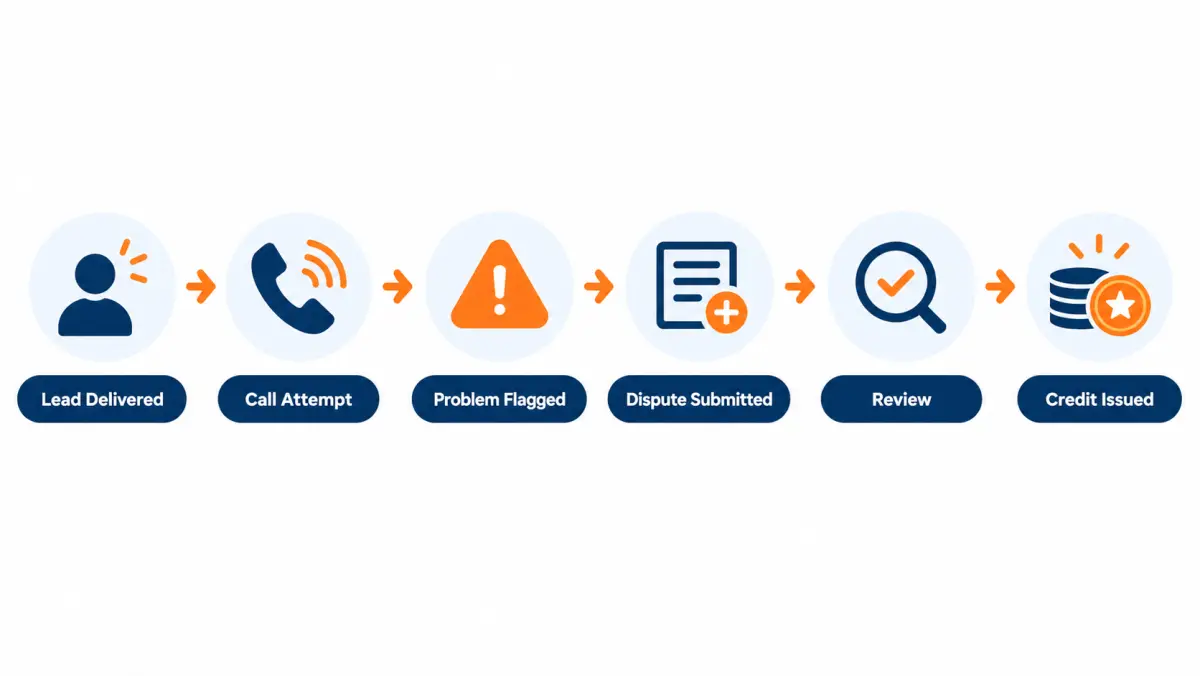
What is typically returnable
Typically returnable solar leads share one trait: the problem was present in the record when it was delivered. Common examples are disconnected or invalid phone numbers, wrong or fake contact details, leads outside the agreed geography or criteria, and duplicates of leads already sent to you. Exact categories vary by vendor, so confirm each one in the written terms.
What follows is a category-by-category walkthrough. For each, we explain what it means, how you would detect it, what evidence usually proves it, and where the gray areas sit. Treat this as a vocabulary and a checklist for reading any vendor's terms, not as a description of any particular vendor's policy.
Disconnected or invalid phone numbers
What it is. The number on the lead does not connect: a carrier recording says the number is disconnected, not in service, or cannot be completed as dialed. It also includes numbers that are structurally impossible (wrong digit count, an area code that doesn't exist).
How you detect it. Your first dial. Many dialers flag "number not in service" automatically from carrier signals; if yours does, that flag is useful evidence.
Evidence that usually works. The lead ID, the dial timestamp, the disposition code your dialer or setter applied, and ideally the call recording or the dialer's carrier response. One dial is usually enough for a truly disconnected number, because the recording is unambiguous.
Gray areas. A number that rings with no voicemail is not disconnected. A number with a full voicemail box is not disconnected. A number that goes to a business line may be wrong or may be the homeowner's work phone. Don't lump these into "disconnected"; they belong under "no answer" (usually an outcome) or "wrong person" (possibly a defect) depending on what you find.
Wrong person or wrong contact details
What it is. The number connects, but the person who answers is not the person named on the lead and has no connection to the inquiry. Or the email bounces, or the address doesn't exist.
How you detect it. The first live conversation. The person says, in effect, "there's no one here by that name" or "I don't know what you're talking about, I don't own a house."
Evidence that usually works. Lead ID, call timestamp, a short note of what the person said, and the recording if your state's call-recording rules allow it and you have recorded lawfully. "Wrong person" disputes are stronger when the note is specific: "Answered by a man named Carlos, says number has been his for 6 years, no one named Jennifer at this number" is a much better note than "wrong number".
Gray areas. The hardest case is a homeowner who denies filling out a form. People forget, people fill out forms on a phone while doing three other things, and spouses answer each other's phones. A denial alone is weak evidence of a defect. A denial plus a name mismatch, or a denial plus an address that doesn't match the person, is much stronger. This is also where the consent record matters, which we cover below.
Leads outside your filters
What it is. The lead doesn't match the criteria you bought. Common filters for residential solar include ZIP code or county, homeowner status, minimum monthly electric bill, property type (single-family vs mobile home vs condo), roof shade, credit self-assessment, and utility. For commercial, it might be building type, roof size, or the contact's role.
How you detect it. Sometimes from the lead record itself (a ZIP outside your list is visible on delivery). Sometimes only in conversation ("we rent", "it's a condo and the HOA owns the roof").
Evidence that usually works. For record-visible mismatches, the lead ID and a screenshot or export of the record next to your agreed filter list. For conversation-discovered mismatches, the call note and timestamp.
Gray areas. Self-reported answers. If a lead says "electric bill $150 to $200" and the homeowner tells you on the phone it's $90, did the seller deliver an out-of-filter lead, or did the homeowner guess wrong on a form? Many policies treat self-reported answers differently from verifiable facts. Ask how they treat this before you buy. A filter you can't verify is a filter you can't easily enforce.
Duplicates
What it is. You received the same homeowner more than once, either within the same batch or across batches. A duplicate costs you twice for one opportunity.
How you detect it. Your CRM's duplicate check on phone, email and address. Do this at import, not when a setter notices they've called the same person twice.
Evidence that usually works. Both lead IDs, both delivery timestamps, and the matching field. Duplicates are usually the easiest category to prove.
Gray areas. A homeowner who was already in your CRM from another source (your own website, a referral, a different vendor) is not a duplicate of that vendor's leads. Whether that is returnable depends on the contract. Many vendors only cover duplicates of leads they sent you. If you want protection against leads you already own, you need to share a suppression list, and the contract needs to say so.
Fake, test or junk submissions
What it is. Obvious junk: "Mickey Mouse", "test test", a keyboard-mash email, a phone number like 555-555-5555, profanity in the name field.
How you detect it. On sight, before dialing. Set your CRM import to flag these.
Evidence that usually works. A screenshot of the record. This category is usually not argued.
Gray areas. Very few. The bigger point is that junk submissions arriving at all tells you something about the seller's front-end validation. One is an accident; a pattern is a signal.
Leads that weren't exclusive when sold as exclusive
What it is. You paid for an exclusive lead and the homeowner reports being contacted by several other companies about the same inquiry, at about the same time.
How you detect it. In conversation. Homeowners volunteer this ("you're the fourth call this morning").
Evidence that usually works. This is the hardest defect to prove. A homeowner saying it is a signal, not proof: they may have filled out multiple forms on different sites, which is common. Stronger evidence is a pattern across many leads from one vendor, or a homeowner naming the same website as the source for each call.
Gray areas. Almost all of it. That's why exclusivity disputes are usually better handled as a vendor-performance conversation backed by a pattern than as single-lead returns. If you buy exclusive leads, ask the vendor how they enforce exclusivity technically and whether they'll investigate patterns. Our exclusive leads page covers the mechanics in more depth: exclusive solar leads.
Consent problems
What it is. The lead's consent record is missing, does not name your company, or does not match the homeowner. Under the Telephone Consumer Protection Act (TCPA), calls and texts made using certain technologies require the consumer's prior express written consent; a lead without a usable consent record is a lead you may not be able to call the way you planned.
How you detect it. By requesting the consent record (sometimes called a consent certificate) and reading it, ideally before dialing at scale.
Evidence that usually works. The lead ID and the consent record (or the vendor's failure to produce one on request).
Gray areas. Consent rules are a legal question, not a return-policy question, and they shift. As of October 2026, the FCC's "one-to-one consent" rule, which would have required consent to name a single seller, was vacated by the U.S. Court of Appeals for the Eleventh Circuit on January 24, 2025. That doesn't mean anything goes; state laws and the rest of the TCPA still apply. Whether a consent problem is "returnable" or a reason to stop buying from a vendor entirely is something to discuss with counsel. Our solar leads TCPA compliance guide covers what to verify.
Leads on the Do Not Call Registry
What it is. The number is on the National Do Not Call Registry, and the consent record either doesn't exist or doesn't cover your company.
How you detect it. By scrubbing against the registry yourself (telemarketers must access the registry; see the FTC's guidance at telemarketing.donotcall.gov), or by your dialer's DNC check.
Gray areas. A homeowner who gave valid written consent to be contacted may be callable even if on the registry; the details depend on the consent and should be reviewed with counsel. Whether a DNC-listed lead is returnable depends on the contract and on what the seller promises about scrubbing.
What is typically not returnable
Leads typically not returnable are those where the record was accurate but the sales outcome was poor: the homeowner didn't answer, wasn't interested anymore, didn't qualify for financing, chose a competitor, or didn't buy. These are conversion losses that every lead source produces, and almost all policies exclude them.
This list is just as important as the returnable list, because the most common reason a return gets denied is that it was an outcome dressed up as a defect. When you train setters to code dispositions, train them on this list too.
No answer, voicemail, or "ghosting"
A homeowner who doesn't pick up is not a defect. The number works; the person isn't answering. Policies almost always exclude this. The fix is operational: call faster, call more times across different times of day, use a compliant text where you have consent, and follow a cadence. Our solar speed to lead guide covers cadences.
Some buyers try to return leads after a set number of unanswered attempts. Most sellers won't accept it, and you should assume they won't unless the contract says so. If unanswered leads are a big share of your losses, the conversation to have with a vendor is about lead age at delivery and contact rate across a batch, not about individual returns.
Not interested, changed mind, "just looking"
A homeowner who says they're not interested anymore was a real person who made a real inquiry. Intent faded, or your pitch didn't land, or they were price shopping. Excluded almost everywhere.
Financing declined or doesn't qualify for the product
If the homeowner can't get approved for a loan, lease or PPA, that's an outcome. Credit self-assessments on forms are self-reported and are not usually a guarantee. If financing failure is a big problem in your pipeline, ask the vendor whether a credit question can be added to the form and whether a mismatch on that question would count as out-of-filter. Our guide to solar leads after the 25D credit covers how the end of the homeowner credit changed financing conversations.
Bought from a competitor
Losing to a competitor is a sales outcome, even when it stings. On an exclusive lead, a homeowner who already signed elsewhere before your first call may point to slow follow-up, a recycled lead, or a homeowner who shopped on several sites. The last one is common and not the vendor's fault.
Roof, shade, structural or utility issues discovered later
If a homeowner told the form their roof was fine and your site survey finds it needs replacing, that's normally an outcome. If the vendor's filter specifically promised something verifiable about the property (for example, a roof-age check), it might be different. Read the filter wording.
Price objection or "too expensive"
An outcome. No policy covers it.
Leads you didn't work inside the window
If you discover a disconnected number on day 12 and the window is 7 days, most vendors will deny it, and they're usually within their terms to do so. This is the most avoidable denial on the list.
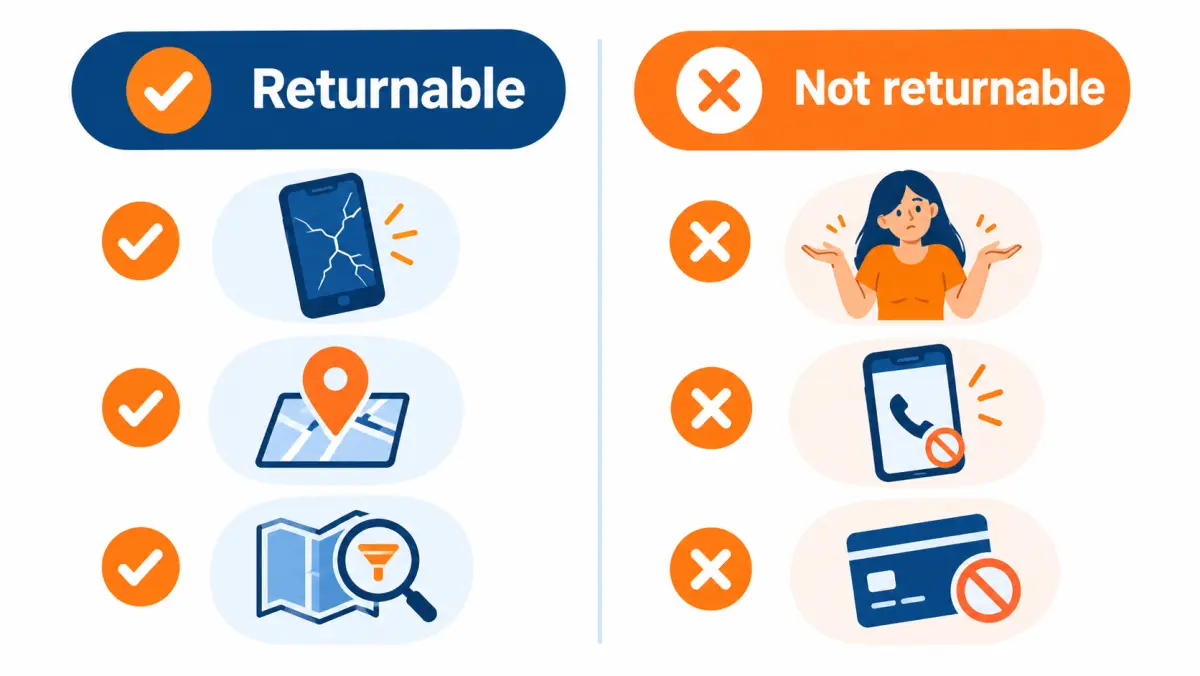
Quick reference: returnable vs not
| Situation | Typically returnable? | Why |
|---|---|---|
| Number disconnected on first dial | Usually yes | Defect present at delivery |
| Wrong person, no link to inquiry | Usually yes, with a clear note | Defect in contact details |
| ZIP outside your purchased list | Usually yes | Out of filter, visible in record |
| Renter when you bought homeowners | Often yes, if discovered in window | Out of filter; may depend on how status was verified |
| Same homeowner sent twice | Usually yes | Duplicate |
| Junk or test submission | Usually yes | Defect |
| No answer after several attempts | Usually no | Outcome |
| Not interested | Usually no | Outcome |
| Financing declined | Usually no | Outcome |
| Signed with a competitor | Usually no | Outcome |
| Price objection | No | Outcome |
| Defect found after the window | Usually no | Window expired |
| Says "never filled out a form" | Depends on evidence | Could be either |
"Usually" is doing real work in that table. Every vendor's list differs. Use the table to ask better questions, then rely on the written contract.
Our return policy, in our own words
Our replacement policy covers three defects: disconnected numbers, wrong contact details, and leads outside your filters. You report them within 7 days. It does not cover a prospect who isn't interested, doesn't answer, doesn't get financing approved, or doesn't buy. Approved credits apply to your next batch. This section uses only our published terms.
Here are our published terms, stated plainly so you can compare them line by line against anyone else's.
| Term | Our published policy |
|---|---|
| What's covered | Replacement credits for disconnected numbers, wrong contact details, or leads outside your filters. |
| Window | 7 days |
| What's not covered | A prospect who isn't interested, doesn't answer, doesn't get financing approved, or doesn't buy. |
| How to report | Reply to the lead notification (or email us) with the reason. |
| Remedy | Approved credits apply to your next batch. |
| Booked appointments | If a confirmed appointment doesn't sit because the prospect no-shows or doesn't match your filters, report it within 7 days of the scheduled time and we replace it. |
| Exclusivity | Each exclusive lead is sold to one company. It is never resold, recycled or sold later as an aged lead. |
| Consent record | Every lead carries a timestamped consent record (certificate) whose disclosure names your company. We send it to you on request. |
| Contract | No long-term contracts. Start with a test batch, scale when the numbers work. |
We also list what is checked before a lead is delivered, because pre-delivery checks reduce how often you need the return policy in the first place:
- Phone number validated before delivery
- Homeowner status self-reported, then checked against property records
- Duplicate-checked against leads already sent to you
- Scrubbed against the National Do Not Call Registry
A few honest notes on how to read these terms.
The policy follows the defects-vs-outcomes line. It covers the three defect types above and excludes the outcomes listed. If you're comparing vendors, the question to ask everyone, us included, is whether their definitions are this specific and whether they're in writing.
The remedy is a credit, not a cash refund. Approved credits apply to your next batch. If you plan to run a test and then decide, ask on your call how that works for your situation before you start.
The 7-day window means your process matters. You need to dial and disposition leads quickly enough to find defects inside it. The sections below on documentation and workflow apply to us just as much as to any other vendor.
Anything not stated here should be confirmed on your call. Pricing, territory availability and the specifics of your filters are confirmed by ZIP on your call. If you want to see how these terms fit the rest of the buying process, start with our main guide on how to buy solar leads, or book a call.
How long return windows are and when they start
A return window is the period after a set start point during which you can report a defective lead. Windows are commonly measured in days from delivery, though some programs measure from a scheduled appointment time. The start point matters as much as the length. A window you cannot meet with your current follow-up speed gives you little real protection.
You'll see windows expressed many ways. Some common shapes, described generically:
- Days from delivery. The clock starts when the lead hits your CRM or inbox. Simple and easy to audit, because delivery timestamps exist on both sides.
- Days from the scheduled appointment. Used for booked-appointment programs, since you can't know if an appointment sat until it happens.
- Business days vs calendar days. A 7-business-day window is longer than a 7-calendar-day window. If the contract doesn't say, ask.
- By end of billing cycle. Some programs let you dispute anything before an invoice closes. This can be generous or tight depending on when in the cycle a lead arrives.
Why windows are short
Sellers keep windows short because lead data decays. A phone number that worked at delivery can be disconnected weeks later; a homeowner's situation changes; and the longer a lead sits, the harder it is to tell "bad at delivery" from "went bad while you waited". Short windows protect the seller from paying for the buyer's slow follow-up.
Why buyers should care about the start point
Consider a lead delivered at 6:45 pm on a Friday. With a 7-calendar-day window from delivery, your deadline is the following Friday evening. If your team doesn't work weekends and your first dial is Monday at 10 am, you've already used close to half the window. If your process is "three attempts across three days before dispositioning", you might not reach a confident "wrong number" call until Wednesday or Thursday. That's fine, but only if someone actually submits the return before Friday.
Now consider the same lead with a 7-business-day window. Your deadline moves to the following Tuesday or so. Same lead, same team, much more breathing room.
Window-fit test
Before buying, run this quick test against your own operation:
- Pull 50 recent leads from any source.
- For each, record the delivery time and the time of the first disposition that would reveal a defect (first live answer, first carrier "not in service" message, or a duplicate flag at import).
- Find the slowest 10% of those leads.
- If the slowest 10% took longer than the window you're being offered, you'll lose returns on real defects, and the policy is worth less to you than it looks.
If you fail the test, fix the process or negotiate the window. Don't just accept that some defects will go unreturned.
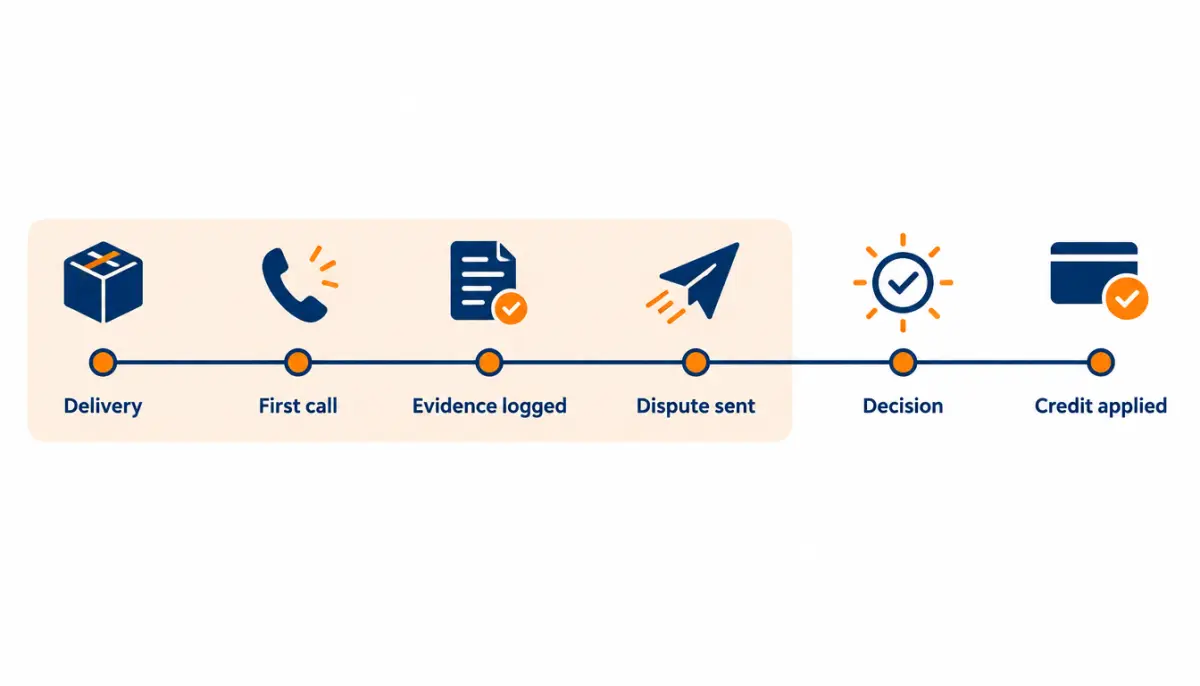
How to document a lead dispute so it gets approved
To document a solar lead dispute, record the lead ID, delivery timestamp, each contact attempt with time and result, a specific disposition reason that matches a returnable category, and supporting proof such as a dialer carrier message, CRM duplicate flag, or a short call note. Submit within the window using the vendor's stated channel and format.
Documentation is where most returns are won or lost. Vendors process returns in batches, often from many buyers at once. A dispute that arrives with everything the reviewer needs, in the format they asked for, gets approved quickly. A dispute that says "these 14 are bad" with no detail gets a request for more information, which costs you days of your window, or gets denied.
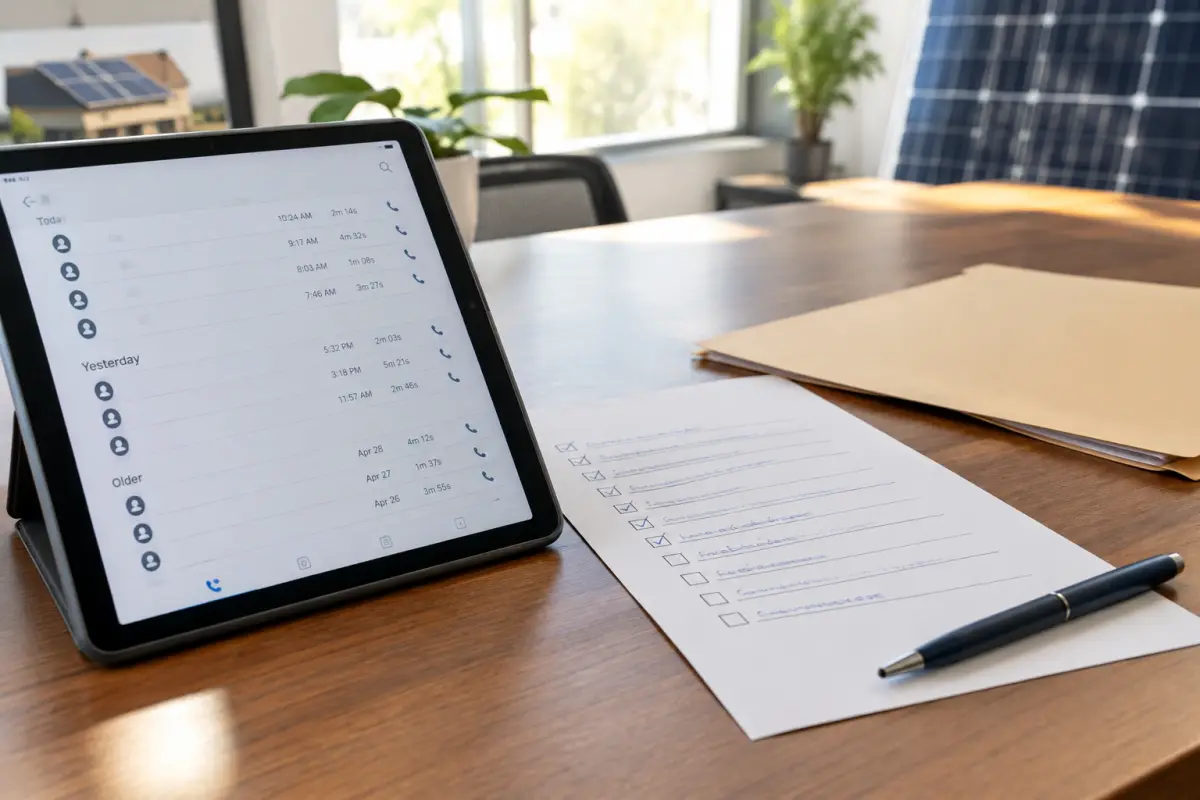
The minimum evidence set
For every lead you want to return, capture these six items. Most CRMs and dialers capture them automatically if configured.
| Item | Why it matters | Where it comes from |
|---|---|---|
| Lead ID | Lets the vendor find the exact record; names and phone numbers can repeat | Lead delivery payload, CRM field |
| Delivery timestamp | Proves you're inside the window | CRM import log, vendor notification |
| Attempt log | Shows you actually worked it (dates, times, results) | Dialer call log |
| Disposition code | Puts the lead in a returnable category | Setter selection in CRM/dialer |
| Specific note | Separates "wrong person" from "not interested" | Setter's free-text note |
| Supporting proof | Removes doubt (carrier message, duplicate match, screenshot of out-of-filter field) | Dialer, CRM, screenshot |
Evidence by return reason
Different reasons need different proof. This table tells setters exactly what to capture for each.
| Return reason | Strong evidence | Weak evidence |
|---|---|---|
| Disconnected / not in service | Dialer carrier response or recording of the "not in service" message; one attempt is usually enough | "Number bad" with no timestamp |
| Wrong person | Call note naming what the person said, timestamp, recording where lawful | "Wrong number" alone |
| Out of filter (visible in record) | Screenshot of the lead field next to your agreed filter list | Saying "not in my area" without the ZIP |
| Out of filter (found in conversation) | Call note quoting the answer ("we rent, landlord's name is..."), timestamp | "Not qualified" |
| Duplicate | Both lead IDs, both delivery timestamps, matching field | "Already had this one" |
| Junk/fake | Screenshot of the record | None needed beyond the record |
Writing call notes that hold up
Setters write notes for themselves, in a hurry. Notes that work in a dispute are specific, factual, and short. Train the team on this pattern: who answered, what they said, what that means.
Weak: "wrong #"
Strong: "Answered by woman, says she's had this number 4 years, doesn't know a Mark Davis, doesn't own a home. Wrong person."
Weak: "not qualified"
Strong: "Homeowner says they rent from parents, parents own the house in another state. Not homeowner."
Weak: "dupe"
Strong: "Same phone and address as lead [ID] delivered 3 days earlier."
The strong versions take 15 extra seconds and change a dispute from a judgment call into a fact.
Disposition codes that map to return categories
Most of your returns problem is a disposition-code problem. If your dialer has one code called "bad lead", your setters will use it for everything from disconnected numbers to rude homeowners, and you'll have no clean way to pull returnable leads. Split it.
A suggested code set, built around the defects-vs-outcomes line:
Defect codes (candidates for return)
BAD-DISCDisconnected or not in serviceBAD-WRONGWrong person, no link to inquiryBAD-FILTER-GEOOutside purchased geographyBAD-FILTER-OWNNot homeowner (when homeowner was a filter)BAD-FILTER-OTHEROutside another agreed filter (state which one in the note)BAD-DUPDuplicate of a lead already deliveredBAD-JUNKFake or test submissionBAD-CONSENTConsent record missing or mismatched (escalate to manager)
Outcome codes (not for return)
NA-1,NA-2,NA-3... No answer, by attemptVMVoicemail leftNINot interestedCBCallback requestedFIN-DECLFinancing declinedLOST-COMPChose a competitorAPPTAppointment setDNC-REQHomeowner asked not to be called again (honor it immediately)
The prefix makes it easy to filter: everything starting with BAD- is a return candidate; everything else isn't. Manager review of BAD- codes before submission keeps your return requests clean and your approval rate high.
A daily returns routine
A short daily routine keeps returns inside the window without anyone having to remember.
- Morning, 10 minutes. Manager filters yesterday's dispositions for
BAD-codes. - Check each. Is the note specific? Is the evidence attached? Is it inside the window? If a note is vague, ask the setter now while they remember the call.
- Batch and send. Submit approved candidates in the vendor's requested format, once per day.
- Log. Record what you sent, when, and to whom, in a returns tracker (template below).
- Follow up. Anything without a decision after the vendor's stated response time gets one polite follow-up.
This routine is about 10 to 15 minutes a day for a typical small team. It's also the single biggest factor in whether a return policy is worth anything to you.
Recording calls: a caution
Call recordings are excellent evidence, but recording laws differ by state. Some states require consent from all parties to a call. If you record, make sure your recording practices are lawful in the states you call, and confirm with counsel. A recording you weren't allowed to make is not evidence you want to rely on.

How return terms change the real cost of a lead
Return terms change your real cost because you pay for every delivered lead but can only sell to valid ones. The effective cost per valid lead equals total spend after credits divided by leads you could actually work. A cheaper lead with a weak return policy can cost more per valid lead, and per sale, than a pricier lead with strong terms.
This is the part most comparisons skip. Two vendors quote you a price per lead. You compare the two prices and pick the lower one. But price per lead is what you pay for a delivered record, and some of those records are defective. What you care about is cost per valid lead, and ultimately cost per sale. Return terms sit right between those numbers.
All numbers in this section are illustrative examples chosen to make the arithmetic easy to follow. They are not market prices, not benchmarks and not our prices.
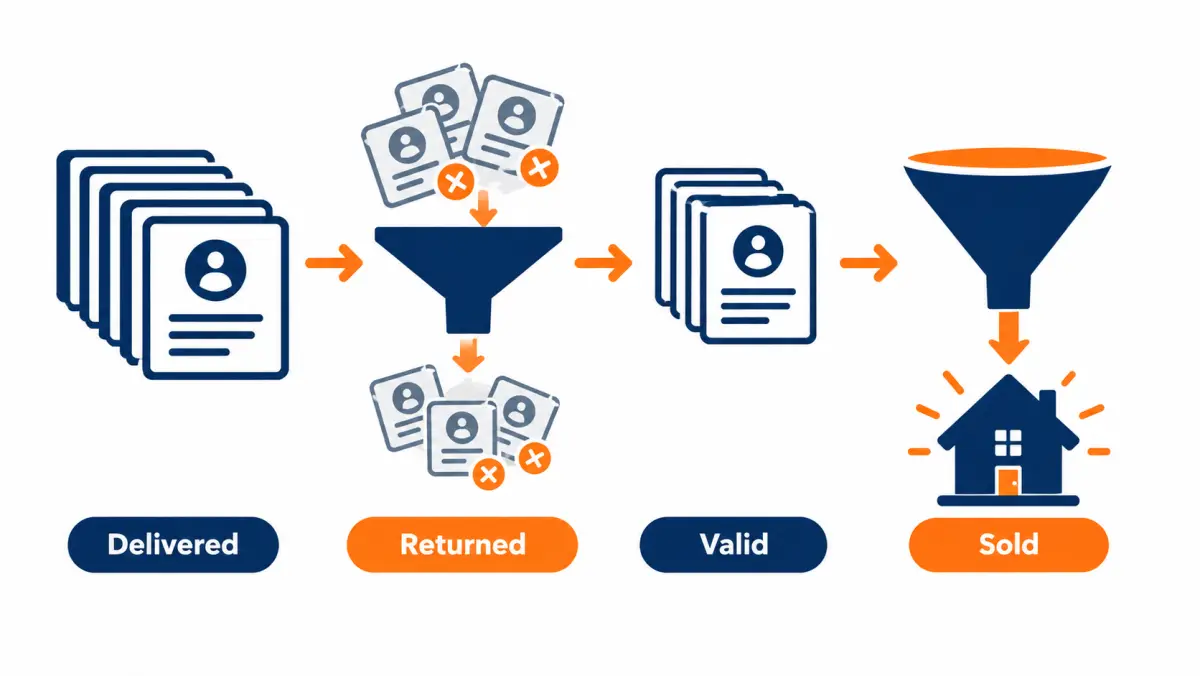
The core formulas
Let's define the terms once.
- P = price per delivered lead
- N = leads delivered
- d = defect rate (share of delivered leads that are defective)
- r = recovery rate (share of defective leads you successfully get credited)
- c = close rate from valid lead to sale (combines contact, appointment, sit and close)
Then:
- Total spend before credits = P × N
- Defective leads = d × N
- Credits received = P × d × N × r (assuming credit equals lead price)
- Net spend = P × N × (1 − d × r)
- Valid leads = N × (1 − d)
- Effective cost per valid lead = P × (1 − d × r) ÷ (1 − d)
- Cost per sale = Effective cost per valid lead ÷ c
The ratio (1 − d × r) ÷ (1 − d) is the "return-terms multiplier". When you recover every defect (r = 1), the multiplier is exactly 1: you pay the sticker price for each valid lead. When you recover nothing (r = 0), the multiplier is 1 ÷ (1 − d), which grows quickly as the defect rate rises.
Illustrative example 1: same price, different recovery
Assume a price of $100 per lead, 100 leads, a 12% defect rate, and a 5% close rate from valid lead to sale. All illustrative.
| Scenario | Recovery rate (r) | Net spend | Valid leads | Effective cost per valid lead | Sales (at 5%) | Cost per sale |
|---|---|---|---|---|---|---|
| A: Strong terms, disciplined team | 100% | $8,800 | 88 | $100.00 | 4.4 | $2,000 |
| B: Strong terms, slow team (misses window on half) | 50% | $9,400 | 88 | $106.82 | 4.4 | $2,136 |
| C: No return policy | 0% | $10,000 | 88 | $113.64 | 4.4 | $2,273 |
Same leads, same team close rate, same price. The only differences are the policy and whether you used it. Scenario B shows something worth noticing: a good policy that your team doesn't use properly is worth half as much as you thought.
Illustrative example 2: cheaper lead, weaker terms
Two hypothetical vendors. Again, illustrative only.
- Vendor X: $90 per lead, 15% defect rate, no returns.
- Vendor Y: $100 per lead, 10% defect rate, returns for defects with 90% recovery (your team catches most defects inside the window).
| Vendor X | Vendor Y | |
|---|---|---|
| Price per lead (P) | $90 | $100 |
| Defect rate (d) | 15% | 10% |
| Recovery rate (r) | 0% | 90% |
| Multiplier (1 − d·r)/(1 − d) | 1.176 | 1.011 |
| Effective cost per valid lead | $105.88 | $101.11 |
Vendor X's sticker price is 10% lower, but its effective cost per valid lead is higher. Before you factor in any difference in close rates, the "cheaper" vendor is the more expensive one. If X's defective leads also waste more setter time (they do, every defective lead eats dials), the gap widens.
Illustrative example 3: the cost of setter time on defects
Defects cost more than the lead price. Each one burns setter time, and setter time is not free.
Assume (illustratively) a setter costs you $25 per hour fully loaded, and each defective lead eats 6 minutes across dialing, noting and returning. That's $2.50 per defective lead in labor. On 100 leads with a 12% defect rate, that's 12 defects × $2.50 = $30. Small, but it doesn't come back with a credit, so it belongs in your model.
The bigger hidden cost is morale and attention. A setter who hits three disconnected numbers in a row slows down and starts treating good leads with less energy. That doesn't show up on a spreadsheet, but every sales manager has seen it.
Illustrative example 4: credits you can't use
Credits only have value if you keep buying. Imagine you run a $5,000 test batch (illustrative), find $600 in approved defect credits, and then decide the vendor isn't for you. If the credits only apply to future batches, your actual test cost was $5,000, not $4,400. When you compare a test result against another vendor's, use net spend you actually recovered, not credits on paper.
This isn't an argument against credit-based policies. Credits are standard and reasonable, because a seller can usually replace a lead at lower cost than refunding cash. It's an argument for knowing the remedy before you start and building it into your test budget.
Illustrative example 5: return terms on booked appointments
Appointment programs have their own version of the math. Assume (illustratively) a price per appointment of $300, 20 appointments, a 25% no-show rate, and a policy that replaces no-shows reported within the window.
| No replacement | Replacement for no-shows (all reported) | |
|---|---|---|
| Appointments paid | 20 | 20 |
| Appointments that sat | 15 | 15 + 5 replacements (assume these sit at the same 75%, so ~3.75 more) |
| Effective cost per sat appointment | $400 | ~$320 |
The replacement appointments can also no-show, which is why the math doesn't reach exactly $300. The point holds: a no-show replacement policy moves your effective cost per sat appointment close to the sticker price, as long as you report inside the window. Our solar appointments page covers how appointment programs work.
Putting it into your cost model
When you build or check a cost-per-sale model, add three inputs alongside price and funnel rates:
- Defect rate (measure it from your own test batch, by category)
- Recovery rate (measure approvals ÷ submissions, and submissions ÷ actual defects)
- Remedy type (credit, replacement or refund) and whether you'll use it
You can run the base cost-per-sale math in our solar lead cost calculator, then adjust the price input using the multiplier above. For the full method behind cost per sale, see solar lead ROI. For typical price ranges by lead type, attributed to public sources, see how much solar leads cost.
Sensitivity table: how much the multiplier moves
This table shows the return-terms multiplier for a range of defect and recovery rates. Multiply any sticker price by it to get the effective cost per valid lead. Pure arithmetic, no market data.
| Defect rate ↓ / Recovery → | 0% | 25% | 50% | 75% | 100% |
|---|---|---|---|---|---|
| 5% | 1.053 | 1.039 | 1.026 | 1.013 | 1.000 |
| 10% | 1.111 | 1.083 | 1.056 | 1.028 | 1.000 |
| 15% | 1.176 | 1.132 | 1.088 | 1.044 | 1.000 |
| 20% | 1.250 | 1.188 | 1.125 | 1.063 | 1.000 |
| 25% | 1.333 | 1.250 | 1.167 | 1.083 | 1.000 |
| 30% | 1.429 | 1.321 | 1.214 | 1.107 | 1.000 |
Read across any row and you'll see the same thing: recovery rate matters more as defect rates climb. On a clean source, a return policy is a small safety net. On a messy source, it's the difference between a reasonable cost and an expensive one.
Contract language to look for and ask for
Good return-policy contract language defines invalid leads by specific, testable defects, states a window with a clear start point, names the evidence and submission channel, sets a decision deadline, specifies the remedy and how credits are handled at termination, and says which document controls if terms conflict. Have counsel review any contract before signing.
This section gives sample clause language you can use as a starting point in a conversation with a vendor or with your attorney. It is not legal advice, it is not a complete contract, and it is not a description of any vendor's terms (including ours, which are stated above). Laws and enforceability vary by state; confirm with counsel.

Clause 1: Definition of an invalid lead
Invalid Lead. A Lead is an "Invalid Lead" if, at the time of delivery, any of the following was true: (a) the telephone number was disconnected, not in service, or not a valid U.S. telephone number; (b) the contact information did not belong to the person who submitted the inquiry; (c) the Lead did not meet the Filters set out in the applicable Order; (d) the Lead duplicated a Lead previously delivered to Buyer under this Agreement within [__] days; or (e) the Lead contained obviously false or test information. A Lead is not an Invalid Lead solely because the consumer does not respond, declines to proceed, does not qualify for financing, or purchases from another provider.
Why it works: it ties invalidity to the moment of delivery, lists testable defects, and excludes outcomes explicitly. Both sides know where the line is.
Clause 2: Return window and start point
Return Window. Buyer may submit a return request for an Invalid Lead within [__] [calendar/business] days after the Lead's delivery timestamp as recorded in Seller's delivery system. For booked appointments, the Return Window begins at the scheduled appointment time.
Why it works: it names the length, the day type, the start event, and whose timestamp counts.
Clause 3: Evidence and submission
Return Request. Each return request must include the Lead ID, the reason code from Schedule [__], and reasonable supporting information (for example, the date and time of contact attempts and a brief description of the result). Requests shall be submitted by [method, e.g., reply to the delivery notification or email to the designated address].
Why it works: it tells your team exactly what to send and where, so nothing gets lost in a sales rep's inbox.
Clause 4: Decision timeline
Review. Seller shall approve or deny each return request within [__] business days of receipt and shall state the reason for any denial. Requests not answered within that period shall be [deemed approved / escalated to (named contact)].
Why it works: it prevents returns from disappearing. "Deemed approved" is a strong buyer ask that many sellers won't accept; escalation to a named contact is a reasonable middle ground.
Clause 5: Remedy
Remedy. For each approved Invalid Lead, Seller shall, at [Buyer's/Seller's] option, (a) deliver a replacement Lead meeting the same Filters, or (b) issue a credit equal to the price paid for the Invalid Lead, applied to Buyer's next invoice. [Upon termination, any unused credits shall be (refunded within __ days / forfeited / applied to a final invoice).]
Why it works: it states what you get and what happens to credits at the end. The bracketed termination language is where you want clarity, whichever way it goes.
Clause 6: Return caps
Some contracts cap returns at a share of delivered leads. Caps protect sellers from bulk returns, but a cap can also leave you paying for real defects above the line. If a cap is proposed, ask what happens when real, documented defects exceed it. A reasonable alternative is a cap that triggers a joint review, not an automatic denial.
Excess Returns. If approved returns in any calendar month exceed []% of Leads delivered, the parties shall meet within [] business days to review Lead quality and Filters. [Seller shall not deny a documented return solely because the threshold has been reached.]
Clause 7: Exclusivity representation
If you buy exclusive leads:
Exclusivity. Seller represents that each Lead designated as exclusive in the Order is sold only to Buyer and will not be sold, resold, or otherwise provided to any other purchaser, including as an aged Lead.
Pair it with a right to ask for an investigation when you see a pattern of homeowners reporting multiple calls.
Clause 8: Consent records
Consent Records. Upon Buyer's request, Seller shall provide within [__] business days the consent record associated with any Lead, including the timestamp, the disclosure language displayed, and the identity of the parties named in the disclosure.
Consent requirements are a legal matter; your counsel should decide what you need here. Our TCPA compliance guide explains what installers typically verify.
Clause 9: Order of precedence
Order of Precedence. In the event of a conflict, the terms of an executed Order shall control over this Agreement, and this Agreement shall control over any terms published on Seller's website.
Without a clause like this, you might win an argument about the IO and lose it on the website's terms.
Clause 10: Suppression list
Suppression. Buyer may provide a list of existing customers and prospects. Seller shall not deliver Leads matching that list, and any such Lead delivered shall be an Invalid Lead.
This is the clause that protects you against paying for homeowners already in your CRM.
Red-flag language
Watch for these phrases. None is automatically a dealbreaker, but each should prompt a question.
| Phrase | Why it matters | What to ask |
|---|---|---|
| "At Seller's sole discretion" (applied to returns) | Lets the seller deny anything | "What criteria do you apply? Can we list them?" |
| "All sales final" | No return policy at all | "Is there any remedy for disconnected numbers or out-of-filter leads?" |
| "Within a reasonable time" | No clear window | "How many days, from what event?" |
| "Credits expire after [short period]" | Value can vanish | "Can expiry be extended or tied to termination?" |
| "Returns limited to [low %]" with no review | Real defects above cap are lost | "What happens to documented defects above the cap?" |
| No mention of returns anywhere | Policy lives only in a rep's promise | "Please add the return terms to the order." |
Templates you can copy
These templates cover the documents you'll use most: a single-lead dispute message, a batch dispute, a returns tracker, a follow-up, an escalation, a denial response, and a pre-purchase questions email. Adapt the wording to your vendor's required format; if a vendor specifies a channel or template, use theirs first.
Copy them into your CRM's snippet library or a shared doc so setters and managers use the same language every time. Consistency speeds up approvals, because reviewers learn to trust a buyer whose disputes always look the same and always check out.
Template 1: Single-lead dispute
Subject: Return request: Lead [Lead ID], [reason code]
Hi [Vendor contact],
We'd like to return the lead below under the [contract/order name] return terms.
- Lead ID: [ID]
- Delivered: [date, time, time zone]
- Reason: [e.g., Disconnected / not in service]
- Attempts: [date/time: result], [date/time: result]
- Detail: [one or two factual sentences, e.g., "Carrier message: number not in service. Dialer log attached."]
- Attachment: [dialer screenshot, recording reference, or CRM duplicate flag]
We're inside the [__]-day window (deadline [date]). Please confirm approval and the credit or replacement.
Thanks, [Name, company, phone]
Template 2: Batch dispute (CSV or table)
Many vendors prefer one message per day with a table rather than one email per lead. Use a consistent column order.
| Lead ID | Delivered (date/time/TZ) | Reason code | Attempt 1 | Attempt 2 | Note | Evidence |
|---|---|---|---|---|---|---|
| [ID] | [timestamp] | BAD-DISC | [time: not in service] | n/a | Carrier "not in service" | Dialer log ref |
| [ID] | [timestamp] | BAD-WRONG | [time: answered] | n/a | Answered by [name], no link to inquiry, has had number for years | Recording ref |
| [ID] | [timestamp] | BAD-FILTER-GEO | n/a | n/a | ZIP [xxxxx] not on purchased list | Screenshot |
| [ID] | [timestamp] | BAD-DUP | n/a | n/a | Same phone/address as Lead [ID] delivered [date] | CRM dup flag |
Covering message:
Subject: Return batch [date]: [count] leads
Hi [Vendor contact], attached is today's return batch under our [order name] terms: [count] leads, all inside the return window. Each row has the reason code, attempts and evidence reference. Happy to send recordings or screenshots for any line. Please confirm decisions by [date per contract].
Template 3: Returns tracker (columns)
Keep a simple tracker, in a spreadsheet or a CRM report. These columns cover what you need for disputes and for measuring vendors later.
| Column | Example |
|---|---|
| Vendor | [name] |
| Order / campaign | [IO number] |
| Lead ID | [ID] |
| Delivered | [timestamp] |
| Window deadline | [date] |
| Reason code | BAD-DISC |
| Submitted on | [date] |
| Submitted by | [name] |
| Decision | Approved / Denied / Pending |
| Decision date | [date] |
| Denial reason (if any) | [text] |
| Remedy | Credit / Replacement / Refund |
| Credit amount or replacement Lead ID | [value] |
| Credit applied on invoice | [invoice no.] |
Two calculated fields are worth adding: days from delivery to submission (tells you whether your process is fast enough for the window) and approval rate by reason code (tells you which kinds of disputes you're documenting well and which you aren't).
Template 4: Polite follow-up
Subject: Following up: return batch [date]
Hi [Vendor contact], checking on the return batch we sent [date] ([count] leads). The contract lists [__] business days for decisions, so I wanted to make sure it reached the right person. Anything else you need from us?
Template 5: Escalation
Use this only after a follow-up has gone unanswered, and keep it factual.
Subject: Escalation: unresolved returns, [order name]
Hi [Account manager / named escalation contact],
We submitted [count] return requests on [dates] under our [order name] terms. We followed up on [date]. We haven't received decisions, and the contract's review period was [__] business days.
A summary is attached: lead IDs, reasons, evidence and submission dates. Could you review and confirm decisions by [date]? We'd like to keep the program running and want to resolve this first.
Template 6: Responding to a denial
Not every denial is wrong. Before responding, check whether the lead was actually an outcome, whether you were outside the window, or whether your evidence was thin. If you still think the denial is mistaken:
Subject: Re: Return denied, Lead [ID]
Thanks for reviewing. The denial reason given was [reason]. We'd ask you to take another look because [specific fact, e.g., "the call recording at 10:14 am on [date] shows the person answering has had the number for six years and has no connection to the named homeowner"]. Recording reference attached. If that doesn't change the decision, understood, and we'll note it for our quality review.
The last sentence matters. It signals you're not going to fight every denial, which makes the vendor more likely to take your contested ones seriously.
Template 7: Pre-purchase questions email
Send this before the first batch, so the answers are in writing.
Subject: Questions on return terms before our test batch
Hi [Vendor contact], before we start, can you confirm the following in writing (or point me to where it's in the order)?
- What counts as an invalid lead? Please list the categories.
- How long is the return window, in calendar or business days, and from what event does it start?
- What evidence do you need per return, and in what format?
- Where do we send returns, and who reviews them?
- How quickly are decisions made, and what happens if a request isn't answered?
- Is the remedy a credit, a replacement, or a refund? If credits, do they expire, and what happens to unused credits if we stop?
- Is there a cap on returns? What happens to documented defects above it?
- Will you honor a suppression list of our existing customers and prospects?
- For exclusive leads, how is exclusivity enforced?
- Can you provide the consent record for any lead on request, and how quickly?
Template 8: Internal setter guidance card
Print it, pin it next to the dialers, or put it in your CRM's help panel.
Is this lead a return?
Return it (code
BAD-) if, when we got it:
- The number is disconnected or not in service
- The person who answers has no connection to the inquiry
- It's outside our ZIPs or another filter we bought
- We already got this person from the same vendor
- It's obviously fake
Don't return it if:
- Nobody answers (use
NA-#)- They're not interested (
NI)- Financing fails (
FIN-DECL)- They went with someone else (
LOST-COMP)Always write: who answered, what they said, what it means. Code it today. The window is short.
Template 9: Weekly vendor quality summary
Once a week, send yourself (and, if the relationship is healthy, your vendor) a short summary.
Vendor quality, week of [date]: [Vendor]
- Leads delivered: [n]
- Return candidates coded: [n] ([%] of delivered)
- By reason: DISC [n], WRONG [n], FILTER [n], DUP [n], JUNK [n]
- Submitted inside window: [n]
- Approved: [n] | Denied: [n] | Pending: [n]
- Median days delivery → submission: [n]
- Notes: [patterns, e.g., "most FILTER-GEO were from one ZIP prefix"]
How return policies differ by lead type
Return policies differ by lead type because each product carries different risks. Exclusive and shared web leads focus on contact-data defects and filters. Aged leads often have narrower or no returns because the data is older. Live transfers usually define a minimum call length or screening standard. Booked appointments typically address no-shows and qualification at the scheduled time.
The categories below describe the product types in general. For aged leads and live transfers specifically, availability for your territory is confirmed on the call. For each type, here's what usually goes wrong, what a return policy should focus on, and what to ask.
Exclusive web leads
What you're buying. A form record sold to one buyer. The homeowner filled out a form, agreed to be contacted, and the record is delivered to you alone.
What usually goes wrong. Contact-data defects (wrong or disconnected numbers), filter mismatches, and, more rarely but more seriously, exclusivity breaches.
What the policy should cover. The standard defect list, plus a clear exclusivity representation and a process for investigating patterns.
What to ask. "How do you enforce one-buyer exclusivity technically, and what do you do if I see a pattern of homeowners reporting other calls?" See our exclusive vs shared solar leads comparison for how the two products differ in cost per sale.
Shared web leads
What you're buying. A form record sold to several buyers, often up to a stated maximum.
What usually goes wrong. Same contact-data defects as exclusive leads. Plus, because several companies call the same homeowner, contact rates are lower and "not interested, already talking to someone" is common. That's an outcome, not a defect.
What the policy should cover. The standard defect list, and a clear statement of the maximum number of buyers per lead. If a lead is sold to more buyers than promised, that's a breach worth a remedy.
What to ask. "What's the maximum number of buyers per lead, and how would I know if it was exceeded?"
Aged leads
What you're buying. Older records, often weeks or months past their first sale, sold at a lower price.
What usually goes wrong. More disconnected numbers, more people who've already gone solar or moved, and harder questions about whether the original consent covers your calls.
What the policy should cover. Return terms on aged leads vary widely, and some programs offer narrow returns or none, which is reflected in the lower price. If there's a policy, it usually focuses on obvious data defects. The consent question deserves special attention: confirm with counsel whether and how you can contact aged leads.
What to ask. "What's the age range of these records, what consent was captured originally, and which defects, if any, are returnable?" Our aged solar leads page explains the category in depth. Availability for your territory is confirmed on the call.
Live transfers
What you're buying. A homeowner who was screened by the seller's agent and connected to your closer live on the phone.
What usually goes wrong. Short calls (the homeowner hangs up quickly), poorly screened homeowners who don't actually match filters, transfers that arrive when your closers are busy, and homeowners who seem surprised to be transferred.
What the policy should cover. Live transfer returns usually hinge on a minimum call duration (calls shorter than a stated threshold aren't billed or are credited) and a screening standard (the homeowner must have confirmed specific criteria before transfer). Also look for what happens when your line doesn't pick up: usually you're charged if the transfer was attempted and you missed it, so check this.
What to ask. "What's the billable call threshold, what screening questions are asked before transfer, and are calls recorded so we can review disputes together?" See solar live transfer leads. Availability for your territory is confirmed on the call.
Booked appointments
What you're buying. A time on your calendar with a homeowner who agreed to meet.
What usually goes wrong. No-shows, homeowners who didn't understand what the appointment was for, missing decision-makers, and homeowners who turn out not to match filters when your rep arrives.
What the policy should cover. Replacement for no-shows and for appointments that don't match your filters, reported within a stated time after the scheduled appointment. Clarity on what "confirmed" means (a reminder call? a text reply?) and whether all decision-makers must be present.
What to ask. "What counts as a no-show? If my rep arrives and the homeowner isn't there, what do you need from me to replace it? How long after the scheduled time do I have to report?" Our appointment policy, for reference, is in the "Our return policy" section above.
Commercial solar leads
What you're buying. An inquiry from a business, nonprofit or property owner about solar on a commercial building.
What usually goes wrong. The contact isn't a decision-maker, the business leases the building and can't authorize roof work, or the project is far outside the size range you install.
What the policy should cover. Filters that matter for commercial (building ownership or authority, approximate roof size or energy use, building type) and how mismatches are handled. Commercial sales cycles are long, so defects may surface later than in residential. The window needs to fit how fast you can confirm basics.
What to ask. "Which filters are verified and which are self-reported? How do you handle a contact who turns out not to have authority?" See commercial solar leads.

Comparison table by lead type
| Lead type | Most common defects | Typical policy focus | Key question |
|---|---|---|---|
| Exclusive web | Bad contact data, out-of-filter | Defect list, exclusivity | How is exclusivity enforced? |
| Shared web | Bad contact data, out-of-filter | Defect list, buyer cap | Max buyers per lead? |
| Aged | Stale data, consent questions | Narrow or none | What's returnable, what consent exists? |
| Live transfer | Short calls, weak screening | Minimum duration, screening standard | What's billable? |
| Appointment | No-shows, wrong decision-makers | Replacement within window after appointment | What's a no-show? |
| Commercial | Wrong contact, no authority | Filters, longer discovery | Which filters are verified? |
Scenarios by installer size
How you use a return policy should change with your team size. A solo installer needs a simple routine that takes minutes a day. A mid-size team needs disposition discipline and a weekly review. A large multi-territory operation needs automated flagging, a returns owner, and vendor-level reporting. Each scenario below is illustrative.
The policy might be the same for everyone, but the way you operate around it is not. Here are three walkthroughs, each labelled as an illustrative example. They describe composite situations to show the process, not real clients.
Illustrative scenario: solo installer or owner-operator
Setup. An owner who also sells. Buys a small batch of exclusive leads each week for one metro area. Uses a basic CRM and a phone, no dialer.
What goes wrong without a routine. The owner calls leads between site visits. A disconnected number gets noted as "bad" in the CRM and forgotten. By the time the owner thinks about returns, two weeks have passed and the window has closed on most of the defects.
The fix.
- Set the CRM to create a task called "Return?" whenever a lead is marked with a bad-number or wrong-person status.
- Every evening, spend five minutes on that task list. Send one message per day to the vendor with any returns.
- Use Template 1 or 2. Keep the notes short but specific.
- Track approvals in a simple spreadsheet (Template 3, fewer columns).
What to measure. Just two numbers: how many defects you found per batch, and how many you got credited. If the gap is large, your routine is slipping.
Illustrative scenario: mid-size team (several setters, a few closers)
Setup. A team of setters working leads through a dialer, closers running appointments, a sales manager. Buys from two or three vendors across a few counties.
What goes wrong without a routine. Setters use one "bad lead" code for everything. The manager tries to pull returns at month-end and finds a pile of leads coded "bad" with no notes. Some are disconnected numbers; some are homeowners who were rude. No way to tell which is which without re-listening to calls, and the windows have closed anyway.
The fix.
- Replace the single bad-lead code with the
BAD-/ outcome code split described earlier. - Make the note field mandatory for any
BAD-code. - Assign one person (often the manager or an ops coordinator) as the returns owner, with a daily 15-minute slot.
- Run Template 9 weekly per vendor.
- Hold a monthly vendor call using the weekly summaries.
What to measure. Defect rate by vendor and reason code; recovery rate by vendor; median days from delivery to submission; approval rate by reason code. The last one tells you where to coach setters.
Illustrative scenario: large multi-territory installer
Setup. Several offices, a call center, dozens of setters, multiple vendors and lead types, an ops or analytics team.
What goes wrong without a routine. Returns are handled differently in each office. Some offices return aggressively and get pushback; others never return anything. Vendors see inconsistent behavior from the same buyer, and the company can't compare vendors fairly because each office's defect data means something different.
The fix.
- Standardize disposition codes across all offices.
- Automate flagging: duplicates and out-of-geography leads can be caught at import by rules, before anyone dials.
- Centralize returns into one team that submits for all offices in each vendor's preferred format.
- Build a vendor dashboard with defect rate, recovery rate, credits outstanding and credits applied.
- Tie vendor budgets to cost per sale after credits, not to sticker price.
What to measure. Everything above, plus credits outstanding by vendor (credits earned but not yet applied) and credit leakage (credits forfeited because they expired or the relationship ended).

Scenarios by market and state
Return-policy use changes by market because contact rates, lead competition and calling rules vary. In competitive markets, speed matters more and outcome losses are higher. In states with stricter calling or recording rules, your evidence practices must be adjusted. The return policy itself rarely changes by state, but how you document and work leads often should.
We don't publish state-by-state return rates; we don't have public data that would support them, and anyone quoting precise figures should show their source. What we can do is describe how market conditions change your process. For how lead prices vary by state, with sources, see solar lead cost by state.
Competitive, high-volume markets
In markets where many installers buy leads, homeowners hear from more companies, which pushes up outcome losses (not interested, already signed). That doesn't change what's returnable, but it changes how you should read your numbers. If your "not interested" rate is high, that's a speed or offer problem, not a vendor-defect problem. Look at contact rate by minutes-to-first-call before blaming the source.
Smaller or rural markets
Lower volume means each lead matters more and defects hurt more. Filters are often wider (bigger geography), so geography mismatches are more common at the edges. Make sure the ZIP list in your order is exactly what you want; an out-of-filter return is only possible if the filter was written down.
States with all-party call-recording consent
If you call homeowners in states that require all parties to consent to recording, your evidence may need to come from call notes and dialer logs rather than recordings, unless you obtain consent at the start of the call in a lawful way. Confirm the rules with counsel. Your note-writing discipline matters more here.
States with their own telemarketing rules
Several states have telemarketing rules beyond the federal ones, such as calling-hour limits, registration requirements, or their own do-not-call lists. These shape when you can call, which affects how quickly you can discover defects inside a window. If calling hours are restricted, your window math tightens. This is a legal area; confirm with counsel. Our TCPA guide is a starting point for the federal picture.
Building a returns workflow inside your CRM
A returns workflow inside your CRM should flag likely defects automatically at import, require a defect code and note when a setter marks a lead bad, show a deadline field based on the vendor's window, route candidates to a reviewer daily, and record decisions and credits. This takes a few hours to set up and saves value every week.
You don't need special software. Most CRMs and dialers can do the following with standard features.
Step 1: Capture the right fields at import
Make sure every lead stores:
- Vendor name
- Order or campaign ID
- Vendor's lead ID
- Delivery timestamp (from the vendor's payload if possible, not your import time)
- All filter fields as delivered (ZIP, homeowner status, bill range, etc.)
- A link to, or a stored copy of, the consent record reference if the vendor provides one
Step 2: Auto-flag obvious defects at import
Set up rules that flag a lead before anyone dials:
- Duplicate check on normalized phone, email and address against leads from the same vendor (and, separately, against your whole CRM so you know about overlaps with other sources).
- Geography check against the ZIP list on the order.
- Junk check for test names, repeated characters, or invalid number formats.
Flagged leads go to a review queue. Some will be real returns; some will be false alarms (for example, two people in the same household). A person decides.
Step 3: Calculate the deadline
Add a calculated field: Return deadline = delivery timestamp + window. If the window is in business days, use a business-day calculation. Show it on the lead record and in the review queue, sorted by soonest deadline.
Step 4: Require structured dispositions
When a setter picks a BAD- code, require a note before saving. Many CRMs support required fields conditional on a picklist value.
Step 5: Daily review queue
A saved view or report: all leads with a BAD- code or an import flag, not yet submitted, deadline in the future, sorted by deadline. The returns owner works this list daily.
Step 6: Submission and status
When the returns owner submits, mark the lead with "submitted" and the date. When a decision comes back, record approved/denied, the reason and the remedy. If you got a replacement, link the replacement lead ID.
Step 7: Reconcile credits against invoices
When the vendor's next invoice arrives, compare it with your tracker. Every approved credit should appear. Most errors here are honest mistakes on either side; catching them monthly avoids a painful year-end reconciliation.
Step 8: Monthly vendor report
Pull defect rate, recovery rate, median days to submission, approval rate by reason, and credits outstanding. Bring it to your vendor call.
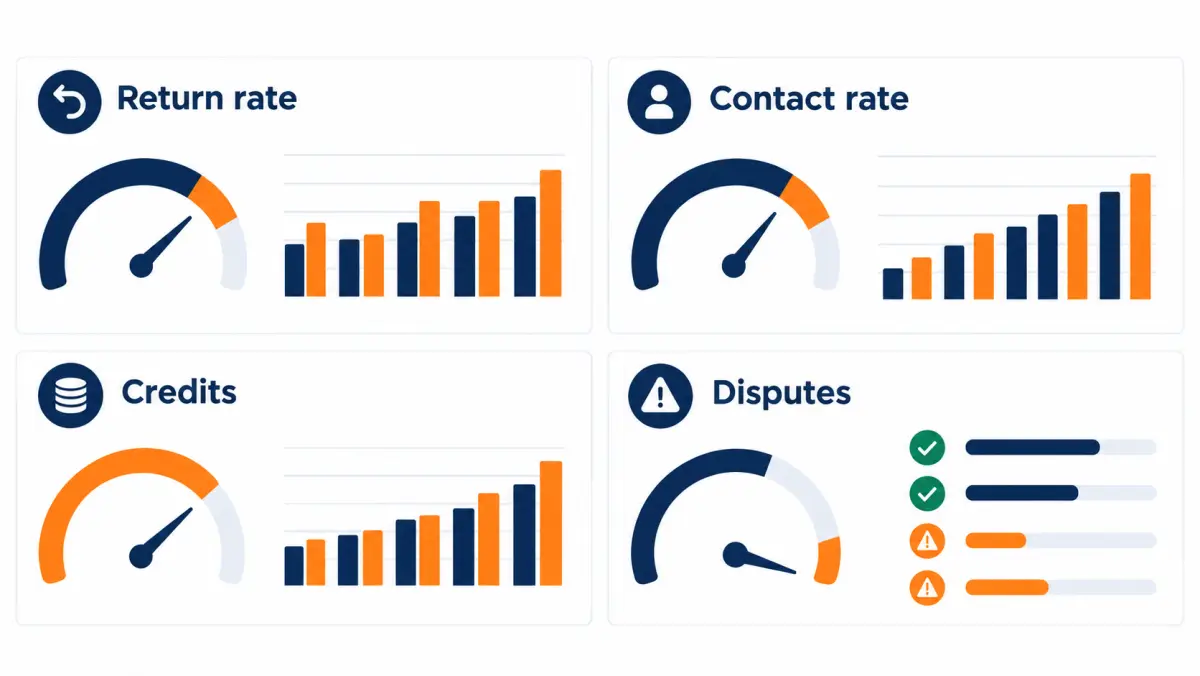
Using return data to judge a lead vendor
Return data is one of the best signals for judging a lead vendor, because it measures data quality separately from your sales skill. Track defect rate by reason, recovery rate, time to decision and pattern changes over time. A rising defect rate in one category usually points to a specific fix, either at the vendor's source or in your filters.
Most installers judge vendors on cost per sale, which is right as the final measure. But cost per sale mixes the vendor's data quality with your team's speed, scripts and closing. Return data isolates the vendor's side. Use both.
The five numbers to track per vendor
| Metric | Formula | What it tells you |
|---|---|---|
| Defect rate | Return candidates ÷ leads delivered | Raw data quality from your side of the table |
| Defect mix | Share by reason code | Where the problems come from (source, filters, dedupe) |
| Submission rate | Submitted ÷ return candidates | Whether your process captures what it finds |
| Approval rate | Approved ÷ submitted | Whether your documentation and the vendor's review line up |
| Decision time | Median days from submission to decision | How responsive the vendor is |
Reading the defect mix
Each defect category points to a different cause, and a different conversation.
- Disconnected numbers rising. Points to phone validation at the source, or to lead age at delivery. Ask about both.
- Wrong person rising. Points to form fraud, typos, or a traffic source with weak validation. Ask whether a specific source or campaign changed.
- Out-of-filter rising. Points to a filter configuration issue on the vendor's side, or a filter that's ambiguous. Review the order together.
- Duplicates rising. Points to the vendor's dedupe window or to multiple campaigns delivering into the same account.
- Junk rising. Points to front-end validation. Usually fixed fast once flagged.
Separating your problems from the vendor's
If your team's contact rate falls but the defect rate stays flat, the issue is likely on your side: slower first calls, fewer attempts, or a new setter. If the defect rate rises and contact rate falls together, look at the vendor. The point of tracking both is to avoid blaming a vendor for your process, or excusing a vendor because you assumed it was your process.
Our guide on how to vet solar lead providers covers the broader checklist for evaluating vendors, including source transparency and test batches.
What a healthy relationship looks like
A healthy lead relationship has a few signs that show up in return data:
- Defect rates are stable or falling over time.
- Returns are decided within the stated time, with reasons on denials.
- When you flag a pattern, the vendor investigates and tells you what changed.
- Approval rates are high because your submissions are clean and their review is consistent.
- Credits show up on invoices without chasing.
When several of those stop being true at once, that's the moment for a frank conversation, not a slow drift.
How to negotiate better return terms
To negotiate better return terms, ask for specifics rather than generosity: a written defect list, a window that fits your measured follow-up speed, a named review deadline, clear credit handling at termination, and a suppression list. Offer something in return, such as consistent volume, clean documentation, or a structured test batch. Vendors respond better to buyers who return cleanly.
What to ask for, in order of value
- Written terms. If the terms aren't written into the order, everything else is moot.
- A clear start point for the window. Often easier to win than a longer window.
- Business days instead of calendar days. A small ask with a real effect for teams that don't work weekends.
- A decision deadline. Prevents returns from disappearing into a queue.
- Suppression list honored. Protects against paying for people you already have.
- Credit handling at termination. Removes the "stuck credits" problem from test batches.
- Joint review instead of a hard cap. Keeps documented defects returnable even in a bad week.
What you can offer
Vendors weigh the cost of processing returns against the value of the account. You can make yourself a lower-cost, higher-value account by offering:
- Clean submissions. "We'll send one batch a day in your format with lead IDs, reason codes and evidence." This saves the vendor real time.
- A defined test. A specific test batch size and a decision date. Vendors like knowing what success looks like.
- Consistent volume if the test works. Not a long-term contract, just a clear plan.
- Feedback. Defect-mix reports help the vendor fix their sources, which helps them with every buyer.
What not to do
- Don't return outcomes as defects. It erodes trust fast, and once a vendor sees it, they'll scrutinize every return you send.
- Don't bulk-return at month-end. It looks like cherry-picking even when it isn't.
- Don't negotiate only on price. A lower price with weaker terms can cost more, as the math section showed.
A short negotiation script
"Before we start the test batch, I want to make sure we're aligned on returns so we don't argue later. Can we put the invalid-lead list in the order, with a [__]-day window from delivery? We'll send returns once a day with lead IDs, reasons and call logs, in whatever format your team prefers. And if the test doesn't work out for us, how are any unused credits handled?"
That's it. Specific, reasonable, and it shows you'll be an easy account to work with.
Handling the hardest disputes
The hardest disputes involve homeowners who deny submitting an inquiry, suspected exclusivity breaches, and self-reported filter answers that don't match reality. These rarely resolve on a single lead. Handle them with specific notes, the consent record, and pattern evidence across many leads, and escalate as a quality review rather than a single-lead argument.
"I never filled out a form"
This is the most common hard case. A homeowner says they never asked about solar. Possible explanations, roughly from most to least common:
- They did, and forgot. People fill out forms quickly, often on a phone, sometimes while comparing several offers.
- Someone else in the household did it.
- The contact details were mistyped (by the homeowner) and belong to someone else.
- The submission was fraudulent or generated by a bad traffic source.
What to do:
- On the call: stay polite, don't argue. Ask a gentle confirming question if appropriate ("We received a request at this address about solar for the home on [street]. Is it possible someone else in the household submitted it?"). If they want no further contact, honor it and record it.
- In the CRM: note exactly what they said, including whether the name and address match.
- For the dispute: request the consent record. If the name, address and number all match the person who answered and the record shows a submission, it's probably a forgotten form, which is an outcome. If the name doesn't match the person who answered and they have no connection, it's a wrong-person defect.
- For patterns: if you see many denials from one vendor, raise it as a quality review with lead IDs. One denial is noise; ten in a week is a signal.

Suspected exclusivity breach
Homeowners say "you're the third company to call today" on leads sold as exclusive.
- Note it every time, with the homeowner's words. Ask, if natural, where they submitted their request; sometimes they name several sites.
- Track the share of leads where this comes up, per vendor.
- If the share is meaningful and consistent, raise it with the vendor as a pattern, with lead IDs. Ask how exclusivity is enforced and what they'll check.
- Don't expect single-lead returns for this. Expect an investigation, and judge the vendor by how seriously they take it.
Self-reported filters that don't match
The form says "homeowner", the person says they rent. The form says "$200+ electric bill", the person says $80.
- Distinguish verifiable filters (ZIP, which is in the record) from self-reported answers.
- If the contract says self-reported answers are not guaranteed, a mismatch is probably an outcome.
- If the vendor checks a filter against an outside source (for example, a property-records check for homeownership), a mismatch on that filter is a stronger case.
- Either way, record the exact answer the homeowner gave.
Consent records that don't match
You request a consent record and it shows a different name, a different site than expected, or disclosure language that doesn't name your company.
- Stop calling that lead until you understand it.
- Escalate to your manager and, if needed, counsel.
- Raise it with the vendor immediately, not in the daily batch.
- This is a compliance matter first and a return matter second.
Common mistakes buyers make with return policies
The most common return-policy mistakes are not reading the terms before buying, working leads too slowly to use the window, using one vague "bad lead" code, returning outcomes as defects, failing to reconcile credits on invoices, and judging vendors on price per lead instead of cost per valid lead after credits.
Here's each one with the fix.
| Mistake | What it costs | Fix |
|---|---|---|
| Not reading terms before the first batch | Surprises on the first dispute | Send Template 7 before buying |
| Slow first contact | Defects found after window closes | Run the window-fit test; fix speed |
| One "bad lead" code | Can't separate defects from outcomes | Use the BAD- / outcome code split |
| Vague notes | Disputes denied for lack of evidence | Train "who, what, means" |
| Returning outcomes | Vendor trust drops; all returns scrutinized | Setter guidance card (Template 8) |
| Month-end bulk returns | Looks like cherry-picking; window missed | Daily routine |
| Not tracking decisions | Credits lost, no vendor data | Returns tracker (Template 3) |
| Not reconciling invoices | Approved credits never applied | Monthly reconciliation |
| Comparing on sticker price | Pick the "cheap" vendor that costs more | Use the return-terms multiplier |
| Ignoring credit handling at termination | Test cost higher than planned | Ask before the test |
| Not sharing a suppression list | Pay for people you already own | Clause 10; send the list |
| Arguing every denial | Vendor stops engaging | Contest only with specific facts |
Troubleshooting: when returns keep getting denied
If returns keep getting denied, check four things in order: whether the leads were outcomes rather than defects, whether submissions were inside the window, whether evidence matched the vendor's requirements, and whether you used the right channel and format. Most denial problems trace to one of these, and each has a straightforward fix.
Diagnostic checklist
Pull your last 20 denied returns and sort them by denial reason.
1. "Not a covered reason" (outcome)
- Look at the setter notes. Are these really "not interested" or "no answer" leads coded as bad?
- Fix: retrain with the setter guidance card. Tighten manager review of
BAD-codes.
2. "Outside the window"
- Calculate days from delivery to submission for each.
- Fix: daily routine; deadline field; window-fit test. If the window genuinely doesn't fit your operation, negotiate.
3. "Insufficient evidence"
- Compare your submission with the vendor's required fields.
- Fix: use Template 1 or 2 exactly; attach dialer logs; write specific notes.
4. "Wrong channel" or "never received"
- Check where you sent it. A sales rep's personal inbox isn't always the returns channel.
- Fix: confirm the channel in writing; reply to the lead notification if that's the stated method.
5. Denied with no reason
- Fix: ask for a reason politely (Template 6). If it keeps happening, escalate (Template 5) and consider it part of your vendor evaluation.
When it's the vendor, not you
Sometimes your process is clean and denials still pile up. Signs:
- Denials without reasons.
- Reasons that contradict the written terms.
- Decision times far beyond what's stated.
- Approval rates dropping sharply without a change in your submissions.
At that point, the return policy isn't working as written. Bring your tracker data to the account manager. If it doesn't improve, that's a reason to change vendors, and your tracker gives you clean data to compare the next one.

Running a test batch with returns built in
A test batch with returns built in starts with written terms, a fixed batch size and decision date, clean tracking fields, and a daily returns routine from day one. At the end, measure defect rate, recovery rate, and cost per sale after credits, then decide on scale using those numbers rather than sticker price.
Every new vendor relationship should start with a test. The return policy is part of what you're testing, not a footnote to it.
Before the batch
- Get terms in writing. Send Template 7. Don't start until you have answers.
- Agree the filters. ZIP list, homeowner status, any bill or property criteria. Put them in the order.
- Share your suppression list if the vendor supports it.
- Set up tracking. Vendor, order ID, lead ID, delivery timestamp, deadline field,
BAD-codes. - Brief setters. Walk through the setter guidance card. Explain why notes matter for this vendor specifically.
- Define success. Write down the cost-per-sale target and the decision date before the first lead arrives, so the decision isn't swayed by one good or bad week.
During the batch
- Call fast. Every minute of delay hurts contact rates and eats into the window.
- Run the daily returns routine.
- Note patterns as they emerge, not just at the end.
- If something serious appears (consent mismatches, a pattern of exclusivity complaints), raise it immediately.
After the batch
Calculate, using the formulas from the cost section:
- Leads delivered, defect rate, defect mix
- Submitted, approved, recovery rate
- Net spend after credits (actual, and whether credits are usable if you stop)
- Contact rate, appointment rate, sit rate, close rate on valid leads
- Cost per valid lead and cost per sale
Then decide: scale, adjust filters and retest, or stop. Our solar lead ROI guide explains how to read a test when sample sizes are small, which they usually are.
Illustrative test batch walkthrough
Here's a composite example to show how the numbers come together. All figures are illustrative.
An installer buys a test batch of 80 exclusive leads at an illustrative $110 each, total $8,800. The terms cover disconnected numbers, wrong contact details and out-of-filter leads, 7-day window from delivery, credits applied to the next batch.
Week 1–2 activity.
- 80 leads delivered.
- Import rules flag 2 as out-of-geography (ZIPs not on the order) and 1 as a duplicate of an earlier lead from the same vendor.
- Setters find 4 disconnected numbers and 3 wrong-person contacts on first attempts.
- Total return candidates: 10 (12.5% defect rate).
- Returns owner submits 9 inside the window. One wrong-person lead was coded late (setter forgot the note until day 9).
- Vendor approves 8, denies 1 (the note said only "wrong number"; the vendor asked for detail and the window had passed by the time the setter added it).
Results.
- Credits approved: 8 × $110 = $880.
- Recovery rate: 8 ÷ 10 = 80%.
- Net spend if the installer continues: $8,800 − $880 = $7,920.
- Valid leads: 70.
- Effective cost per valid lead: $7,920 ÷ 70 = $113.14 (multiplier 1.029).
- Sales from the batch: 3 (illustrative).
- Cost per sale after credits: $7,920 ÷ 3 = $2,640.
- Cost per sale if credits are not used (installer stops): $8,800 ÷ 3 = $2,933.
What the installer learns. The vendor's data quality looks reasonable, and the returns process works when the team uses it. The two lost returns were the team's fault, both fixable with the daily routine. The decision about scaling depends on whether $2,640 per sale fits the installer's margins, which is a separate question from the return policy. If it does, scaling means the credits get used and the lower number applies.
Reconciling credits: a worked month-end example
Reconciling credits means matching every approved return in your tracker against the credits shown on the vendor's invoice, then resolving gaps before paying. Do it monthly. A simple three-column check, approved in tracker, credited on invoice, and difference, catches nearly all errors in minutes.
The three-column check
| Lead ID | Approved in tracker | Credited on invoice | Difference |
|---|---|---|---|
| [ID-A] | Yes, $X | Yes, $X | 0 |
| [ID-B] | Yes, $X | No | Missing credit |
| [ID-C] | Pending | No | Follow up on decision |
| [ID-D] | Denied | No | None (record reason) |
| [ID-E] | Yes, replacement | Replacement lead [ID] delivered | Confirm replacement matched filters |
Steps
- Export approved returns for the billing period from your tracker.
- Pull the invoice's credit lines.
- Match on lead ID. If the invoice doesn't list lead IDs, ask the vendor for a credit detail report.
- Flag missing credits, extra credits (it happens, and correcting them in the vendor's favor builds trust), and pending items.
- Send one message to the vendor listing gaps before paying the invoice, if your terms allow.
- Record outcomes. Missing credits that get fixed are routine; missing credits that don't get fixed are a vendor-performance issue.
Replacements need checking too
If your remedy is a replacement lead, check that the replacement matches your filters and isn't a lead you've already received. Replacements go through the same import checks as any other lead. A replacement that's itself defective should be returnable under the same terms; confirm that in writing.
Return policies and compliance: where they overlap
Return policies and compliance overlap at consent records, Do Not Call scrubbing, and opt-out handling. A lead with a missing or mismatched consent record is a compliance risk before it is a return. Treat compliance problems as urgent, stop contacting affected leads, and involve counsel. Use the return process for the commercial remedy afterward.
This guide is about the commercial side of returns. But a few compliance points directly affect how you handle returns.
Consent records
The TCPA requires prior express written consent for certain marketing calls and texts. If you buy leads, the consent record is your evidence that you had permission. A vendor's return policy can't fix a consent problem after you've called; it can only give you money back. That's why checking consent records before dialing at scale, on a sample from each new vendor, matters more than any return clause.
As of October 2026, the FCC's one-to-one consent rule was vacated by the Eleventh Circuit (January 24, 2025). The FCC's consumer guidance on unwanted calls and texts is at fcc.gov. State rules can add requirements. Confirm with counsel what your consent records must show.
Do Not Call scrubbing
Sellers and buyers both have reasons to scrub against the National Do Not Call Registry. If your contract says the vendor scrubs, and a DNC-listed number without valid consent arrives, that's a contract question. Your own obligations as the caller don't go away because a vendor scrubbed. The FTC operates the registry and publishes guidance for telemarketers at telemarketing.donotcall.gov.
Opt-outs
If a homeowner asks not to be contacted again, honor it immediately and record it. Don't keep calling to "confirm" a wrong-number return. A single attempt that establishes the defect is enough. Your evidence comes from your notes and logs, not from repeated contact.
Keep compliance and commercial disputes separate
A practical rule: if a return involves consent, DNC, or an opt-out, it goes to a manager the same day and is handled as a compliance item first. The commercial remedy (credit or replacement) follows. Mixing them into the normal daily batch risks treating a serious problem as routine.
Return policies for installers who also resell or share leads
If you pass leads to partners, subcontractors or other installers, you inherit a return-policy problem in reverse: you need your own rules for what partners can send back to you, aligned with the rules your vendor applies to you. Misaligned terms leave you holding defects you can't return upstream.
Some installers buy more leads than they can work and pass overflow to partners, or work with dealers and subcontractors who take leads in certain territories. Before doing this, check whether your vendor's terms allow it at all; many exclusive-lead agreements restrict passing leads to third parties, and consent records may only name your company. Confirm with the vendor and with counsel.
If it is allowed, align terms:
- Same defect list. Partners can return what you can return upstream, no more.
- Shorter window for partners. If your vendor gives you 7 days, give partners less, so you have time to submit upstream.
- Same evidence standard. Ask partners for the same fields you need to send upstream.
- Clear remedy. If you only get credits upstream, offering partners cash refunds creates a mismatch you'll pay for.
Questions to ask on a vendor call about returns
On a vendor call, ask how the defect list is defined, when the window starts, what evidence is needed, where returns go, how fast decisions arrive, what the remedy is, how credits are handled at termination, whether there is a cap, whether a suppression list is honored, and what pre-delivery checks reduce defects in the first place.
Here's the full list as a call checklist. Tick each as you get an answer, and ask for written confirmation afterward.
Definitions
- What exactly counts as an invalid lead?
- Are self-reported filter answers treated differently from verified ones?
- How are duplicates defined, and over what time period?
Window
- How many days?
- Calendar or business days?
- Starting from what event, measured by whose timestamp?
Process
- What evidence do you need per return?
- What format (email, CSV, portal)?
- Who reviews, and how fast?
- What happens if a return isn't answered in time?
Remedy
- Credit, replacement or refund?
- Do credits expire?
- What happens to unused credits if we stop?
- Are replacement leads subject to the same return terms?
Limits
- Is there a cap on returns?
- What happens to documented defects above the cap?
Prevention
- What checks run before delivery?
- Do you honor a suppression list?
- How is exclusivity enforced (if buying exclusive)?
- Can you provide consent records on request, and how quickly?
Paperwork
- Where are these terms written down?
- Which document controls if terms conflict?
If you'd like to walk through these with us, book a call. Our answers are the published terms above, and anything specific to your territory is confirmed by ZIP on the call.
Who on your team owns which part of returns
Returns work best when ownership is split by role: the owner sets terms and judges vendors on cost per sale after credits, the sales manager enforces coding and notes, the returns owner submits and tracks daily, setters and field reps capture evidence at the moment of contact, and finance reconciles credits monthly.
In small companies, one person may wear several of these hats. The point is that each job is named, so nothing falls between people.
Owner or general manager
- Reads and approves the return terms before any new vendor starts.
- Decides the test-batch budget, including how unused credits affect it.
- Judges vendors on cost per sale after credits, not sticker price.
- Steps in on escalations and pattern disputes, which are relationship conversations.
Sales manager
- Trains setters and reps on the code set and note format.
- Reviews
BAD-codes daily or delegates it with clear rules. - Coaches on approval rates by reason: if wrong-person returns keep getting denied, the notes need work.
- Watches the line between "vendor quality" and "our follow-up speed" in weekly numbers.
Returns owner (ops coordinator, inside sales lead, or the manager)
- Runs the daily routine.
- Maintains the tracker and the vendor table in your internal standard.
- Sends follow-ups and escalations on schedule.
- Flags anything compliance-related to the manager the same day.
Setters
- Code every lead at the moment of contact.
- Write specific notes for every
BAD-code. - Honor opt-outs immediately.
- Raise patterns they notice ("three of today's leads from this vendor were in the wrong county").
Field reps (appointments)
- Log arrival time, contact attempts and departure for every no-show.
- Note filter mismatches discovered at the home (renter, mobile home, wrong decision-maker) in the same specific format.
- Submit field notes the same day, since appointment windows start at the scheduled time.
Finance or bookkeeping
- Reconciles approved credits against invoices each month.
- Tracks credits outstanding by vendor.
- Flags credits near expiry, if the vendor's terms include expiry.
How volume and seasonality affect returns
Volume and seasonality affect returns because busy periods slow follow-up, which pushes defect discovery closer to the window's end, and because lead sources and traffic mix can shift when vendors scale. Plan for peak weeks by tightening the daily routine, prioritizing leads near deadline, and watching defect mix for sudden changes.
Solar demand moves with seasons, utility rate announcements, local incentive changes and news cycles. When you increase volume, three things tend to happen at once.
Your team gets slower per lead. More leads per setter means longer time to first dial. Since the window clock runs from delivery, defects get discovered later. The window-fit test you ran at normal volume may fail at peak volume. Rerun it whenever volume changes meaningfully.
The vendor's traffic mix may change. To deliver more leads, vendors often add sources or campaigns. New sources can have different defect profiles. Watch the defect mix weekly when you scale, not just the overall rate. A sudden jump in wrong-person or junk returns after a volume increase is worth raising promptly with lead IDs.
Returns pile up. More leads means more return candidates in absolute terms, even at the same rate. A daily routine that took 10 minutes may take 30. Plan for it, or the routine becomes a weekly one and you start missing windows.
A peak-week checklist
- Rerun the window-fit test with expected peak volume.
- Sort the dialing queue so leads near their return deadline that haven't been dialed rise to the top.
- Add a second person to the returns routine, or extend the time slot.
- Check defect mix every few days instead of weekly.
- Confirm the vendor's returns team is staffed for peak volume and that decision times will hold.
- Hold scale increases until you see a week of stable defect data from the higher volume.
When volume drops
Low-volume periods are the time to clean up: reconcile all outstanding credits, refresh setter training on codes and notes, update your internal standard, and review each vendor's terms for changes. It's also the right time to run a new vendor test, because your team has the capacity to work leads fast and give the test a fair read.
Case-style walkthroughs of real dispute types
These walkthroughs show how typical disputes play out from the first call to the decision. They are illustrative composites, not real clients or real vendors, and they are written to show what good documentation looks like and where disputes go wrong.
Walkthrough 1: the clean disconnected number
Situation. A lead arrives at 11:02 am on a Tuesday. The setter dials at 11:04 am and hears a carrier recording: the number is not in service.
What the setter does. Codes BAD-DISC. Note: "Carrier recording: number not in service. One attempt, 11:04 am." The dialer stores the call with a carrier result.
What the returns owner does. Wednesday morning, sees it in the queue, checks the note and the dialer log, adds it to the daily batch.
Outcome. Approved the same week. Nothing to argue about.
Lesson. Clean defects are easy when the team codes them right away. The work is in the routine, not the argument.
Walkthrough 2: the vague wrong number
Situation. A lead arrives Friday evening. The setter calls Monday. A man answers, says "wrong number," and hangs up. The setter codes BAD-WRONG with the note "wrong #".
What goes wrong. The vendor asks for more detail: did the person say they don't know the named homeowner, or did they just not want to talk? The setter doesn't remember. The deadline passes while the question sits in an inbox.
What would have worked. A specific note at the time, even if short: "Man answered, said nobody named Linda lives here, hung up." That's a clear wrong-person defect. Without it, "wrong number" can mean "I don't want to talk," which is an outcome.
Lesson. The note is the evidence. Fifteen seconds at the time saves the return.
Walkthrough 3: the out-of-filter renter
Situation. An installer buys homeowner-only leads. A setter reaches a woman who says she rents and her landlord would have to approve anything on the roof.
What the setter does. Codes BAD-FILTER-OWN. Note: "Says she rents, landlord owns property, would need landlord approval. Not homeowner."
What the vendor checks. Whether homeownership was self-reported only or checked against another source, and what the contract says about each. If the vendor's process includes a property-records check and the record lists a different owner, the case is strong.
Outcome. Depends on the contract, which is why you read it first. In a policy that covers "leads outside your filters" and where homeowner status is a filter, this is a typical approval.
Lesson. Know which filters are verified and how mismatches are treated before you buy.
Walkthrough 4: the forgotten form
Situation. A homeowner answers, confirms their name and address, but says they never asked about solar. The setter codes BAD-WRONG.
What the vendor does. Pulls the consent record. The name, address, phone and timestamp all match the homeowner. The submission came from a solar savings page eight hours earlier.
Outcome. Denied. Everything matches the person who answered; the most likely explanation is a forgotten or casual submission.
What the installer should take from it. This one was an outcome. The setter's code was understandable but wrong. The fix is coaching: a name-and-address match plus a denial is "not interested" in practice. If such cases become frequent from one vendor, it's worth a pattern review, because frequent forgotten forms can mean low-intent traffic sources. That's a quality conversation, not a single-lead return.
Walkthrough 5: the missed window
Situation. A batch arrives over a busy week. The team is short a setter. Four leads aren't dialed until day 8. Two turn out to be disconnected.
Outcome. Both returns denied: outside the window.
What would have worked. The deadline field would have shown these leads approaching their deadline. A rule that "any lead within 2 days of its deadline and not yet dialed goes to the top of the queue" would have caught them.
Lesson. The window punishes slow teams. Build the deadline into the dialing priority, not just the returns process.
Walkthrough 6: the appointment no-show
Situation. A booked appointment is set for Thursday at 5 pm. The rep arrives on time; nobody answers the door. The rep calls and texts the homeowner, waits 15 minutes, and leaves. The rep logs "no-show" with time of arrival, attempts, and departure.
What the manager does. Reports the no-show to the vendor Friday morning with the appointment ID, the scheduled time, the rep's arrival time, the contact attempts, and a note.
Outcome. Under a policy that replaces no-shows reported within a window after the scheduled time, a typical approval.
Lesson. Appointment disputes depend on the rep's field notes. Make "no-show log" a required step in your field process: arrival time, contact attempts, departure time.
Writing your own internal return standard
An internal return standard is a one-page document that tells your team exactly how to identify, code, document and submit returns for every vendor you use. It translates each vendor's terms into one consistent process, assigns ownership, and sets the daily and monthly rhythm. It is the single most useful document in a lead-buying operation.
Vendors write return policies for all their buyers. You need a version written for your team. Here's an outline you can fill in.
Section A: Purpose and owner
- Who owns returns (name, role)
- Backup owner for vacations and sick days
- Where the tracker lives
Section B: Vendor table
| Vendor | Lead types | Covered defects | Window and start | Channel | Evidence required | Remedy | Termination handling |
|---|---|---|---|---|---|---|---|
| [Vendor 1] | |||||||
| [Vendor 2] |
Fill this in from each vendor's written terms. When terms change, update the table the same day.
Section C: Codes and notes
- The
BAD-and outcome code list - The note format: who answered, what they said, what it means
- Examples of good and bad notes
Section D: Daily routine
- Time slot
- Steps (filter, check, batch, send, log, follow up)
Section E: Monthly routine
- Reconcile credits against invoices
- Vendor quality summary
- Review approval rates by reason code; coach where approvals are low
Section F: Escalation
- When to escalate (unanswered returns, unexplained denials, pattern issues)
- Who escalates, to whom
- Compliance items (consent, DNC, opt-outs): same-day manager review, counsel if needed
Section G: Training
- New setters review the guidance card on day one
- Monthly 15-minute refresh using real (anonymized) examples from your tracker
One page, updated as vendors change. It makes the return policy work the same way whether the most experienced setter or the newest one is on the phones.
One-page return policy checklist
This checklist condenses the guide into the items to confirm before, during and after buying leads from any vendor. Print it or copy it into your onboarding doc for each new source. Each line maps to a section above if you need the detail.
Before you buy
- Return terms are written into the order or contract, not just described on a call
- Defect list names specific, testable defects
- Outcomes (no answer, not interested, financing declined, bought elsewhere) are clearly excluded, so nobody argues later
- Window length, day type (calendar or business) and start event are stated
- Evidence requirements and submission channel are stated
- Decision deadline and denial reasons are promised
- Remedy is stated (credit, replacement or refund), plus handling of unused credits at termination
- Any cap is stated, along with what happens to documented defects above it
- Suppression list is accepted, if you have one
- Consent record can be produced on request; you've reviewed a sample with counsel's guidance
- Window-fit test passed at your expected volume
While you buy
- Every lead has vendor, order ID, lead ID and delivery timestamp in the CRM
- Import rules flag duplicates, out-of-geography and junk
- Deadline field visible and used in dialing priority
- Setters use
BAD-codes with specific notes - Daily returns routine runs, with a named backup
- Compliance items (consent, DNC, opt-outs) go to a manager the same day
After each period
- Credits reconciled against the invoice
- Defect rate, defect mix, recovery rate and approval rate reviewed per vendor
- Cost per valid lead and cost per sale calculated after credits
- Patterns raised with vendors using lead IDs
- Internal standard updated for any change in vendor terms
If every box is ticked, your return policy is doing its job: you pay for defects only when you choose to, and your vendor comparisons reflect real cost rather than sticker price.
Glossary of return-policy terms
These definitions explain the return-policy vocabulary used in solar lead buying. Vendors may use the same words with slightly different meanings, so always check the definitions section of the contract you sign. Where a term has a common alternate name, it is listed.
- Approval rate. Share of submitted returns that the vendor approves.
- Batch. A group of leads delivered or returned together.
- Billable call. For live transfers and inbound calls, a call that meets the contract's duration or qualification threshold and is charged.
- Cap (return cap). A limit on returns, usually as a share of leads delivered in a period.
- Consent record (consent certificate). Evidence of the consumer's agreement to be contacted, typically including timestamp, disclosure language and the parties named.
- Credit. A reduction in what you owe the vendor, usually applied to a future invoice or batch.
- Defect. A problem with the lead record present at delivery (wrong or disconnected number, wrong person, out of filter, duplicate, junk).
- Defect rate. Return candidates divided by leads delivered.
- Disposition (disposition code). The result your team records for a contact attempt or a lead (no answer, appointment set, not interested, bad number, etc.).
- Duplicate. The same consumer delivered more than once, as defined by the contract (often by phone, email or address match within a time period).
- Exclusive lead. A lead sold to one buyer only.
- Filters. The criteria a lead must meet under your order (geography, homeowner status, bill range, property type, etc.).
- Insertion order (IO) / order form. The document setting the terms of a specific campaign: volume, price, filters, territory, and sometimes returns.
- Invalid lead. The contract's term for a returnable lead.
- Master services agreement (MSA). The umbrella contract for the relationship.
- No-show. For appointments, a homeowner who is not present at the scheduled time.
- Order of precedence. A clause stating which document controls when documents conflict.
- Outcome. What happened after a valid lead was worked (no answer, not interested, financing declined, bought elsewhere). Usually not returnable.
- Recovery rate. Defects you received credit or replacement for, divided by all defects found.
- Refund. Money returned to your payment method.
- Replacement. A new lead delivered in place of a returned one.
- Return window. The period after a stated start event during which returns may be submitted.
- Shared lead. A lead sold to more than one buyer, usually up to a stated maximum.
- Suppression list. A list of existing customers and prospects the vendor agrees not to deliver.
- Return-terms multiplier. (1 − defect rate × recovery rate) ÷ (1 − defect rate). Multiply a price per lead by it to get effective cost per valid lead.
FAQ
What is a solar lead return policy?
A solar lead return policy is the set of contract terms that defines which purchased leads are invalid, how long you have to report them, what evidence you need, how disputes are decided, and what you receive in exchange, usually a credit or replacement lead. It protects buyers from paying for defective records and separates those defects from normal sales losses.
Which solar leads can typically be returned?
Leads with defects present at delivery are the usual candidates: disconnected or invalid phone numbers, wrong or fake contact details, leads outside the filters you bought (such as geography or homeowner status), and duplicates of leads the same vendor already sent you. The exact list varies by vendor, so check the written terms.
Can I return a solar lead if the homeowner isn't interested?
Usually not. A homeowner who isn't interested, doesn't answer, doesn't get financing approved, or buys elsewhere is a sales outcome, not a lead defect, and most return policies exclude outcomes. Our own published policy excludes all four.
How long is a typical solar lead return window?
Windows vary by vendor and product and are often measured in days from delivery, or from the scheduled time for booked appointments. Check whether the window uses calendar or business days and what event starts it. Our published window is 7 days. Run a window-fit test on your own follow-up speed before you buy.
What's the difference between solar lead replacement and a refund?
A replacement delivers a new lead in place of a returned one. A credit reduces what you owe on a future invoice. A refund returns money to your payment method. Credits and replacements are most common. If you might stop buying, ask how unused credits are handled at termination.
How do I get credit for bad solar leads?
Report each bad lead inside the window through the vendor's stated channel, with the lead ID, delivery time, a reason that matches a covered defect, your contact attempts and a specific note or proof. Clean, consistent submissions get approved fastest. With us, you reply to the lead notification or email us with the reason, and approved credits apply to your next batch.
What should a lead dispute process include?
A clear defect list, a window with a start point, required evidence, a submission channel, a decision deadline with reasons for denials, a stated remedy, and an escalation path. On your side, it should include disposition codes that separate defects from outcomes, a daily review, a tracker and monthly credit reconciliation.
Do return terms really change the cost of solar leads?
Yes. You pay for every delivered lead but can sell only to valid ones. Effective cost per valid lead equals price × (1 − defect rate × recovery rate) ÷ (1 − defect rate). A lower sticker price with weak or unused return terms can cost more per valid lead and per sale than a higher price with strong terms you actually use.
Are aged solar leads returnable?
It depends on the vendor. Aged lead programs often have narrower return terms or none, reflecting their lower price and older data. Consent for contacting aged leads also needs careful review with counsel. Ask what's returnable before buying, and confirm availability for your territory on a call.
What if a homeowner says they never filled out a form?
Note exactly what they said and whether the name and address match, then request the consent record. If everything matches the person who answered, it's most likely a forgotten submission, which is usually treated as an outcome. If the person has no connection to the named homeowner, it's a wrong-person defect. Patterns across many leads deserve a quality review.
Is a solar lead return policy a legal document?
Return terms are part of your contract with the vendor, so they can have legal effect, and consent and calling rules carry legal risk. This guide is not legal advice. Have counsel review contracts, consent records and calling practices.
Where to go next
A return policy is one piece of buying leads well. It protects you against bad data, but it doesn't decide whether a lead source is worth buying. For that, you need cost-per-sale math, fast follow-up, and vendor vetting. These pages cover each part in depth.
- The full buying process, from lead types to vendor checklists: buy solar leads
- Vetting a vendor, including test batches and red flags: how to vet solar lead providers
- The cost-per-sale method behind the math in this guide: solar lead ROI
- What consent records must show and how to check them: solar leads TCPA compliance
- Cadences that help you find defects inside the window: solar speed to lead
- Run your own numbers: solar lead cost calculator
If you'd like to compare our terms with what you're using now, book a call. Pricing and territory are confirmed by ZIP on the call.