Solar Live Transfer Leads, Screened Homeowners on the Phone
Solar live transfer leads explained: screened homeowners connected to your reps by phone, with screening criteria, billable call rules, costs and compliance in plain terms.
Updated · 82 min read
In this guide (41 sections)
- What is a solar live transfer?
- Who are solar live transfers for?
- What screening criteria do solar live transfers use?
- How do call routing and coverage work?
- How are solar live transfers billed?
- How much do solar live transfers cost?
- What is the cost per sale for live transfers?
- Are solar live transfers legal?
- How do you get the most from transferred calls?
- What should you ask a live transfer vendor before buying?
- How do live transfers fit different installer sizes?
- How do live transfers compare with appointments and exclusive leads?
- How do you start a live transfer test?
- How do you staff a team to take solar live transfers?
- What should a live transfer call script include?
- How do you handle objections on a transferred call?
- How do you write a screening spec your vendor can follow?
- How should you log transfers in your CRM?
- More installer scenarios: who wins and who loses with transfers
- How do state and utility differences affect live transfers?
- How has the end of the 25D credit changed live transfers?
- How do inbound solar calls compare with outbound live transfers?
- How do you review a vendor's screening script and recordings?
- How do you run a 30-day live transfer pilot, week by week?
- Illustrative walkthroughs: three live transfer pilots
- How do you handle a transfer from the homeowner's side?
- What contract terms should you get in writing for live transfers?
- How do you dispute a bad live transfer?
- How do you coach reps who take live transfers?
- What compliance housekeeping should installers do for transfers?
- Troubleshooting live transfer programs
- How do you budget for live transfers?
- Should you run more than one live transfer vendor?
- What do good and bad handoffs sound like?
- What do homeowners ask on a live transfer, and how should reps answer?
- How do you measure live transfers fairly against other lead sources?
- What does a first-week daily log look like?
- How do you recover missed transfers and no-show appointments?
- Live transfer glossary
- Live transfer quick reference
- FAQ
Solar live transfer leads are homeowners who have been screened on a phone call and then connected, live, to one of your reps. You skip the dialing and the voicemail; your rep picks up and the prospect is already there. This page explains the category in detail as of October 2026: how a transfer works, who it suits, how screening and billing rules are usually defined, what it costs per sale, and the compliance questions that come with outbound screening and call transfer.
A note on availability: whether live transfers are available for your territory, and on what terms, is confirmed on your call. This page describes the product category so you can judge it and compare vendors. To check your ZIPs, book a call. For a map of every lead type, see our guide to the best solar lead providers and how to compare them.
What is a solar live transfer?
A solar live transfer is a phone call in which a screening agent qualifies a homeowner for solar and then connects that homeowner directly to an installer's rep while they are still on the line. The installer receives a live conversation rather than contact details, and usually pays per transfer that meets agreed criteria and lasts a minimum time.
Definition. A solar live transfer is a screened homeowner handed by phone, in real time, to one installer's rep. It differs from a web lead, which delivers contact details for your team to call, and from a booked appointment, which delivers a scheduled meeting time.
Warm vs blind transfer
| Type | What happens | Effect on your rep |
|---|---|---|
| Warm transfer | The screener stays on the line, introduces the homeowner and passes on what they learned, then drops off | Rep starts with context and a homeowner who has been told who is joining |
| Blind (cold) transfer | The screener connects the call and drops off without an introduction | Rep starts from zero; homeowner may be confused about who is calling |
Warm transfers are the norm for solar because the first 30 seconds matter. When you compare vendors, ask which they use and listen to a sample recording.
What happens on the call, step by step
- Contact. The homeowner either calls in (from an ad or mailer) or is called by the screening team after submitting an inquiry.
- Screening. The screener confirms identity, homeownership, rough bill, roof and shade, and interest, following an agreed script.
- Disqualification. If the homeowner fails a criterion, the call ends politely and no transfer happens.
- Ring-out. The system rings your rep or queue.
- Introduction. On a warm transfer, the screener introduces the homeowner and summarizes the answers.
- Handoff. The screener leaves; your rep and the homeowner talk.
- Logging. Call duration, recording reference and screening answers are logged for billing and disputes.
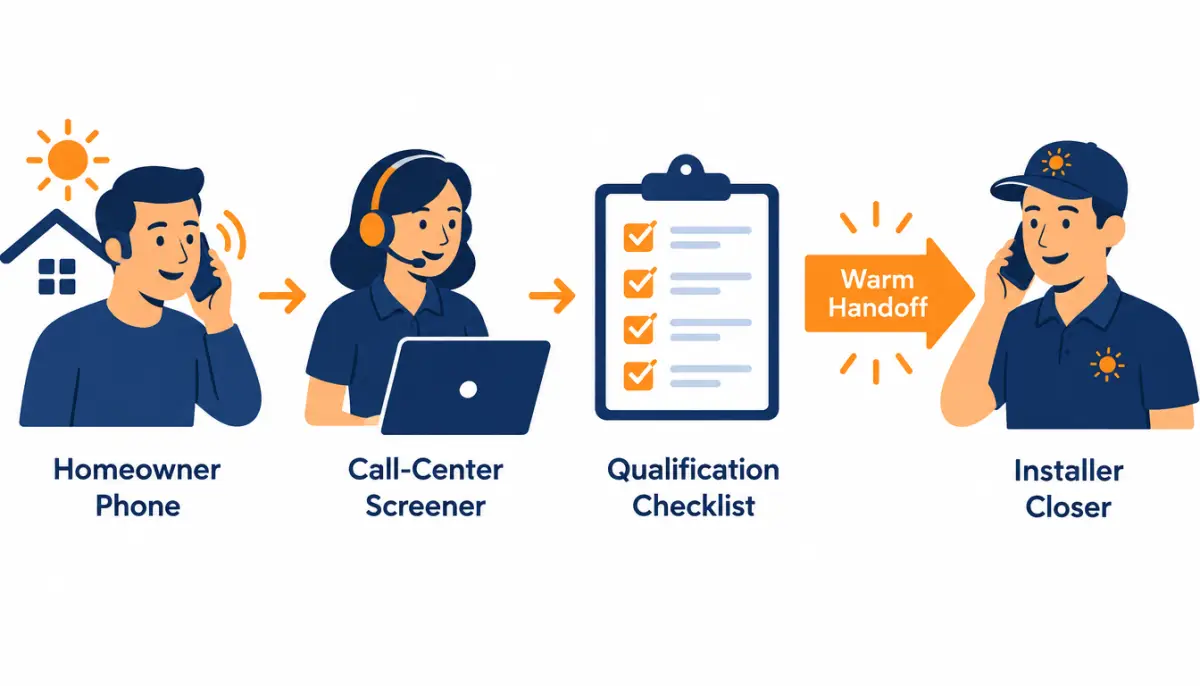
Live transfer vs inbound call vs appointment
These terms get mixed up. In this guide:
- Live transfer: an outbound or inbound conversation screened by a third party, then handed to you live.
- Inbound call (pay per call): a homeowner calls a tracked number from an ad and is routed to you, usually with lighter or automated screening (an IVR question or two). Often billed per call over a duration.
- Booked solar appointment: a setter books a meeting on your calendar; you meet the homeowner later.
Pay per call is covered in its own section below because buyers often compare it with transfers.
Who are solar live transfers for?
Solar live transfers suit teams that have reps available on the phone during set hours and can turn a live conversation into an appointment or a sale, but lack the setter capacity to dial raw leads. They do not suit teams that cannot answer reliably, because a transfer no one picks up is wasted for both sides.
Teams with closers on the phones
If your closers can run discovery and book or even close on the phone, a transfer puts them straight into the part of the job they are best at. Virtual-selling teams, which present proposals over screen share, fit especially well.
Teams without setters
Small installers often have no one whose job is to dial new leads within minutes. Transfers solve that: the screening team does the dialing, and your rep only picks up when there is someone to talk to.
Who should not buy transfers
- Teams that cannot staff the phones. If no one is reliably free during the agreed transfer hours, you will miss transfers or answer them distracted.
- Teams that only sell in person and cannot book on the call. A transfer handed to someone who only says "someone will call you back" wastes the momentum.
- Very small territories. Transfer programs need enough homeowners in the area to screen; tiny territories can mean long gaps.
- Teams unwilling to dispute calmly. Transfers involve billing judgment calls. You need someone to review recordings and file disputes with evidence.
What screening criteria do solar live transfers use?
Solar live transfers are typically screened for homeownership, a minimum monthly electric bill, a suitable roof with limited shade, the decision-maker being on the call, and stated interest in a quote. The installer agrees these criteria with the vendor in writing, along with disqualifiers, before the first call is transferred.
Homeowner, bill, roof, intent
| Criterion | Typical screening question | Why it matters |
|---|---|---|
| Homeowner | "Do you own the home at this address?" | Renters cannot sign for residential solar |
| Decision-maker | "Is anyone else on the title who would need to be part of the decision?" | Avoids a second meeting just to involve a spouse |
| Bill | "Roughly what is your average monthly electric bill?" | Signals system size and savings potential |
| Roof | "How old is your roof, and what material?" | Roof replacement may come first |
| Shade | "Is your roof mostly sunny, partly shaded or heavily shaded?" | Heavy shade often fails at survey |
| Utility | "Which company provides your electricity?" | Rules and savings differ by utility |
| Intent | "Would you like to speak with a local installer about a quote now?" | Confirms the person wants the transfer |
Disqualifiers
Write disqualifiers as clearly as criteria. Common ones:
- Renter, or not on title
- Mobile home or property type you do not install on
- Bill below your minimum
- Already has solar (unless you sell batteries or expansions)
- Outside your ZIPs
- Explicitly not interested in speaking now
- Language you cannot support
Script review and call recordings
Ask to review the screening script before launch and to hear a sample of recorded transfers each week during the first month. You want to hear: how the screener introduces the call, whether criteria are asked as written, whether the homeowner clearly agrees to be connected, and how the handoff sounds. Recording practices and the consent needed to record vary by state; see the compliance section below.

How do call routing and coverage work?
Routing sends each screened homeowner to one of your reps during agreed hours, usually through a ring group or a single number. Coverage means having reps free to answer within seconds. When no rep answers, the program needs a fallback, such as a callback booking or ending the call without billing, agreed before launch.
Hours, answer time and ring order
Agree in writing:
- Transfer hours by day of week, in the homeowner's time zone.
- Answer target. A warm transfer cannot hold for long; the homeowner is waiting. Many programs expect an answer within a few rings.
- Ring order. Simultaneous ring to a group, or sequential through a list. Simultaneous is faster but needs clear rules about who takes the call.
- Capacity cap. Maximum transfers per hour or day, so you do not receive more calls than your team can take.
Geography and language
Transfers should be filtered to your ZIPs, just like web leads. If you serve Spanish-speaking homeowners, ask whether the screening team can screen in Spanish and transfer to a Spanish-speaking rep, and whether the criteria and consent language are the same.
What happens when no rep answers
Missed transfers are the most common source of friction. Common fallbacks:
| Fallback | How it works | Trade-off |
|---|---|---|
| Rollover | Ring a second number or rep | Needs a backup person |
| Callback booking | Screener books a callback time with the homeowner | Momentum drops; becomes like an appointment |
| End and release | Screener ends the call; no charge | Lost opportunity; no cost |
| Voicemail transfer | Homeowner leaves a message | Weak; rarely recommended |
Whatever the fallback, agree whether an unanswered transfer is billable. In most fair programs it is not, but confirm in writing.
How are solar live transfers billed?
Solar live transfers are usually billed per transfer that meets the agreed screening criteria and stays connected for a minimum duration after the handoff. Calls that drop early, fail criteria, or reach no one are normally not billable. The exact minimum, the definition of a qualified call and the dispute process should all be written into your terms before launch.
Minimum call duration
Most transfer and pay-per-call programs set a minimum connected time before a call counts. The number varies by vendor and program, and you should treat any figure as negotiable rather than standard. What matters more than the exact number:
- When the clock starts. From the moment your rep answers, or from the moment the screener drops off? Starting after the handoff is fairer to the buyer.
- What counts as connected. Hold music and silence should not count.
- How it is logged. Duration should come from the call platform log, which you can see.
What counts as billable
A clear billable definition reads something like this (illustrative wording, not our terms):
A transfer is billable when the homeowner meets all agreed screening criteria, is connected to the buyer's rep, and the connected call lasts at least the agreed minimum duration after the screener leaves the line.
And a non-billable list:
| Not billable (typical) | Why |
|---|---|
| No answer, busy, or voicemail on your side | No conversation took place |
| Homeowner fails a written criterion (renter, outside ZIPs) | Screening failure |
| Duplicate of a homeowner already transferred to you | You already paid |
| Call shorter than the minimum duration | No real conversation |
| Wrong person or prank call | Data failure |
Dispute process
Disputes need evidence on both sides. A workable process:
- Your rep marks the call outcome in your CRM immediately, with a reason code.
- You submit disputes within an agreed window, with the call ID and reason.
- The vendor reviews the recording and screening answers.
- Approved disputes become credits on the next invoice.
For our lead and appointment programs, the published windows are 7 days for replacement credits and 7 days from the scheduled time for appointments. Dispute terms for any transfer program are confirmed on your call.
Raw-call billing vs qualified-call billing
| Model | You pay for | Price per unit | Risk sits with |
|---|---|---|---|
| Raw call (pay per call) | Any call over a duration threshold | Lower | Buyer: you screen |
| Qualified transfer | Screened calls that meet criteria | Higher | Seller: they screen |
Neither is better in general. Raw-call billing suits teams with strong phone screeners of their own; qualified transfers suit teams that want the seller to absorb screening.
Pay per call for solar
Pay per call is the inbound cousin of the live transfer. A homeowner sees an ad, calls a tracked number, perhaps answers a short IVR question ("Press 1 if you own your home"), and is routed to your team. Billing is usually per call over a minimum duration. It produces callers with high in-the-moment intent, since they dialled you, but lighter screening. It needs the same answer-rate discipline as transfers, and the ad and IVR disclosures should be reviewed by counsel like any other consent flow.
How much do solar live transfers cost?
Published U.S. prices for solar live transfers are scarce. ActiveProspect's July 2026 roundup does not list a live transfer price; it cites The Leads Warehouse at $100 to $300 or more per inbound solar call and Enervio at $150 to $500 per booked appointment. Treat these as directional. Pricing for your territory is confirmed by ZIP on your call.
Reported market bands, dated and attributed
| Format | Reported range (USD) | Source | As of |
|---|---|---|---|
| Inbound solar call | $100 to $300+ per call | The Leads Warehouse, as cited by ActiveProspect | July 2026 |
| Booked appointment | $150 to $500 per appointment | Enervio, as cited by ActiveProspect | July 2026 |
| Real-time web lead | $40 to $120 per lead | The Leads Warehouse, as cited by ActiveProspect | July 2026 |
| Live transfer | Not listed in that source | n/a | July 2026 |
For more context on what solar leads cost in 2026, see the pricing guide.
What moves transfer pricing
- Screening depth. More criteria means more calls screened per transfer.
- Market. Competitive states cost more to reach homeowners in.
- Hours. Evening and weekend coverage costs more to staff.
- Billing model. Qualified-transfer billing costs more per unit than raw-call billing.
- Volume and caps. Small daily caps and narrow territories raise unit cost.
Our terms
We do not publish a transfer price. Whether transfers are available for your ZIPs, and at what price, is confirmed on your call.
What is the cost per sale for live transfers?
Cost per sale for live transfers equals the price per billable transfer divided by the share of transfers that become sales. Because the screener has already reached and qualified the homeowner, transfers skip the contact stage that drags down web lead economics, so a higher unit price can still produce a competitive cost per sale.
Worked example
Illustrative example only. These are not our prices or market data.
| Input (illustrative) | Live transfer | Exclusive web lead |
|---|---|---|
| Price per unit | $150 | $120 |
| Contact rate | 100% (already on the phone) | 65% |
| Appointment rate (of contacts) | 45% | 40% |
| Sit rate | 70% | 70% |
| Close rate | 25% | 25% |
| Units per sale | 1 ÷ (1.00 × 0.45 × 0.70 × 0.25) = about 12.7 | about 22 |
| Unit cost per sale | about $1,900 | about $2,640 |
| Labor per unit (illustrative) | $8 (one call) | $10 (several attempts) |
| Total per sale | about $2,000 | about $2,860 |
In this example the transfer costs more per unit and less per sale. Two things can reverse it: a low answer rate on your side (missed transfers you still pay for under a loose contract) and weak screening (transfers that fail on the first question). Model your own numbers with the cost per install calculator.
Why transfers can beat raw leads for small teams
For a two-person team, the hidden cost of web leads is time: dialing, voicemails, texts and callbacks. A transfer converts that dialing time into talking time. If your scarce resource is hours rather than dollars, transfers can be the cheaper format even at a higher unit price.
Sensitivity: what moves transfer cost per sale most
Using the illustrative example above, changing one input at a time:
| Change (illustrative) | Approx. total per sale |
|---|---|
| Base case | about $2,000 |
| Appointment rate falls from 45% to 30% | about $3,000 |
| Close rate rises from 25% to 30% | about $1,700 |
| 20% of transfers missed but still billed | about $2,500 |
| Price per transfer rises to $200 | about $2,650 |
The appointment rate on the live call and your own answer discipline move the result as much as the price does.
Worked example: building your own live transfer break-even
You can decide whether live transfers make sense for your team before buying any, by working backwards from your close rate to the maximum price per transfer you can afford. This illustrative example uses placeholder numbers; substitute your own figures from past phone sales.
Start with three inputs you already know or can estimate from your CRM:
- Gross profit per installed job after equipment, labour and commission (call it G).
- Target acquisition cost as a share of gross profit you are willing to spend on marketing (for example, 25% of G).
- Transfer-to-install rate, which is the share of connected, screened homeowners your closers turn into installed systems. If you have no live transfer history, use your best phone-appointment rate as a starting estimate and treat the result as provisional.
Then work through the steps:
- Maximum spend per install = 0.25 x G.
- Maximum price per billable transfer = maximum spend per install x transfer-to-install rate. At a 10% rate, you can pay up to 0.025 x G per transfer and still hit target.
- Adjust for non-billable calls. If some transfers are credited for disconnects or failed screening, your effective rate on paid transfers rises slightly; use paid transfers as the denominator.
- Add closer time. Each transfer occupies a closer for the length of the call plus notes. If a closer could otherwise work booked appointments, count that opportunity cost.
Before signing, check these terms because they move the break-even:
- The minimum call duration or screening standard that makes a transfer billable.
- Hours of operation and what happens when no closer answers.
- The credit process for wrong numbers, renters and duplicates.
- Daily caps and the notice needed to pause.
Plug the result into the solar lead cost calculator. Live transfer availability for your territory is confirmed on the call.
Are solar live transfers legal?
Solar live transfers can be run lawfully, but they involve several rule sets at once: consent for the outbound screening call, Do Not Call rules, rules on autodialers and prerecorded messages, and state laws on recording calls, some of which require every party's consent. This is general information, not legal advice; confirm the full call flow with counsel.
Consent for outbound screening and transfer
If the screening team calls homeowners (rather than homeowners calling in), the calls need a lawful basis. For telemarketing calls using autodialers or prerecorded voices, federal rules require prior express written consent. The FCC's guide to unwanted calls and texts and the FTC's Telemarketing Sales Rule guidance set out the federal framework. Ask any vendor:
- What consent supports the screening call, and whose name is in the disclosure?
- Is the transfer to your company covered by that consent?
- Does the screener get verbal agreement before transferring?
- Can they produce the consent record for any transferred call?
The FCC's one-to-one consent rule was vacated by the Eleventh Circuit on January 24, 2025. That removed a federal requirement to name a single seller; it did not remove the value of clear consent or override state laws.
Call recording laws vary by state
Some states allow recording when one party consents; others require all parties to consent. Transfers are often recorded for quality and disputes, and the call may cross state lines. A clear recording notice at the start of the call is common practice. Confirm the right approach for the states you call into with counsel.
DNC handling
Screening lists should be scrubbed against the National Do Not Call Registry and internal do-not-call lists, and any "stop calling me" said on a transfer must be honoured across both the vendor's and your systems. Agree how opt-outs captured by your reps get back to the vendor.
For the wider topic, read about calling purchased solar leads and our TCPA compliance page.
How do you get the most from transferred calls?
Get the most from transferred calls by answering within seconds, opening with a short script that confirms what the screener said, booking a firm next step before the call ends, and logging every outcome with a reason code. Those four habits decide most of the difference between a good and a poor transfer program.
Answer-rate targets
Set an internal target for the share of transfers answered during agreed hours, review it weekly, and staff to it. If your answer rate is low, reduce the transfer cap rather than miss calls; missed transfers frustrate homeowners and screeners alike.
Opening script for a warm transfer
"Hi Pat, this is Morgan with [your company], thanks for holding. I understand you own the home on Oak Street, your bill runs about [range], and you'd like a quote. Is that right? Great. Let me ask a couple of quick questions so I can give you something useful..."
Then: confirm decision-makers, ask why now, explain the next step (site survey or virtual proposal), and offer two specific times. Avoid re-asking every screening question; it signals the handoff was wasted.
For the follow-up after the call, use the follow-up rules for solar leads: confirmation text, reminder before the appointment, and a fast reschedule if they miss.
CRM logging and attribution
| Field | Purpose |
|---|---|
| Call ID from vendor | Ties disputes and billing to the recording |
| Answered by | Rep accountability |
| Connected duration | Billing check |
| Outcome code | Appointment, callback, not qualified (reason), not interested |
| Appointment date | Sit-rate tracking |
| Sale and revenue | Cost per sale by source |
Weekly, reconcile your log against the vendor's invoice. Mismatches are easier to resolve at week one than at month three.
What should you ask a live transfer vendor before buying?
Before buying solar live transfers, ask the vendor who does the screening, what consent supports each call, what exactly makes a call billable, how missed transfers are handled, how disputes work, and whether you can hear recordings. Get every answer in writing. Vague answers on billing and consent are the two most reliable warning signs.
Vendor question list
| Area | Question | A good answer sounds like |
|---|---|---|
| Screening | Who screens: your own staff or a partner? Where are they based? | A named team or partner, with QA and script control |
| Script | Can we review and approve the script? | Yes, before launch and on changes |
| Consent | What disclosure did the homeowner agree to, and does it cover a transfer to us? | A specific record, available per call |
| Exclusivity | Is a transferred homeowner ever sent to another installer? | No; one buyer per transfer, in writing |
| Billing | What is billable, and when does the duration clock start? | A written definition, starting after the handoff |
| Missed calls | Are unanswered transfers billed? | No, with a defined fallback |
| Disputes | What is the window and process? | A fixed window, call-ID based, recording review |
| Recordings | Can we hear recordings of our transfers? | Yes, on request or in a portal |
| Caps | Can we set hourly and daily caps? | Yes, and change them quickly |
| Contract | Is there a minimum term? | A test period without a long commitment |
How to check the answers
Do not rely on the sales call alone. During the test, pick five transferred calls a week at random and compare three things: the screening answers the vendor logged, what the homeowner told your rep, and what the recording shows. If the three agree, the screening is doing its job. If they keep disagreeing, for example homeowners who turn out to be renters or who did not expect a call, raise it with the vendor with call IDs attached and pause the cap until it is fixed. A vendor who welcomes this kind of audit is usually one worth keeping.
Red flags
- Billing defined only as "connected calls" with no criteria.
- No access to recordings, or recordings only after a dispute is filed.
- Consent described as "fully compliant" with no record you can see.
- Pressure to commit to large monthly volume before any test.
- Transfers from far outside your ZIPs labelled "close enough".
How do live transfers fit different installer sizes?
Live transfers fit small teams that are short on dialing time, mid-size teams that want afternoon or evening phone coverage, and large teams that want a predictable stream of conversations for virtual closers. The common requirement is someone ready to answer. The scenarios below show the reasoning; the numbers you use should be your own.
Scenario A: owner plus one rep
The owner sells in the morning and runs installs in the afternoon. A small daily cap of transfers during a two-hour window when the owner is at a desk turns that window into booked surveys. The risk is answer rate: one busy day on a roof means missed calls. Set the cap low and the hours narrow.
Scenario B: five reps, no setter
The team currently splits web leads between reps, and follow-up is uneven. Transfers routed to a ring group during set hours give every rep live conversations without any dialing, while web leads continue for the reps who call fast. Track which source produces the lower cost per sale after the test.
Scenario C: virtual-selling team
Closers present proposals by video and can often move from the transfer straight to a design session the same day. For this team a transfer can be close to a same-day appointment. The key metric is the share of transfers that reach a proposal in the first call.
| Scenario | Cap | Hours | Main metric |
|---|---|---|---|
| A: owner plus one | Small | Narrow window | Answer rate |
| B: five reps | Moderate | Business hours | Appointment rate per transfer |
| C: virtual closers | Larger | Extended | Proposals from first call |
How do live transfers compare with appointments and exclusive leads?
Live transfers, booked appointments and exclusive web leads all go to one installer, but they hand over the homeowner at different stages and need different staffing. Choose the format that matches the work your team can do well: dialing (web leads), live phone selling (transfers) or in-person or scheduled closing (appointments).
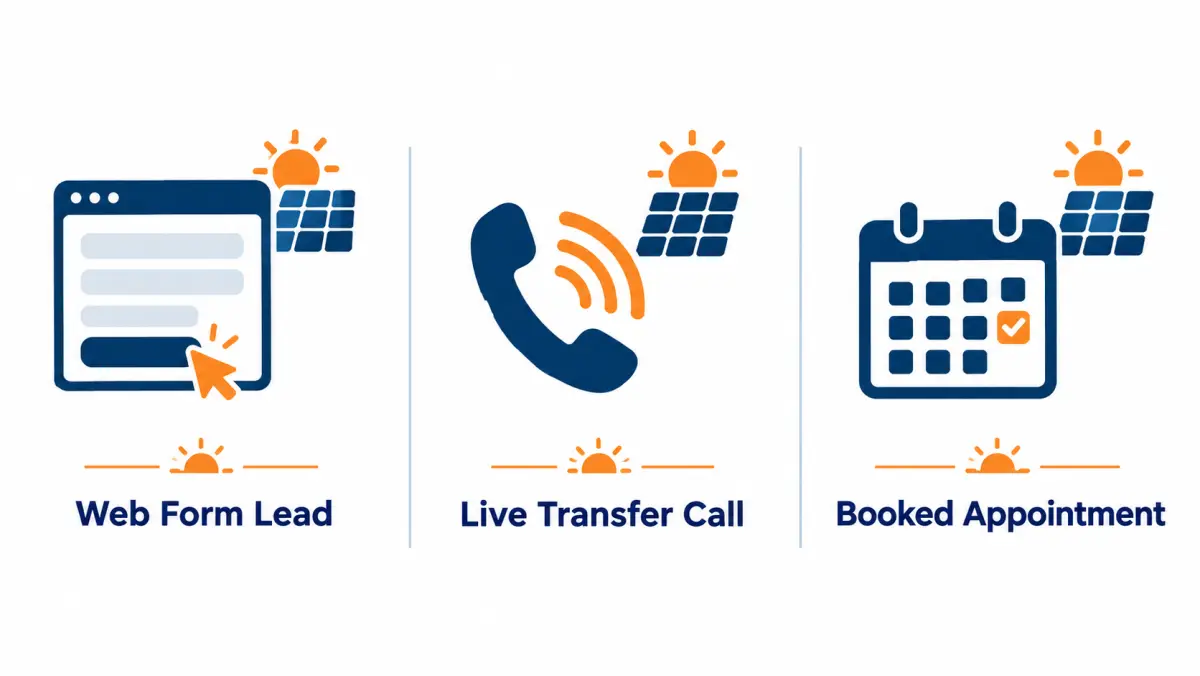
| Factor | Exclusive web lead | Live transfer | Booked appointment |
|---|---|---|---|
| What you receive | Contact details and form answers | A screened homeowner on the line | A confirmed meeting time |
| Who makes first contact | Your team | Screener | Seller's setter |
| Staffing you need | Fast callers | Reps on phones during set hours | Closers |
| Typical failure | Slow follow-up | Missed transfers | No-shows |
| Price per unit | Lower | Higher | Highest |
| Billing basis | Per lead | Per qualified call | Per appointment |
| Replacement or dispute | Credits for invalid data, 7 days (our leads) | Per program terms | Replacement for no-shows or filter mismatch reported within 7 days of the scheduled time (our appointments) |
Many teams combine them: web leads for setters, transfers for afternoon phone coverage, appointments for closer overflow.
How do you start a live transfer test?
Start with a 30-minute call to confirm whether transfers are available in your ZIPs, then agree written screening criteria, hours, a daily cap, the billable definition and dispute window. Run a small test with recordings reviewed weekly, and judge it on cost per sale, not on how many calls arrived.
Test checklist
- Confirm availability for your ZIPs and hours on the call.
- Agree criteria, disqualifiers and the billable rule in writing.
- Set up routing: numbers, ring group, rollover and caps.
- Train reps on the warm-transfer opener and logging.
- Run a capped test; review recordings and your answer rate weekly.
- Reconcile invoices against your log; file disputes with evidence.
- Compute cost per sale and compare with your other sources.
There are no long-term contracts on our programs: start with a test, scale when the numbers work. Book a call to check your territory.
How do you staff a team to take solar live transfers?
To take live transfers well you need a rep available within a few rings for every hour you accept calls, a ring order that rolls to a second and third rep, a fallback for when nobody answers, and one person who owns the daily numbers. Staffing, more than price, decides whether transfers pay off.

A web lead can wait ten minutes for a rep to finish lunch. A transfer cannot. The homeowner is holding the line with a screener, and every ring after the third raises the chance they hang up, lose interest, or decide this was a sales trap. So the first question in any transfer program is not "what does it cost" but "who picks up, and when."
The three roles in a transfer program
Even in a two-person company, three jobs need an owner. One person can hold more than one of them, but each needs a name next to it.
| Role | What they do | Typical owner by team size |
|---|---|---|
| Receiver | Answers the transfer, runs discovery, books or closes | Closer or rep on shift |
| Backup | Second in the ring order; takes the call if the receiver is busy | Another rep, the owner, or an office manager trained on the first five minutes |
| Program owner | Reviews daily dispositions, disputes calls, talks to the vendor, adjusts hours and caps | Sales manager or owner |
The program owner is the role that gets skipped. Without it, disputes go unfiled, bad screening goes unreported, and the test ends with a gut feeling instead of a number.
Shift design: match accepted hours to staffed hours
The simplest rule is that you should never accept transfers in an hour where you cannot answer them. That sounds obvious, but it is the most common failure. Teams sign up for "business hours" coverage, then discover that their closers are out on site visits from 10 a.m. to 3 p.m. and nobody is at a desk.
Work it out on paper first:
- List every hour of the week you would like to receive calls.
- For each hour, write the name of the person who will be at a phone with a headset, CRM open, not driving and not in a meeting.
- Strike out every hour that has no name, or only one name with no backup.
- Accept transfers only in the hours that survive.
Many small teams find their real coverage is two or three blocks a day, not a continuous window. That is fine. A narrow, reliable window beats a wide, leaky one. Most vendors let you set schedules by day and hour; ask how fine-grained the schedule can be and how fast a change takes effect.
Ring groups, answer time and the fallback
Agree the routing before the first call, then test it with dummy calls from the vendor.
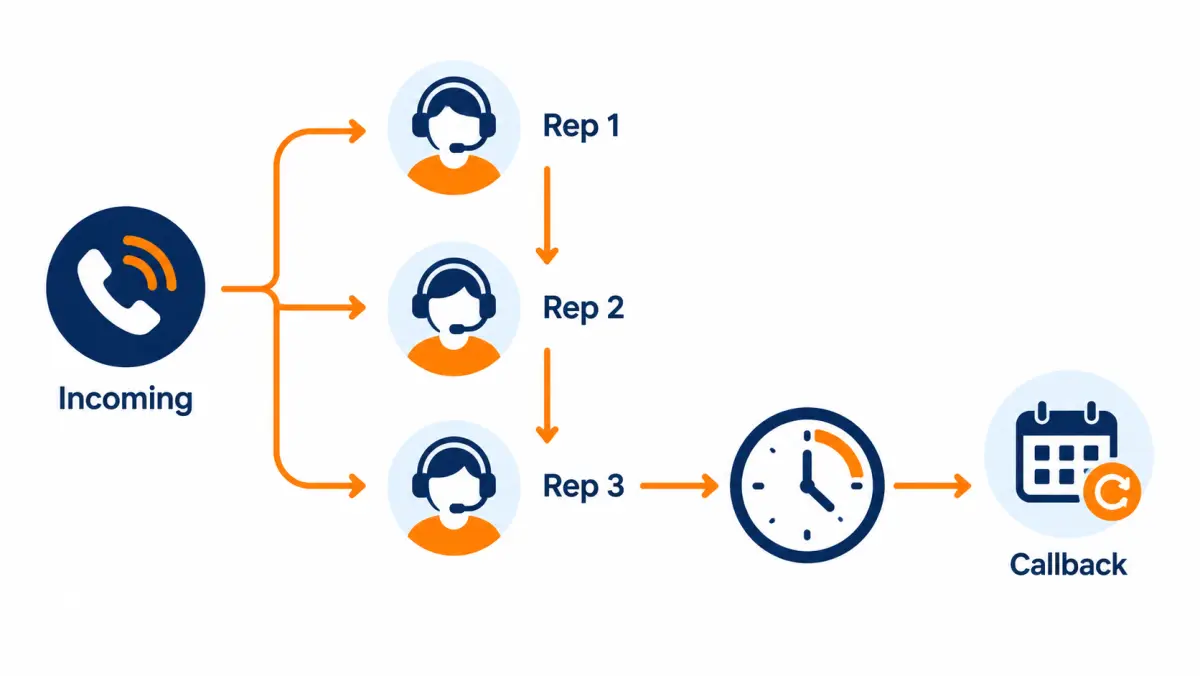
- Ring order. Sequential (rep 1, then 2, then 3) gives you control over who gets the best calls. Simultaneous ring (all phones at once) gets faster pickup but can cause two reps to grab the same call. Many teams use sequential with a short ring time per rep.
- Ring time per rep. Short enough that the homeowner never waits long in total. Agree a total "time to answer" ceiling with the vendor and work backwards.
- Fallback. What the screener does if nobody answers: book a callback on your calendar, take a message, try a second number, or politely end. Write down which, and whether a fallback call is billable. In most fair programs, a transfer nobody answered is not billable, but you need that in writing.
- Caller ID. Ask what number shows on your rep's phone. Reps should know at a glance that the incoming call is a transfer and not a supplier or an existing customer.
Readiness checklist before the first live call
- Every rep in the ring group has taken at least three practice transfers from the vendor or a manager role-playing the screener.
- Headsets, not handsets. Reps need both hands for the CRM and the satellite roof view.
- A transfer record template in the CRM with the screener's answers as fields, not free text.
- A satellite imagery tool open and logged in, so the rep can look at the roof while the homeowner talks.
- Calendar access for booking site visits or virtual follow-ups on the call.
- A disposition list (see below) every rep uses the same way.
- The program owner has the vendor's dispute contact, the dispute window and the evidence they accept.
- Everyone knows the schedule and who is backup each block.
Training drill: the first five minutes
Most of the value of a transfer is decided in the first five minutes. Run this drill weekly for the first month:
- A manager plays the screener and reads a handoff summary ("This is Dana from Elm Street, she owns, bill around the middle of the range, south-facing roof, husband is home tonight").
- The rep greets by name, confirms one or two facts, and asks one open question.
- The manager, now playing the homeowner, throws one curveball: "I just wanted a price," "I'm a bit busy," "Is this the same company that called me?"
- The rep handles it and moves to the next step (roof look, bill review, booking).
- Debrief: did the rep repeat questions the screener already asked? Did they earn the next two minutes?
Reps who have only worked web leads tend to over-qualify on transfers, re-asking everything, which irritates a homeowner who just answered the same questions. The drill fixes that.
What should a live transfer call script include?
A live transfer script has four parts: a short greeting that uses what the screener learned, a confirmation of one or two key facts, open discovery about why the homeowner agreed to talk, and a clear next step such as a roof review, bill upload or booked visit. It should sound like a continuation, never a restart.
The screener's script belongs to the vendor, and you should review it (more on that later). The receiving script is yours. Below are working scripts for the common situations. Adjust the wording to your own voice, and run any disclosures past counsel.
The standard warm-transfer opening
When the screener stays on the line and introduces the homeowner:
Screener: "Hi, I have Maria on the line. Maria owns her home on Cedar Avenue, her electric bill runs on the higher side in summer, and she's curious whether solar would cut it. She has about fifteen minutes."
Rep: "Thanks. Maria, hi, I'm Alex with [company]. Thanks for staying on. I've got your street pulled up. Before I look at the roof, what got you thinking about solar now? Was it the summer bills, or something else?"
Three things are happening. The rep thanks the screener, which signals continuity. The rep uses the name and one fact, which shows they listened. And the first question is open, so the homeowner talks about their own reason, not the screener's checklist.
Opening for a blind or semi-warm transfer
If the screener drops off before you speak, the homeowner may not know who you are:
"Hi, is this Maria? This is Alex with [company], the solar installer the last caller mentioned. She said you'd be open to a quick look at whether solar makes sense for your home on Cedar. Is now still a good time?"
Asking "is now still a good time" costs a few seconds and saves the call when the answer is no; you can book a callback instead of fighting a distracted homeowner.
Confirming without re-qualifying
Pick two facts that matter most for your business and confirm them in a single sentence:
"Just so I've got it right, you own the home, and the bill is usually in that higher range in summer?"
Do not walk back through the whole screening list. If something important is missing, ask it naturally later in discovery.
Discovery questions that work on a live call
- "What would a good outcome look like for you, a lower bill, backup power, or something else?"
- "Has anyone else talked to you about solar recently?" (This tells you whether you are competing.)
- "Who else would be part of the decision?"
- "Are you planning to stay in the home for a while?"
- "Any work coming up on the roof?"
- "How do you usually like to pay for home projects, cash, a loan, or would you want to look at a lease or power purchase option?"
That last question matters more since the federal 25D credit ended for systems placed in service after 2025. Homeowners who expected a 30% tax credit on a purchase may have read headlines and be unsure. More on that in the post-25D section below.
Moving to the roof and the bill
"While we're talking, I'm looking at your roof from above. I can see the main slope faces roughly south and there's a big tree on the west side. Does that tree shade the roof in the afternoon?"
"If you have a recent bill handy, or can pull it up in your utility app, I can get a much better picture. Would you mind texting me a photo of the page with the usage on it?"
Asking for the bill on the call is one of the best signals of intent you can get. A homeowner who sends it is engaged; one who won't may still be early.
Booking the next step
Never end a good call with "I'll send you something." End with a time:
"Here's what I'd suggest. I'll put together a design and savings estimate from your roof and bill. Can we go through it Thursday at six, when your husband's home? I'll send a calendar invite and a text reminder."
If you close on the first call (some virtual teams do), make sure the homeowner has every document and disclosure your finance partner and state require. Speed is not worth a cancelled contract.
Script for a transfer that is clearly not qualified
Screeners make mistakes. When the homeowner turns out to rent, for example:
"Thanks for telling me. Solar on a rented home needs the owner's agreement, so I'm not able to help directly today. If your landlord is ever interested, here's how they can reach us."
Then disposition the call as a screening failure and file the dispute the same day with the recording timestamp. Be polite on the call. The homeowner did nothing wrong.
Script for "I just wanted a price"
"That makes sense, and I'll give you a real number. The honest answer is it depends on your roof and your usage, which is why I asked about the bill. If you can send me a photo of it now, I can give you a range on this call."
Script for "Is this the same company that called me?"
"The person you spoke with screens calls for installers, and connected you to us because we install in your area. I'm with [company]; we'd be the ones doing the design and the install."
Have this answer ready. Homeowners are entitled to know who they are talking to, and a confused homeowner will not book. Your vendor's screener script should also identify the seller and the installer clearly; review it.
How do you handle objections on a transferred call?
Objections on transfers are different from objections on cold calls because the homeowner already agreed to talk. Most are about time, trust or money. Acknowledge the concern, answer briefly, and offer a small next step, such as a roof look or bill photo, rather than pushing for a large commitment on the spot.
Time objections
"I only have a couple of minutes."
"No problem. Let's use them well. Two quick things and I'll book a proper time: who's on the electric account, and roughly what does it run in summer?"
"Can you call me back later?"
"Sure. What time tonight or tomorrow works? I'll put it in now and text you so you have my number."
Then actually call at that time. A transfer converted to a scheduled callback is still valuable if the callback happens.
Trust objections
"I've been burned by a solar salesperson before."
"I'm sorry that happened. What went wrong? ... Here's how we work: I'll show you the design and the numbers, and you can take as long as you want to decide. No signatures today."
"How did you get my number?"
"You spoke with a screener a minute ago who asked if you'd like to talk with an installer, and you said yes. That's how you got to me. If you'd prefer not to talk, I'll make a note and you won't hear from us again."
If the homeowner says they never agreed, stop, apologize, honour the request, add them to your internal do-not-call list, and flag the call to the vendor. That is both the right thing to do and a compliance signal you need to act on.
Money objections
"I heard the tax credit went away."
"You're right that the federal homeowner credit ended for systems installed after 2025. That changes the math for a cash purchase, so let's look at your actual numbers. Depending on your utility and roof, there may still be a case for owning, and there are lease and power purchase options where the payment is set up differently. I'd rather show you than guess."
Do not quote incentives you have not confirmed for that address. State and utility programs change. Point to the official source and your own verified design.
"I can't afford a big project right now."
"Understood. Many people look at solar because of the bill they're already paying. Let's see whether the monthly cost of a system would be below what you pay the utility now. If it isn't, I'll tell you."
Decision-maker objections
"My wife handles this."
"Makes sense. When are you both home? I'd rather walk through it once with both of you than twice."
Book the time with both names. A sit with only one decision-maker present tends to end in "we'll think about it."
Competition objections
"I'm already getting quotes."
"Good, you should compare. What have you seen so far? I'll make sure ours is laid out so you can compare line by line: system size, panel and inverter, warranty, and price per watt."
How do you write a screening spec your vendor can follow?
A screening spec is a one-page document that tells the vendor exactly which homeowners you will pay for: required answers, disqualifiers, geography, hours, the handoff summary format and the billable rule. A written spec reduces disputes because both sides judge calls against the same text instead of memory.
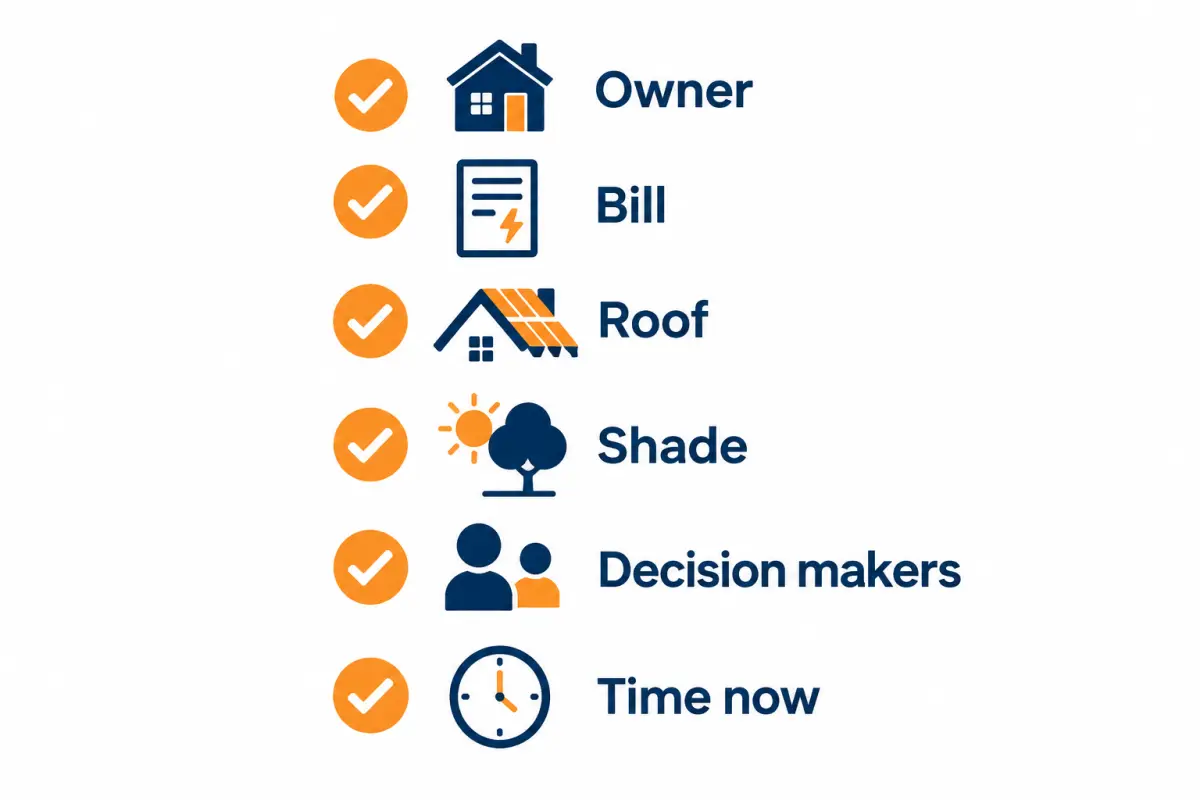
The earlier section on screening criteria lists what screeners commonly ask. The spec is where you turn that into rules. Here is a template you can copy.
Screening spec template
1. Geography
- Service ZIPs or counties (attach list).
- Exclusions: specific utilities you do not serve, HOA communities you avoid, flood zones, etc.
2. Hours accepted
- Days and hours by time zone, with who is on shift (internal only).
- Holiday blackout dates.
3. Required answers (all must be "yes" or in range)
- Owns the home, and their name is on the title or they are a co-owner.
- Single-family home or townhome (state your property types).
- Average electric bill in your accepted range (state it).
- Electric utility is one you serve.
- Decision-maker on the call, or available at a time they can name.
- Willing to talk with an installer now.
4. Disqualifiers (any one ends the transfer)
- Renter, or owner not on title with no owner available.
- Mobile or manufactured home (if you don't install on them).
- Roof known to need replacement within a set period, unless you also do roofing.
- Already signed with another installer.
- Heavy shading the homeowner describes as most of the day.
- Credit score question, only if you need it and counsel has approved how it is asked.
5. Handoff summary format Ask the screener to say these in order, in one breath, before dropping or staying on:
- First name and street.
- Ownership confirmed.
- Bill range.
- Roof and shade in their words.
- Who else decides and when they're home.
- Anything unusual ("asked about batteries," "has quotes already").
6. Billable rule
- Minimum connected time after the rep answers (state the number and that the clock starts when your rep picks up).
- Not billable: no answer from your team (if agreed), disqualifier discovered in the first part of the call, duplicate within your agreed window, out of territory, wrong hours.
7. Disclosure and consent text
- The exact consent language used before the screening call started, or the form text if the call followed a web form. Your counsel reviews it.
- The recording disclosure used at the start of the call.
8. Dispute rules
- Window in days, evidence required (recording timestamp, disposition), turnaround time, how credits are applied.
Writing criteria that are testable
Vague criteria cause disputes. Compare:
| Vague | Testable |
|---|---|
| "Good roof" | "Homeowner states the roof is under a stated number of years old, or does not expect to replace it in the next stated period" |
| "Decent bill" | "Homeowner states average bill falls in our stated range" |
| "Motivated" | "Homeowner agrees to speak with an installer now" |
| "Decision-maker" | "Person on the call is on the title, or names a co-owner available at a specific time" |
A screener can follow the right-hand column, and you can check it against a recording.
How strict should your criteria be?
Every added requirement means the screener talks to more homeowners per transfer, which tends to raise the price per transfer. Every removed requirement means your reps spend more time on calls that go nowhere. The right balance depends on your team:
- Reps are scarce, budget is not: tighter spec, fewer calls, higher unit price.
- Reps have spare hours, budget is tight: looser spec, more calls, lower unit price, more filtering on your side.
- Unsure: start moderately tight, then loosen one criterion at a time once you know your close rate on each type.
How should you log transfers in your CRM?
Every transfer should create one CRM record with the screener's answers as structured fields, a timestamp for the handoff, who answered, how long the connected call lasted, and a disposition from a fixed list. Without that, you can't dispute bad calls, compare vendors or calculate cost per sale.
The earlier CRM section covers attribution basics. Here is a practical disposition list and field set.
Disposition codes for live transfers
| Code | Meaning | Billable under most fair programs? | Action |
|---|---|---|---|
| T-APPT | Appointment or virtual meeting booked | Yes | Confirm and remind |
| T-SOLD | Closed on the call | Yes | Hand to operations |
| T-CALLBACK | Homeowner asked for a set callback time | Usually yes, if over minimum duration | Call at the time |
| T-NURTURE | Interested but not now (moving, roof, timing) | Usually yes | Add to follow-up sequence |
| T-NOTINT | Not interested after a real conversation | Usually yes | Close out |
| T-DQ-RENT | Renter or not on title | Disputable | File dispute with timestamp |
| T-DQ-AREA | Out of territory | Disputable | File dispute |
| T-DQ-OTHER | Failed another written criterion | Disputable | File dispute, cite the criterion |
| T-DUP | Same homeowner already transferred or in your CRM | Disputable within the agreed window | File dispute |
| T-HANGUP | Homeowner dropped before the minimum duration | Usually not billable | Log; check if a pattern |
| T-MISSED | Nobody on your side answered | Depends on contract | Fix staffing first |
| T-NOCONSENT | Homeowner says they never agreed | Escalate | Honour DNC request, flag to vendor and counsel |
Fields to capture on every transfer
- Vendor and campaign or program name
- Handoff timestamp and answering rep
- Connected duration (from your phone system, not only the vendor's report)
- Screener answers: ownership, bill range, utility, roof and shade notes, decision-makers
- Recording link or ID, if the vendor provides one
- Disposition code
- Next step date
- Outcome fields filled later: sit, sale, contract value, cancellation
Reporting you should be able to run weekly
- Transfers received, answered, and missed, by hour block
- Dispositions by code
- Appointment rate and sit rate on transfers vs your other sources
- Disputes filed, approved and pending
- Sales and cost per sale by source
If you use our cost per install calculator, you can drop these numbers straight in.
More installer scenarios: who wins and who loses with transfers
Live transfers suit teams that can answer the phone reliably and close or book on a call. They tend to struggle where reps are mostly in the field, where the territory is too narrow to fill a daily cap, or where the business sells something screeners cannot qualify well. The scenarios below extend the three earlier ones.
Every scenario here is illustrative. The numbers are round figures to show the math, not market data or our prices. Plug your own figures into the cost per install calculator.
Scenario D: regional installer with twenty reps and a setter team
Situation. A regional installer runs a setter team that dials web leads and books appointments for field closers. Setters are busy in the evening, quiet mid-morning.
How transfers fit. Transfers can be routed to setters, not closers, in the quiet morning hours. The setter treats the transfer as a warm call and books a field appointment. Closers never take a transfer directly.
What to watch. The handoff now has two steps (screener to setter, setter to closer), and context gets lost. Make the setter's booking note include the screener's answers word for word. Compare the sit rate on transfer-sourced appointments against web-lead appointments, not just the booking rate.
Illustrative math. Suppose the setter team has, say, 15 idle setter-hours per week in the morning. If a transfer takes about 15 minutes including notes, those hours could absorb roughly 60 transfers a week without adding headcount. If you'd otherwise pay for those hours anyway, the marginal labor cost of handling transfers is close to zero, which changes the cost-per-sale comparison sharply.
Scenario E: entering a new market
Situation. An installer is opening a new territory three hours from headquarters. No local brand, no referrals, no review base yet.
How transfers fit. Transfers can create conversations quickly without first building a local web presence, and the screener's notes give you an early read on what homeowners in the area care about: bills, outages, roof age, HOA rules.
What to watch. Homeowners in a new market may ask "where are you based?" and "who will install?" Have honest answers. If you plan to send crews from far away at first, say so and explain service response times. Narrow the ZIP list to what your crews can actually reach; out-of-range sales that you later cancel are worse than no sale.
Decision rule. Treat the first 60 days in a new market as research as much as revenue. Track which ZIPs produce sits, and narrow the territory before scaling.
Scenario F: a roofer or electrician adding solar
Situation. A roofing company has started offering solar. Its sales staff know roofs, not solar financing or utility rate plans.
How transfers fit. Transfers with a roof-age question in the spec can be a good match: a homeowner whose roof needs work soon is a poor solar lead for a pure-play installer but a strong one for a roofer who can do both.
What to watch. The rep must be able to explain production, utility billing and financing on the call. If not, route transfers to a single trained person and book a separate solar consultation. Also review whether you want the "roof needs replacing" answer to be a requirement, not a disqualifier; it is unusual, so put it in writing.
Scenario G: battery-first or backup-power seller
Situation. An installer that leads with batteries and backup power in an outage-prone area.
How transfers fit. The screener can ask about outages and backup needs. Homeowners with recent outages are often motivated.
What to watch. Battery-only or battery-plus-solar projects carry different prices and financing. Make sure the screener does not imply costs or savings. Add "interested in backup power" as a handoff field, so the rep starts in the right place.
Scenario H: commercial installer
Situation. A commercial and industrial installer serving small businesses and farms.
How transfers fit. Rarely well. Commercial decisions involve owners, landlords, finance teams and site data that a short screening call cannot gather. A transfer may reach a manager, not the owner. See commercial solar leads for formats that fit C&I better.
When it can work. Small owner-occupied businesses (a single-location shop that owns its building) can behave like residential buyers. If you test, write a separate spec: owns the building, is the decision-maker, monthly bill range, roof type.
Scenario summary
| Scenario | Fit for transfers | Main risk | First fix |
|---|---|---|---|
| A. Owner plus one rep | Good if hours are narrow and reliable | Missed calls | Accept only staffed hours |
| B. Five reps, no setter | Good | Inconsistent handling | Shared script and dispositions |
| C. Virtual-selling team | Strong | Over-qualifying on call | Drill the first five minutes |
| D. Regional with setters | Good in idle hours | Lost context across two handoffs | Verbatim notes into booking |
| E. New market | Good for research and early volume | Out-of-range sales | Tight ZIP list |
| F. Roofer adding solar | Good with a custom spec | Rep can't explain solar | One trained receiver |
| G. Battery-first | Good in outage areas | Screener implying savings | Script review |
| H. Commercial | Poor | Wrong contact | Use other formats |
How do state and utility differences affect live transfers?
State and utility rules shape live transfers in two ways: they change what homeowners can save, which changes how many screened calls turn into sales, and they change the legal steps around calling and recording. The same screening spec can perform well in one utility territory and poorly in the next.

For a full breakdown of why lead prices differ between states, read solar lead cost by state. This section covers what is specific to the transfer format.
Utility rate structures change the conversation
How a utility credits exported solar power, and how it prices power by time of day, changes the savings story. California's move from net metering to its Net Billing Tariff in April 2023 is the best-known example: exports are valued lower than before, which pushed many installers toward pairing solar with batteries. Other states and utilities have their own rules, and they change.
For transfers, that means:
- The screener should not quote savings. Savings depend on the rate plan; leave it to your rep.
- Your rep needs the utility name early. Add utility to the handoff summary so the rep can frame the conversation before the homeowner asks.
- Your spec may differ by utility. If one utility in your area makes solar-only economics weak, you might accept transfers there only when the homeowner is interested in batteries or backup.
Bill thresholds by market
A bill range that marks a good prospect in a high-rate market may be too low in a low-rate one, and vice versa. Set the bill range per utility or per state, not once for the whole program. A practical approach: look at your last 50 sold residential jobs in each market, note the bill the homeowner reported at first contact, and set the screener's floor near the low end of that list.
Call recording consent
Recording rules vary by state. Several states, including California, Florida, Pennsylvania and Washington, generally require consent from everyone on a call to record it. Others require only one party. A transfer can involve a screener in one state, a homeowner in a second and your rep in a third. The usual practice is to give a recording disclosure at the start of the screening call and again when your rep joins, if your rep's system records. Confirm the approach with counsel; this is not legal advice.
State telemarketing rules
On top of the federal Telephone Consumer Protection Act and the FTC's Telemarketing Sales Rule, some states have their own telemarketing laws, registration requirements or calling-hour limits. Florida and Oklahoma, for example, have their own telemarketing statutes with their own consent requirements. Ask your vendor how their screening calls comply in each state you buy in, and have counsel review. See our guide to solar leads and TCPA compliance for what buyers should verify.
Time zones
If your team sits in one time zone and you buy in two, set schedules in each homeowner's local time. Calls to homeowners in the evening are often productive, but federal and state rules limit calling hours for telemarketing. Your vendor's dialing hours and your accepted transfer hours both need to fit those limits.
State scenario table (illustrative)
| Market profile | What tends to happen with transfers | Spec adjustment |
|---|---|---|
| High rates, generous export credit | Strong savings story; more transfers book | Standard spec |
| High rates, reduced export credit | Savings story depends on battery or self-consumption | Add "open to battery" as a handoff field; train reps on TOU rates |
| Low rates | Fewer homeowners see savings; more "not interested" after discovery | Raise bill floor; narrow to best ZIPs |
| All-party recording consent state | Extra disclosure steps | Disclosure at start and when rep joins; counsel review |
| State with its own telemarketing law | Extra consent or registration duties | Vendor confirms compliance per state in writing |
These are patterns to test, not predictions. Your own disposition data decides.
How has the end of the 25D credit changed live transfers?
The federal Residential Clean Energy Credit (Section 25D) does not apply to systems placed in service after December 31, 2025. On a transfer, that means homeowners who expected a 30% credit on a purchase may be confused, so reps need a clear, honest answer and a way to compare ownership, loan, lease and power purchase options.
For the wider picture, see solar leads after the 25D credit. The IRS describes the credit and its timing on its Residential Clean Energy Credit page.
What changes on the call
- Expect the question. Many homeowners heard about the credit. Some think it still applies; others think solar is "dead" without it. Your rep should raise it before the homeowner does if the conversation turns to price.
- Lead with the bill, not the incentive. A transfer conversation that starts with "what are you paying now" survives the loss of the credit better than one that starts with "you'll get 30% back."
- Explain ownership options plainly. Third-party-owned systems (leases and power purchase agreements) are treated differently from homeowner purchases under federal tax law, and those rules have also changed. Confirm current terms with your finance partners before describing them, and avoid promising any credit.
- Don't let the screener pitch incentives. If the vendor's script mentions tax credits, ask them to remove it. A screener promising a credit that no longer applies creates angry homeowners and potential legal exposure.
Screening adjustments post-25D
- Consider adding "open to a lease or power purchase option, or plans to pay cash or finance" as a soft handoff field, not a disqualifier.
- If you sell only cash and loan purchases, your close rate on transfers may have dropped since 2025; check your own numbers before blaming the vendor.
- If you sell third-party-owned products, a credit-related question may matter to the finance partner; counsel should approve how any credit question is asked.
Script: the 25D question
Homeowner: "Isn't there a 30% tax credit?"
Rep: "There was a federal credit for homeowners who bought systems, but it ended for systems installed after 2025. So I won't build your numbers around it. What I'll do is show you the monthly cost of each option, buying, financing, or a lease-type agreement, next to what you pay the utility now. If none of them beat your current bill, I'll tell you."
How do inbound solar calls compare with outbound live transfers?
Inbound calls come from homeowners who dial a number after seeing an ad or comparison site; outbound live transfers come from screeners who reach homeowners and then connect them. Inbound callers often show higher in-the-moment intent but lighter screening; transfers usually carry more screening but depend on the consent behind the outbound call.
The short "pay per call" section above introduces the format. Here is a practical comparison for installers deciding between them.
Side-by-side
| Factor | Inbound call (pay per call) | Outbound live transfer |
|---|---|---|
| Who starts the call | Homeowner | Screener |
| Typical screening | IVR prompts or a short agent check | Scripted screening call |
| Intent signal | Homeowner chose to call | Homeowner agreed to talk when reached |
| Consent questions | Ad and IVR disclosures; any outbound follow-up needs its own basis | Consent basis for the outbound screening call |
| Volume control | Depends on ad spend and call tracking | Depends on screener capacity and data |
| Hours | Calls come when ads run; can be bursty | More predictable within scheduled hours |
| Billing | Per call over a minimum duration | Per qualified transfer over a minimum duration |
| Risk of wrong-fit callers | Higher (light screening) | Lower if spec is followed |
When inbound calls fit better
- Your reps are strong at qualifying on their own and like talking to motivated callers.
- You want to avoid outbound calling altogether.
- Your market responds to search or social ads, so callers arrive in volume.
When transfers fit better
- You want homeowners filtered against a written spec before your rep's time is spent.
- You need a steadier flow within scheduled hours.
- You can review and approve a screening script.
Questions specific to inbound programs
- What ads, landing pages or comparison sites generate the calls? Can you see examples?
- What does the IVR ask, and what disclosure does the caller hear?
- Are calls routed to more than one installer, or to you alone?
- What is the minimum duration for billing, and does IVR time count?
- Can callers be re-routed to another buyer if your line is busy, and are you billed?
How do you review a vendor's screening script and recordings?
Review the screener's script line by line before launch, then listen to a sample of recorded calls every week. Check that the script identifies who is calling and why, does not promise savings or incentives, asks your criteria accurately and hands off cleanly. Recordings show whether the script is actually followed.

Script review checklist
Identification and honesty
- The screener says their name and the company they work for.
- The purpose of the call is stated in plain terms near the start.
- The script names, or will name at handoff, the installer the homeowner is being connected to.
- No claims of being a utility, a government program or "your local energy office."
- No claims about "free solar," guaranteed savings, or specific incentives.
Qualification
- Each of your required criteria is asked as a clear question.
- Questions are not leading ("You own your home, right?" is weaker than "Do you own or rent your home?").
- Disqualifiers end the screen politely.
Consent and disclosures
- Recording disclosure near the start.
- The homeowner agrees to be connected before the transfer.
- A clear path if the homeowner asks not to be called again.
- Counsel has reviewed the consent basis and the disclosures.
Handoff
- Summary follows your spec format.
- The screener tells the homeowner who they will speak with next.
Recording review routine
Listen to a sample each week. A simple routine:
- Pull a random sample of transfers, plus every call your reps flagged.
- For each, score yes or no: identification, criteria asked correctly, consent to connect, clean handoff, no prohibited claims.
- Note anything a homeowner said that surprised your rep ("I thought you were the utility").
- Send the vendor a short written summary each week: what's working, what isn't, and specific timestamps.
Ask in the contract for access to recordings, how long they are kept, and how quickly they are delivered after a dispute request.
Red flags in recordings
- Screener reads criteria so fast the homeowner says "yes" to everything.
- Homeowner sounds surprised to be transferred.
- Screener mentions incentives, "programs" or savings figures.
- Screener coaches the homeowner on answers ("just say you own it").
- Background noise or scripting that suggests the call came from a source you didn't approve.
Any one of these is a reason to pause and talk to the vendor. Several together are a reason to stop. Our guide to how to vet a solar lead provider covers broader vendor checks.
How do you run a 30-day live transfer pilot, week by week?
A good transfer pilot runs about 30 days: one week of setup and test calls, two weeks of live volume at a fixed spec, and a final week to collect outcomes and decide. Hold the spec, hours and team steady during the live weeks so the result reflects the format, not changes you made midway.
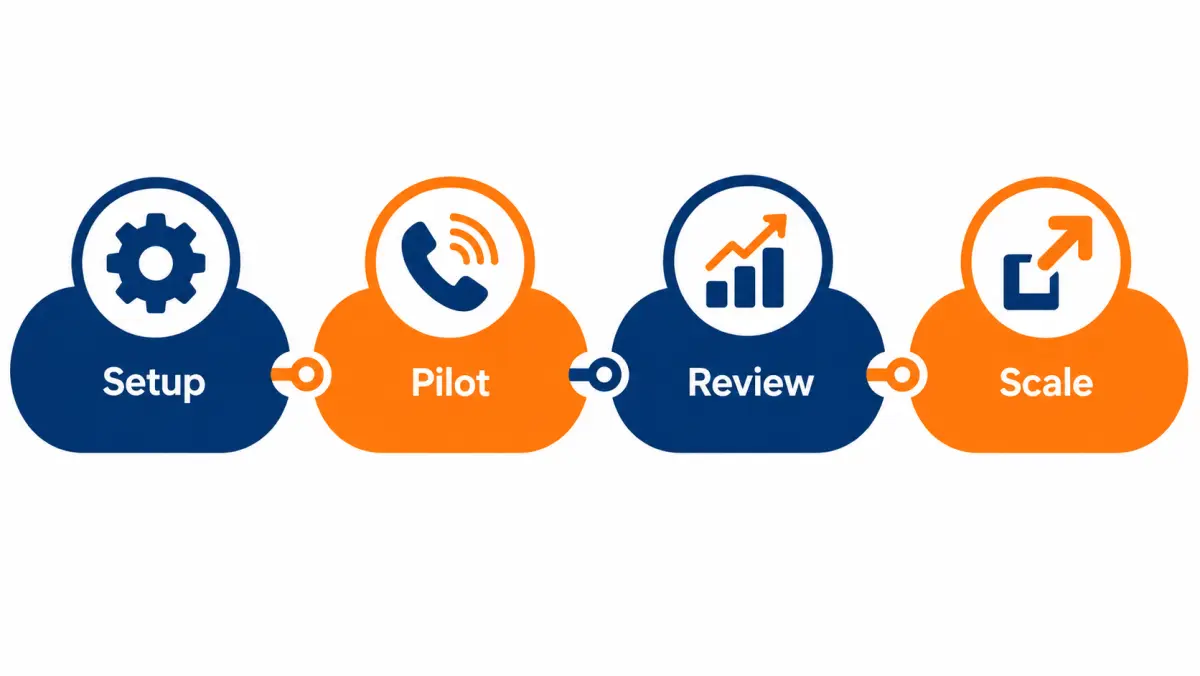
The short test checklist above lists what to agree before you start. This section is the operating plan.
Week 0: setup (before any billable calls)
| Task | Owner | Done when |
|---|---|---|
| Sign off screening spec | Program owner | Vendor confirms in writing |
| Review screener script and disclosures | Program owner and counsel | Script approved, version dated |
| Set schedule and ring group | Sales manager | Dummy calls ring the right phones in the right order |
| Build CRM fields and dispositions | Ops or CRM admin | Test record created from a dummy transfer |
| Agree billing, dispute window and evidence | Program owner | In the contract or order form |
| Train receivers | Sales manager | Each receiver has done the five-minute drill |
| Set a cap | Program owner | Daily and total pilot cap agreed |
Do at least three dummy transfers from the vendor's actual phone system. Check caller ID, ring order, the fallback when nobody answers and whether the handoff summary is spoken in your format.
Week 1: low volume, high attention
- Keep the daily cap low. The aim is to catch problems while they are cheap.
- The program owner listens to every transfer recording (or as many as possible) this week.
- Hold a ten-minute huddle at the end of each day: what came through, what was wrong, what to tell the vendor.
- File disputes daily, not at the end of the week.
Week 2: steady volume
- Raise the cap to your planned pilot level if week 1 was clean.
- Move to sampling recordings rather than listening to all.
- Start comparing appointment rate on transfers with your other sources.
- Don't change the spec or hours unless something is plainly broken. Changes mid-pilot make the results hard to read.
Week 3: steady volume, prepare the readout
- Keep volume steady.
- Make sure every transfer from weeks 1 and 2 has a disposition and a next-step date.
- Chase appointment outcomes: did they sit?
Week 4 and after: outcomes and decision
Sales lag transfers. A transfer in week 2 may book a site visit for week 3 and sign in week 5. Set your decision date with that lag in mind. Many teams make a provisional call at day 30 on leading indicators (answer rate, appointment rate, dispute rate) and a final call at day 60 or 90 on cost per sale.
Scorecard formulas
Use the same definitions every week, for every source.
| Metric | Formula | What it tells you |
|---|---|---|
| Answer rate | Transfers answered by your team ÷ transfers offered | Your staffing discipline |
| Billable rate | Billable transfers ÷ transfers answered | How often calls meet the spec and minimum time |
| Dispute approval rate | Disputes approved ÷ disputes filed | Vendor fairness, and whether your disputes are well-founded |
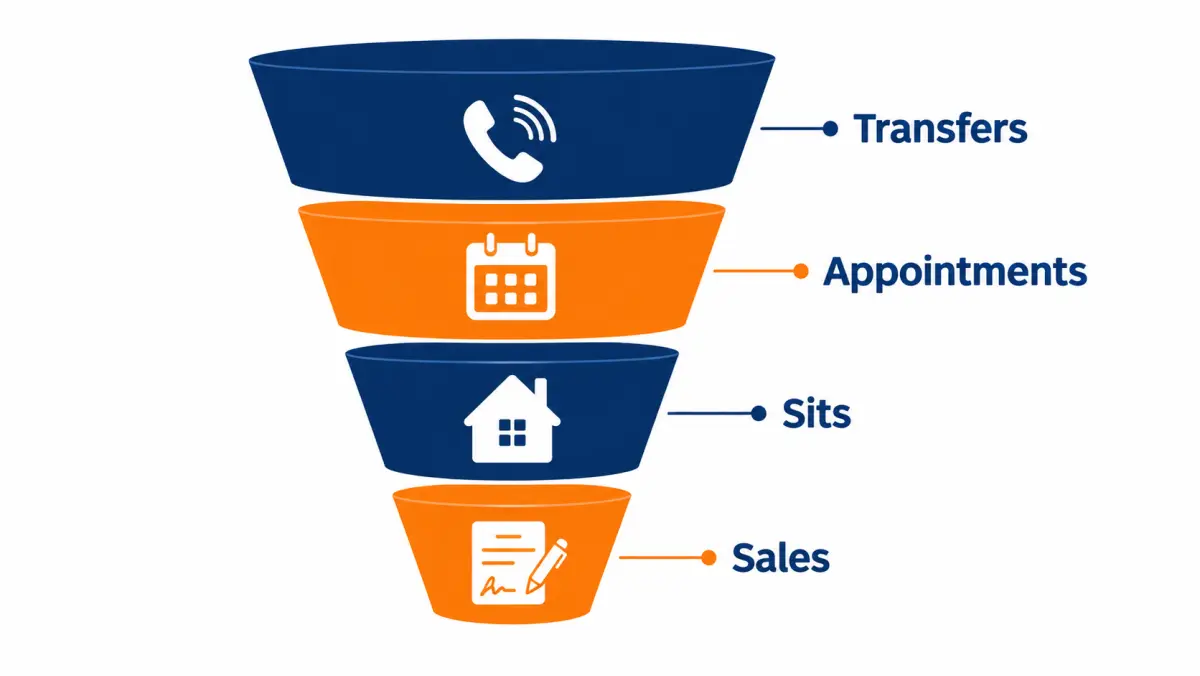
| Appointment rate | Appointments booked ÷ billable transfers | Screening quality plus rep skill |
| Sit rate | Appointments held ÷ appointments booked | Intent and your confirmation process |
| Close rate | Sales ÷ appointments held | Rep skill and fit |
| Cost per appointment | Total transfer spend ÷ appointments booked | Compare with the solar appointments format |
| Cost per sale | (Transfer spend + labor) ÷ sales | The number that decides |
Decision rules to agree in advance
Write these down before the pilot starts, so the result isn't argued after the fact:
- Scale if cost per sale is at or below your target and the dispute rate is stable or falling.
- Adjust and extend if cost per sale is above target but leading indicators point to a fixable cause (answer rate low, one disqualifier slipping through).
- Stop if the vendor won't share recordings, disputes are routinely denied without evidence, or homeowners regularly say they did not agree to be called.
For deeper ROI math, see solar lead ROI.

Illustrative walkthroughs: three live transfer pilots
The three walkthroughs below are illustrative composites, written to show how decisions get made. They are not real clients, real results or our prices. Each follows the 30-day plan above and shows a different outcome: one scales, one fixes and extends, one stops.
Walkthrough 1: the small team that fixed its hours and scaled
Setup. A two-closer residential installer, owner also sells. They accept transfers 9 a.m. to 7 p.m. weekdays.
Week 1. The owner notices that most missed transfers come between 11 a.m. and 2 p.m., when both closers are on site visits. Answer rate in that block is poor; in the evening block it is near perfect.
Change. They cut the midday block from the schedule and move one closer's site visits to mornings, so one rep is always at a desk from 3 p.m. to 7 p.m.
Weeks 2 and 3. Volume drops a little because the window is narrower. Answer rate rises sharply. Disputes fall, because fewer calls reach a busy rep who rushes and mis-dispositions them.
Outcome. At day 60, cost per sale on transfers is in line with their exclusive web leads, and the closers prefer transfers because they spend less time dialing. They scale by adding Saturday morning, which they can staff.
Lesson. The fix was on the installer's side. The vendor's screening was fine all along.
Walkthrough 2: the regional team with a screening gap
Setup. A regional installer with setters. Transfers go to setters in the morning.
Week 1. Setters flag a run of transfers where the homeowner says the roof "needs work soon." The spec didn't mention roof age.
Change. The program owner adds a roof-age question to the spec, with a clear threshold, and asks the vendor to treat it as a disqualifier unless the homeowner says they're already planning a reroof (which the company can bundle).
Weeks 2 and 3. Billable rate improves. The vendor raises the price per transfer modestly because more homeowners now fail screening. Appointment rate rises more than enough to offset it.
Outcome. Provisional decision at day 30: adjust and extend for another 30 days with the new spec. Final decision depends on sit and close data, which needs more time.
Lesson. A tighter spec can raise the price per transfer and still lower cost per sale.
Walkthrough 3: the program that stopped
Setup. A five-rep installer buys transfers from a new vendor offering a low price.
Week 1. Several homeowners say "I didn't ask for anyone to call me" or sound confused about who they are talking to. The vendor's recordings arrive late, and two are missing the start of the call.
Response. The program owner pauses the program and asks for the consent record behind each flagged call and for full recordings. The vendor sends partial information.
Outcome. The installer stops the pilot in week 2 and has counsel review what happened. They keep a written log of the flagged calls and the vendor's responses.
Lesson. A low price does not offset consent risk. Missing or partial recordings are a reason to stop, not to negotiate.
What the three have in common
- A named program owner who looked at data daily in week 1.
- Written decision rules, so the decision came from the numbers, not mood.
- Fast, specific feedback to the vendor with timestamps.
How do you handle a transfer from the homeowner's side?
From the homeowner's side, a good transfer feels like being introduced to someone who already knows why they are calling. A bad one feels like being passed around. Small steps on your side, such as using their name, not repeating questions and following up when promised, make the difference between a booked visit and a hang-up.

Think about what the homeowner has just done. They answered a call, answered questions about their home and bill, agreed to talk to an installer, and waited through a few rings. They have given you time and some trust. The fastest way to lose both is to make them start over.
What homeowners commonly notice (and how to respond)
| Homeowner experience | What it signals | Your fix |
|---|---|---|
| "I already told the last person that." | Rep is re-qualifying | Confirm two facts, then move on |
| "Who are you with again?" | Weak handoff | Clear introduction; ask vendor to name you at handoff |
| "I didn't expect to be put through right away." | Screener didn't get clear agreement to connect | Raise with vendor; review recordings |
| "I just want a number." | Price-first homeowner | Ask for the bill; give a range when you can |
| "You said you'd call back Tuesday." | Broken follow-up | Calendar every callback; disposition T-CALLBACK |
Follow-up after the transfer
The transfer is the start. A simple follow-up sequence:
- Within minutes of hanging up: a text with your name, company, the next step and the time agreed.
- Same day: an email with a short summary and anything you promised (a design, a bill review).
- Day before the appointment: a reminder by text.
- If no booking: a check-in at a time the homeowner suggested, not on a fixed robo-schedule.
Make sure any texts and follow-up calls have a lawful basis. Consent given for the screening call may not automatically cover your own marketing texts; confirm with counsel. For timing rules that protect conversion, see solar speed to lead.
Site visit or virtual meeting after a transfer

When a transfer books a site visit, bring the transfer notes. Open with something from the call: "Last week you mentioned the big summer bills and the tree on the west side, so I've looked at that." It shows the homeowner the first conversation counted. For virtual follow-ups, share your screen with the design and the bill comparison side by side.
What contract terms should you get in writing for live transfers?
Before buying transfers, get the billable definition, minimum duration, dispute window, evidence rules, territory, hours, caps, consent documentation, recording access, cancellation terms and exclusivity in writing. Verbal promises about "only qualified calls" are hard to enforce; a short written schedule protects both sides.
The vendor question list above tells you what to ask. This section turns the answers into contract terms. Have counsel review any contract; this is not legal advice.
Terms checklist
Definitions
- "Transfer," "billable transfer," "connected time" and "qualified" are defined.
- Connected time starts when your rep answers, not when the screener dials.
- The screening spec is attached as a schedule, with a version date.
Billing
- Price per billable transfer (or per call), by territory if it varies.
- What is not billable: missed by your team (if agreed), disqualified in the first part of the call, duplicates within a stated window, out of area, out of hours.
- Billing cycle and payment terms.
- Whether prepay balances are refundable if you stop.
Disputes
- Dispute window in days.
- Evidence you provide (timestamp, disposition, reason) and evidence the vendor provides (recording, consent record).
- Vendor's response time.
- How credits are applied.
Volume and schedule
- Daily and weekly caps you can change, and how much notice is needed.
- Your schedule by day and hour, in the homeowner's time zone.
- Pause rights: you can pause at short notice without penalty.
Exclusivity
- Whether a transferred homeowner is connected only to you.
- Whether the vendor may contact the same homeowner on behalf of another installer later, and after what period.
Compliance
- The vendor's consent basis for the screening call is documented and provided on request for each transfer.
- DNC scrubbing practice (national and internal lists) and how your opt-out list is shared with them.
- Recording disclosures and retention period.
- Each party's responsibilities if a homeowner complains, and notice requirements.
- Counsel has reviewed indemnity and insurance terms.
Exit
- Notice period to stop.
- What happens to unused prepaid balance.
- Data you keep and data you return or delete.
A one-page service schedule (template)
| Item | Agreed value |
|---|---|
| Territory | Attached ZIP list, version date |
| Hours | Days, hours, time zone |
| Daily cap | Number |
| Weekly cap | Number |
| Minimum connected time | Seconds, clock starts at rep answer |
| Ring group and fallback | Numbers in order; fallback action |
| Billable definition | Reference to spec schedule |
| Dispute window | Days |
| Evidence | Recording and consent record on request within stated time |
| Exclusivity | Yes or no, and window |
| Pause notice | Hours |
| Exit notice | Days |
Our own commercial terms for any program are confirmed on your call. As a general point, we don't use long-term contracts: start with a test, and scale when the numbers work.
How do you dispute a bad live transfer?
To dispute a bad transfer, log the disposition and the reason the same day, cite the written criterion it failed, include the recording timestamp where the failure is heard, and submit inside the agreed window. Disputes that reference the spec and a timestamp are easy to approve; disputes that say "bad call" are not.
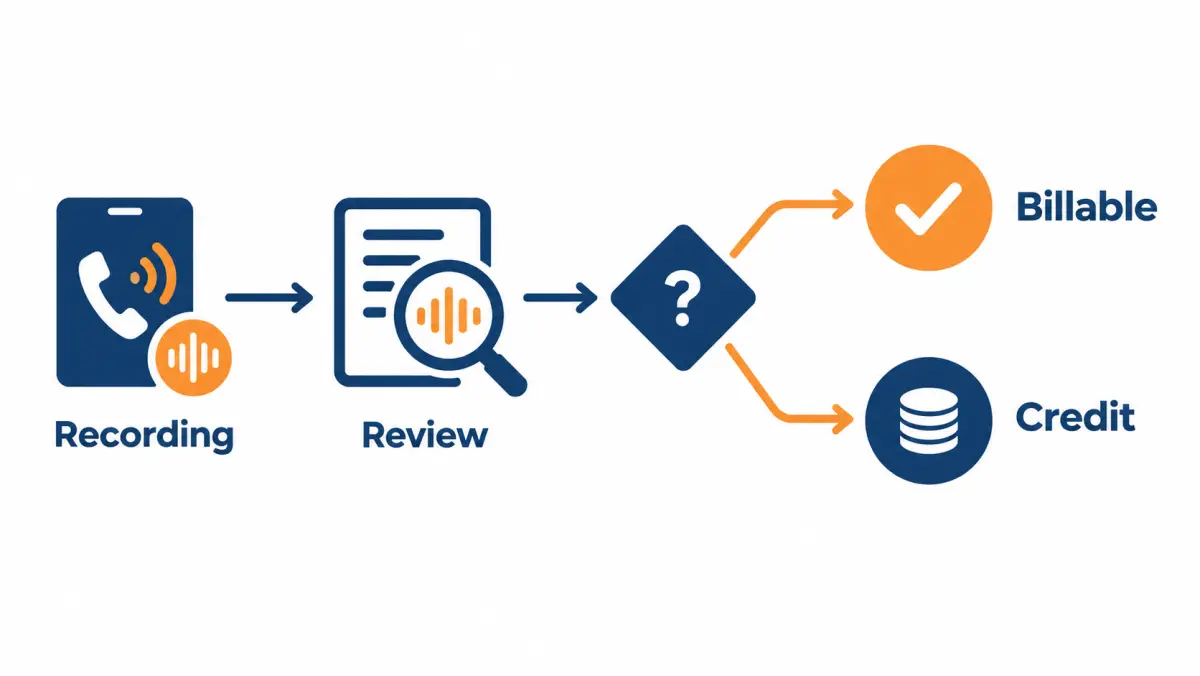
The earlier billing section explains the dispute process in outline. Here is how to run it day to day so credits actually arrive.
A dispute that gets approved
Compare two submissions for the same call:
Weak: "Call 14 was bad, homeowner not interested."
Strong: "Transfer at 4:12 p.m. Tuesday, answered by Jordan. At about 0:40 into the connected call the homeowner says she rents the house. Fails spec item 3a (owns the home). Disposition T-DQ-RENT. Requesting credit."
The weak version is also not a valid dispute under most programs: "not interested" after a real conversation is usually billable, because the vendor delivered a screened homeowner who chose not to proceed. The strong version names a written criterion, gives a time and points to evidence.
What usually qualifies for a credit
These are typical in fair programs; your contract decides.
- Homeowner fails a written requirement (renter, outside territory, wrong property type).
- Duplicate of a homeowner already transferred or already in your CRM within the agreed window.
- Call delivered outside your accepted hours.
- Connected time below the minimum because the homeowner dropped.
- Homeowner states they did not agree to be contacted (handle as a compliance issue too).
What usually does not qualify
- Homeowner not interested after hearing your pitch.
- Homeowner cancels the appointment later.
- Your rep didn't answer (unless your contract says otherwise).
- Homeowner's financing is declined.
Running disputes as a weekly routine
- Daily: receivers disposition every transfer before end of shift. Anything with a T-DQ or T-DUP code goes on the dispute list.
- Daily or every other day: program owner checks each candidate against the spec and the recording, and drops weak ones.
- Before the window closes: submit in the vendor's format with timestamp, rep, criterion and recording position.
- Weekly: reconcile credits against submissions; chase anything outstanding.
- Monthly: look at dispute patterns. If one criterion keeps failing, fix the script or the spec instead of filing the same dispute forever.
When disputes are a symptom
A high dispute volume is not a win even if every dispute is approved; it means your reps are spending time on calls that should never have arrived. Use the pattern to fix the cause:
| Pattern | Likely cause | Fix |
|---|---|---|
| Many renters | Ownership question asked in a leading way | Rewrite as "Do you own or rent?" |
| Out-of-area calls | ZIP list out of date at vendor | Re-send dated list; confirm upload |
| Duplicates | Vendor not checking your CRM history | Agree a suppression file or matching method |
| Short drops | Long ring time or homeowner not told about transfer | Shorten ring; check consent to connect |
| Calls outside hours | Schedule set in wrong time zone | Confirm time zone in writing |
How do you coach reps who take live transfers?
Coach transfer receivers on a short list of behaviors that you can hear on recordings: answer speed, using the handoff details, open discovery, handling one objection, and booking a firm next step. Score a few calls per rep each week with the same rubric, and coach one behavior at a time.
Call review rubric
Score each behavior 0 (missed), 1 (partly) or 2 (done well).
| Behavior | What "done well" sounds like |
|---|---|
| Fast answer | Picks up within the agreed rings, greeting ready |
| Uses the handoff | Says the homeowner's name and at least one fact the screener gave |
| No re-qualifying | Confirms at most two facts, doesn't repeat the list |
| Open discovery | Asks why now, what a good outcome is, who else decides |
| Roof and bill | Looks at the roof live; asks for a bill photo |
| Handles an objection | Acknowledges, answers briefly, offers a small next step |
| Firm next step | Books a time with all decision-makers; sends invite on the call |
| Clean disposition | Correct code and notes within the shift |
A perfect score is 16. Track each rep's average week to week. Pick the lowest-scoring behavior and coach only that one for the week.
Coaching session format (15 minutes)
- Play two minutes of one call where the target behavior was missed.
- Ask the rep what they'd do differently.
- Role-play the moment twice.
- Play a call from another rep where it was done well.
- Agree the one behavior to focus on next week.
Common receiver habits that cost sales
- Starting with the company story. Homeowners on a transfer want to talk about their bill and their house, not your founding year.
- Quoting price too early without data. A number without the bill sounds made up.
- Booking without the spouse or co-owner. It feels like progress and usually isn't.
- Over-promising savings. Particularly after 25D ended, inflated promises create cancellations.
- Forgetting to send the calendar invite on the call. Homeowners forget verbal bookings.
Matching reps to transfers
Not every rep is good at transfers. Reps who thrive on in-person rapport may struggle on the phone. If you have the luxury, put your best phone reps first in the ring order during your highest-volume hours, and let others take overflow. Revisit the ring order monthly based on rubric scores and appointment rates.
What compliance housekeeping should installers do for transfers?
Installers buying transfers should keep their own internal do-not-call list, honour opt-out requests at once, store transfer records with the consent documentation the vendor provides, give recording disclosures if they record, and have counsel review the full call flow. These steps protect you even when the vendor runs the screening.
This section covers the installer's own operations. It is general information, not legal advice. For the broader rules, see our TCPA compliance overview and solar leads and TCPA in 2026. The FCC's consumer guide to unwanted calls and texts and the FTC's guidance on complying with the Telemarketing Sales Rule are useful background.
The regulatory backdrop as of October 2026
- The FCC's "one-to-one consent" rule for lead generators, which would have required consent to be given to one seller at a time, was vacated by the Eleventh Circuit on January 24, 2025. Some vendors still describe it as current; it is not in force as written. Consent still matters: the TCPA, the Telemarketing Sales Rule, state laws and Do Not Call rules all still apply.
- State laws continue to change. Ask counsel to review your states periodically.
Your internal checklist
- Internal DNC list. When a homeowner asks not to be contacted, record it immediately and suppress the number across your dialer, texting tool and CRM.
- Share opt-outs with the vendor. So they do not screen and transfer the same homeowner again.
- Keep transfer records. Date, time, rep, disposition, recording ID and any consent documentation the vendor provides, retained for a period counsel recommends.
- Recording disclosures on your side. If your phone system records, disclose it when your rep joins, in line with counsel's advice for all-party consent states.
- Follow-up consent. Check whether the homeowner's agreement covers your follow-up texts and calls, or whether you need separate consent.
- Complaint handling. A named person, a log and a response time.
- Vendor audits. Ask for consent records on a random sample of transfers each month, not only on disputes.
When a homeowner says "I never agreed to this"
- Apologize and end the sales conversation.
- Add the number to your internal DNC list.
- Disposition T-NOCONSENT with a timestamp.
- Ask the vendor for the consent record and full recording for that call.
- If there's a pattern, pause the program and involve counsel.
Troubleshooting live transfer programs
Most transfer problems fall into a handful of patterns: calls that go unanswered, calls that arrive unqualified, calls that qualify but don't book, appointments that don't sit, and billing that doesn't match your records. Each has a short list of causes, and most fixes sit with the schedule, the spec or the script.
Symptom-cause-fix table
| Symptom | Likely causes | What to check | Fix |
|---|---|---|---|
| Low answer rate | Reps in the field during accepted hours; ring time too short; wrong numbers in ring group | Missed calls by hour block | Cut unstaffed hours; extend ring order; test with dummy calls |
| Many short calls | Homeowner surprised by the transfer; long wait; weak handoff | Recordings around handoff; ring duration | Ask vendor to confirm agreement to connect; shorten rings |
| Renters and non-owners | Leading ownership question; screener rushing | Recordings of the ownership question | Rewrite question; weekly script review |
| Out-of-area calls | Old ZIP list; vendor mapping by area code | Vendor's ZIP file date | Re-send list; ask how location is verified |
| Transfers don't book | Rep re-qualifying; price-first pitch; no decision-maker | Rubric scores; disposition notes | Coach the first five minutes; add decision-maker to handoff |
| Booked but no-shows | No confirmation; single decision-maker; long gap to appointment | Days between call and appointment | Book sooner; text reminder; both owners present |
| Sits don't close | Weak savings case post-25D; wrong product fit | Close notes by reason | Update financing options; refine spec |
| Invoice higher than your log | Different start time for connected clock; billed missed calls | Compare your phone system's log with vendor report | Agree clock definition; reconcile weekly |
| Disputes denied | Vague disputes; past window; criteria not written | Your dispute submissions | Cite spec and timestamp; file daily |
| Homeowners say they didn't agree | Consent basis unclear | Consent records for flagged calls | Pause; involve counsel; request full records |
| Calls spike then vanish | Vendor capacity shifting to other buyers | Daily volume vs cap | Ask about capacity and priority; agree minimums if needed |
| Same homeowner from two vendors | Overlapping data or sources | CRM duplicate check | Share suppression list; clarify exclusivity |
When to blame the vendor and when to look inward
A quick test: if the problem shows up before your rep says anything substantial (wrong person, wrong area, surprised homeowner), it is usually on the vendor's side. If it shows up after (homeowner was right but didn't book, booked but didn't sit), it is usually on yours. Plenty of programs fail because installers assumed every bad outcome was the vendor's fault and never fixed their own staffing or scripts.
How do you budget for live transfers?
Budget for live transfers by starting from the number of sales you want, working back through your close, sit and appointment rates to the transfers needed, then multiplying by the price confirmed for your territory. Add rep labor and a reserve for disputes in progress, and check that you can staff the hours that volume requires.
Working backwards from sales (illustrative)
Illustrative example only. These are not market data or our prices; use your own rates and the price confirmed on your call.
| Step | Illustrative input | Result |
|---|---|---|
| Target sales per month | 6 | 6 |
| Close rate on sits | 25% | 24 sits needed |
| Sit rate on appointments | 70% | about 34 appointments |
| Appointment rate on billable transfers | 40% | about 86 billable transfers |
| Billable share of answered transfers | 90% | about 95 answered transfers |
| Answer rate | 95% | about 100 transfers offered |
At an illustrative price of $150 per billable transfer, the transfer spend is roughly 86 × $150 ≈ $12,900 for the month, or about $2,150 per sale before labor. The cost per install calculator runs this for you.
Labor check
The same example implies about 100 offered transfers a month, or roughly five per working day. At about 15 to 20 minutes each including notes, that is one to two rep-hours a day on transfers alone, plus follow-up and site visits. If you don't have those hours in the accepted window, lower the target or the cap.
Cash flow
- Prepay vs invoice. Prepaid programs tie up cash before results. Ask whether unused balance is refundable.
- Lag to revenue. Sales signed in month one may not fund until installation milestones. Make sure the program doesn't strain payroll.
- Credits timing. Approved disputes usually apply to future invoices, not refunds. Count pending credits as uncertain until they appear.
Sensitivity in budgeting
The two inputs that move the budget most in the example are the appointment rate on transfers and the close rate. A small change in either can move the transfers needed by a large amount. Set the pilot cap high enough to measure those two rates with some confidence, but not so high that a bad week costs more than you can absorb.
Should you run more than one live transfer vendor?
Running two transfer vendors at once can give you a direct comparison and protect volume if one slows down, but only if both use the same spec, the same hours and the same disposition codes. Without that, you compare apples with oranges, and duplicate homeowners from overlapping sources become a real risk.
When two vendors make sense
- You have enough staffed hours to absorb both without missed calls.
- You want to compare screening quality on equal terms.
- One vendor can't fill your cap in all your ZIPs.
How to run a fair comparison
- Give both the same written spec and the same ZIP list.
- Split hours or days rather than overlapping, if possible, so your receivers aren't overloaded.
- Tag every transfer by vendor in the CRM.
- Compare on the scorecard formulas above, especially cost per sale, not just price per transfer.
- Review recordings from both with the same rubric.
Duplicates across vendors
If two vendors reach the same homeowner, you can pay twice. Agree with each vendor how duplicates against your CRM are handled, and share a suppression file of homeowners already in your pipeline if the contracts allow it. Ask each vendor about their sources; heavily overlapping sources raise duplicate risk.
Mixing transfers with other sources
Transfers rarely need to be your only source. A common mix:
| Source | Role in the mix |
|---|---|
| Exclusive real-time web leads | Steady base volume your setters or reps work |
| Live transfers | Fill staffed phone hours with conversations |
| Booked appointments | Fill closers' calendars when no one has time to set |
| Aged leads | Low-cost volume for idle dialing hours |
| Referrals and own marketing | Highest-margin base you build over time |
For a side-by-side on exclusive versus shared delivery, see exclusive vs shared solar leads. For homeowner-focused programs in general, see residential solar leads.
What do good and bad handoffs sound like?
A good handoff tells your rep who the homeowner is, why they agreed to talk, and the two or three facts that shape the conversation, in under thirty seconds. A bad one is either silent, so the rep starts cold, or a rushed list of yes answers that gives the rep nothing to build on.
The examples below are written for training. They are not transcripts of real calls.
Example 1: a strong warm handoff
"Hi, this is Sam with the screening team. I have Priya on the line. Priya owns her home on Birch Lane with her husband, Raj, who's home after six. Her summer bills are in the higher range, the roof is about eight years old, faces mostly south, and there's a neighbour's tree on one corner. She's mainly interested in lowering the bill and asked whether batteries are worth it. Priya, I'll let you two talk."
Why it works. The rep has the name, the co-owner and when he's home, the bill range, the roof age and orientation, a shade note, the homeowner's main motivation and a product interest. The rep can open with batteries or the bill and book an evening slot with Raj.
Example 2: a thin handoff
"Okay, I've got a homeowner for you, she qualifies. Go ahead."
What's missing. Name, street, bill, roof, decision-makers, motivation. The rep has to re-qualify, which annoys the homeowner. If you hear this often, raise it with the vendor and point to the handoff format in your spec.
Example 3: a leading handoff
"This is Mike, he owns, bill's high, roof's good, he wants solar, he's ready to go."
The problem. Every answer is framed as a yes, and "ready to go" is the screener's opinion. When the rep asks "what's got you thinking about solar?" and Mike says "I don't know, the guy said I'd qualify for a free program," you have a script problem. Pull the recording and check whether the screener promised anything.
Example 4: a blind transfer that still works
The screener drops off, and the rep hears only "Hello?" The rep has the handoff fields on screen from the vendor's data feed:
"Hi, is this Ana? This is Chris with [company], the installer the last caller mentioned. I see you're on Willow Court and your bill runs on the high side in summer. Is now still a good time for a quick look at the roof?"
Why it works. Even without a spoken introduction, the rep uses data delivered alongside the call. If your vendor can send screener answers to your CRM or screen at the moment of transfer, ask for it; it makes blind transfers much less blind.
Scoring handoffs
Add a simple handoff score to your weekly recording review:
| Element | Present? |
|---|---|
| Homeowner's name | Yes / No |
| Street or area | Yes / No |
| Ownership | Yes / No |
| Bill range | Yes / No |
| Roof and shade | Yes / No |
| Decision-makers and availability | Yes / No |
| Motivation in the homeowner's words | Yes / No |
| Installer named to the homeowner | Yes / No |
Share the totals with the vendor each week. Handoff quality usually improves quickly when it is measured.
What do homeowners ask on a live transfer, and how should reps answer?
Homeowners on a transfer usually ask the same handful of questions: who you are, what it costs, whether it is worth it without the federal credit, how long it takes and what happens next. Prepared, honest answers to these keep the call moving and build the trust a booking needs.
Prepare short answers your reps can use in their own words. Below are working versions; adapt them to your company and check any claims about your own process or warranties.
"Who are you, and who was I just talking to?"
"I'm with [company], a solar installer that works in your area. The person before me works for a screening team that connects homeowners who want to talk to an installer. From here on, you're dealing with us."
"How much does it cost?"
"It depends on the size of the system your home needs and the roof. I can give you a realistic range today if you share a recent bill; an exact price comes with a design."
Never give a number your company won't stand behind. A rough range from the bill and roof is fine if your reps are trained to produce one consistently.
"Is it still worth it without the tax credit?"
"For some homes yes, for some no. The federal homeowner credit ended for systems installed after 2025, so I'll show you the numbers without it. If solar doesn't beat your current bill over time, I'll say so."
"How long does the whole thing take?"
"There's a design, a contract if you go ahead, permits and utility approval, then installation and inspection. Timing depends on your town and utility. I'll give you our current estimate for your area when we go through the design."
Don't quote a fixed timeline unless your operations team has confirmed it for that jurisdiction.
"Will I have to pay anything today?"
"No. Today is a conversation. If you like the design, there'll be a contract to review, and you can take your time with it."
Make sure this is true for your company before reps say it.
"What about my roof?"
"I'm looking at it from above now. If it's near the end of its life, it's usually better to deal with that before solar goes on. We'll check it properly at the site visit."
"Can I get batteries?"
"Yes, we can look at a system with a battery. It changes the price and what you get, especially for backup during outages. Let's include it in the design so you can compare."
"Do I have to decide on this call?"
"Not at all. The goal of this call is to see if your home's a good fit and set up a time to go through a design."
"Can you take me off your list?"
"Of course. I'll make a note now so you don't hear from us again. Sorry for the bother."
Then actually do it: internal DNC, disposition, and share the opt-out with the vendor.
How do you measure live transfers fairly against other lead sources?
Measure every source with the same funnel definitions, the same time window and the same cost inputs, including rep labor. Transfers look worse than they are if you count only price per unit, and better than they are if you ignore missed calls and the time spent on unqualified ones.
Attribution pitfalls
- Counting the wrong unit. Price per transfer and price per web lead are not comparable. Compare cost per appointment, cost per sit and cost per sale.
- Different windows. A web lead bought in March may close in June. Compare cohorts by the month the lead or transfer arrived, and wait long enough for each cohort to mature.
- Ignoring labor. Web leads need dialing time; transfers need staffed waiting time. Both are real costs.
- Double-counting. A homeowner who filled a web form and was later transferred may be counted as two sources. Choose a rule (first touch or last touch) and apply it everywhere.
- Ignoring cancellations. If transfer-sourced sales cancel at a different rate, cost per sale on signed contracts is misleading. Track cost per installed system too.
- Cherry-picking reps. If your best rep takes all transfers, transfers will look better than the format deserves. Compare like with like, or adjust.
A fair comparison table
| Metric (same definitions for all) | Transfers | Exclusive web leads | Appointments | Aged leads |
|---|---|---|---|---|
| Units bought | ||||
| Spend | ||||
| Rep hours spent | ||||
| Appointments | ||||
| Sits | ||||
| Sales | ||||
| Cancellations | ||||
| Cost per sale (spend + labor) | ||||
| Cost per installed system |
Fill it in monthly. Leave it blank where you have no data rather than guessing.
Valuing rep time
To include labor, pick an hourly cost for rep time, such as their loaded hourly cost, or the margin a rep could earn using that hour on another source. Multiply by hours spent per source. Don't spend long perfecting the number; using any consistent figure is far better than leaving labor out.
How long to wait before judging
Solar sales cycles are long. A pilot judged at day 30 on sales will usually look worse than it is, because many transfer-sourced appointments haven't closed yet. Use leading indicators at day 30 and cost per sale at day 60 to 90, as in the pilot plan above.
What does a first-week daily log look like?
A first-week daily log is a one-page record of every transfer: time, who answered, connected length, disposition, any spec failure, any homeowner concern and the action taken. Filled in at the end of each shift, it gives the program owner what they need to dispute, coach and talk to the vendor the next morning.
Daily log template
| Time | Rep | Connected length | Disposition | Spec item failed (if any) | Homeowner concern | Action |
|---|---|---|---|---|---|---|
End-of-day summary (five lines)
- Transfers offered, answered, missed (and in which hour blocks).
- Appointments booked and callbacks set.
- Disputes to file, with spec item and timestamp.
- Any homeowner who said they didn't agree to the call (escalate).
- One thing to tell the vendor tomorrow.
Morning huddle (ten minutes)
- Read yesterday's summary.
- Agree today's ring order and backup.
- Assign callbacks.
- One coaching point from yesterday's recordings.
After week one, a weekly summary is usually enough, with the daily log kept for disputes and the end-of-shift dispositions kept for everything.
How do you recover missed transfers and no-show appointments?
Recover missed transfers by calling back fast, using the screener's notes, within the consent basis counsel has approved, and recover no-shows by rebooking with every decision-maker and a reminder. Both need a named owner and a time limit; recovery that happens "when someone gets to it" rarely happens at all.
Even well-run programs miss some transfers and lose some appointments. What matters is having a recovery routine, because each of those homeowners already passed screening, and in many programs you have already paid for the ones that connected.
Missed transfers: what you can and can't do
If nobody answered and the vendor's fallback booked a callback, you have a time the homeowner agreed to. Call at that time, from a number you'll use again, and open with the context:
"Hi, this is Jordan with [company]. You spoke with our screening partner earlier and asked for a call around now about solar for your home on Oak Street. Is this still a good time?"
If the fallback was "end the call" with no callback booked, check with counsel before calling the homeowner yourself. Whether you can call depends on the consent basis behind the screening call and what the homeowner agreed to. Don't assume.
Missed transfer routine
| Step | Who | When |
|---|---|---|
| Log the miss with time and reason | Receiver or program owner | Same shift |
| Check the fallback outcome (callback booked or not) | Program owner | Same shift |
| Make the callback at the agreed time | Assigned rep | At the agreed time |
| Review why it was missed | Program owner | Daily in week 1, weekly after |
| Adjust schedule or ring group | Sales manager | As soon as a pattern shows |
No-show appointments from transfers
A no-show on a transfer-sourced appointment is usually one of four things: the homeowner forgot, a decision-maker couldn't attend, they had second thoughts, or something came up. The fix depends on which.
Same-day check. If the homeowner hasn't joined a virtual meeting a few minutes after the start, or isn't home for a site visit, call once and text once:
"Hi Priya, it's Chris from [company]. I'm here for our 6 p.m. look at your solar design. If now's not good, just reply with a better time and I'll rebook."
Next-day rebook. If you don't reach them the same day, try once the next day at a different time of day. Offer two specific times rather than "whenever works."
After two tries. Move them to a slower follow-up sequence and close the appointment as a no-show in the CRM. Don't keep the appointment marked as pending; it distorts your sit rate.
Reducing no-shows on transfers
- Book soon. The longer the gap between the transfer and the appointment, the more no-shows. Offer the earliest slot that suits all decision-makers.
- Both decision-makers. Ask "who else should be there?" and confirm they're available.
- Calendar invite on the call. Send it while the homeowner is still on the line and ask them to accept it.
- Reminder the day before and an hour before. Within the contact rules counsel has approved.
- Give them a reason to show. "I'll have your roof design and the comparison with your bill ready" beats "I'll come by to chat."
Appointment programs vs transfers on no-shows
Booked appointment programs usually come with a written no-show policy from the seller. Our own appointment program, for example, replaces a confirmed appointment that doesn't sit because the prospect no-shows or doesn't match your filters, if you report it within 7 days of the scheduled time. Transfers work differently: you, not the vendor, book the appointment, so a no-show after a transfer is normally your problem to recover, not a billing issue. Factor that into any comparison with solar appointments.
Recovery metrics
Track these alongside the main scorecard:
| Metric | Formula |
|---|---|
| Missed-transfer recovery rate | Missed transfers later reached and dispositioned ÷ missed transfers |
| Callback completion rate | Callbacks made on time ÷ callbacks booked |
| No-show rebook rate | No-shows rebooked ÷ no-shows |
| Rebooked sit rate | Rebooked appointments that sit ÷ rebooked appointments |
If recovery rates are low, the cause is usually ownership: nobody's job. Assign a named person per day.
Live transfer glossary
These are the terms most often used in solar live transfer programs, defined plainly. Definitions vary between vendors, so always check how a term is defined in your own contract before relying on it.
- Answer rate. Share of offered transfers your team picks up.
- Billable transfer. A transfer that meets the written spec and the minimum connected time, and is not otherwise excluded.
- Blind transfer. The screener connects the homeowner and drops off without introducing them.
- Cap. The maximum number of transfers per day or week you will accept.
- Connected time. How long your rep and the homeowner are on the line, usually measured from when your rep answers.
- Consent record. The documentation showing how and when the homeowner agreed to be contacted.
- Disposition. The code your rep assigns to the outcome of a call.
- Dispute window. The number of days you have to challenge a billed transfer.
- DNC. Do Not Call; the National Do Not Call Registry, state lists and your own internal list.
- Fallback. What happens when nobody on your team answers a transfer.
- Handoff summary. The short description the screener gives your rep before or as the call connects.
- Inbound call. A call started by the homeowner, typically after an ad.
- IVR. Interactive voice response; automated prompts on an inbound line.
- Pay per call. A billing model where you pay per call over a minimum duration.
- Program owner. The person on your team who reviews dispositions, files disputes, talks to the vendor and owns the pilot decision.
- Rubric. The fixed list of behaviors used to score recorded calls the same way for every rep, week after week.
- Suppression file. A list of homeowners already in your pipeline or on your do-not-call list, shared with a vendor so they are not screened and transferred again.
- Spec failure. A transfer that misses one or more written requirements in the screening spec; normally the basis for a dispute.
- Ring group. The set of phones a transfer rings, and the order they ring in.
- Screener. The agent who qualifies the homeowner before the transfer.
- Screening spec. The written list of requirements and disqualifiers for a billable transfer.
- Sit. An appointment that actually happens with the decision-makers present.
- Warm transfer. The screener stays on the line to introduce the homeowner and summarize their answers.
Live transfer quick reference
This quick reference pulls the most useful checks from this guide into one place. Use it before signing with a vendor, during the first week of a pilot and at each monthly review. Each item links back to the detail above.
Before you buy
- Can you staff every accepted hour with a receiver and a backup?
- Is the screening spec written, testable and attached to the contract?
- Have you and counsel reviewed the screener's script, consent basis and disclosures?
- Are billable rules, connected-time start, dispute window and evidence in writing?
- Do you have dispositions and CRM fields ready?
During the pilot
- Listen to recordings daily in week 1.
- Dispute with criterion and timestamp, inside the window.
- Hold the spec and hours steady in weeks 2 and 3.
- Coach one behavior per rep per week.
At review
- Compare cost per sale with your other sources, including labor.
- Check dispute patterns and fix causes.
- Decide using rules written before the pilot.
Whether live transfers are available for your ZIPs, and on what terms, is confirmed on your call. Book a call to check your territory, or compare formats in our guide to the best solar lead providers.
FAQ
What is a live transfer in solar?
A solar live transfer is a phone call in which a screener qualifies a homeowner and then connects them, live, to an installer's rep. The installer gets a conversation instead of contact details, and usually pays per qualified transfer over a minimum duration.
How much do solar live transfers cost?
Published U.S. transfer prices are scarce. ActiveProspect's July 2026 roundup lists inbound solar calls at $100 to $300 or more (The Leads Warehouse) but no live transfer price. Pricing for your territory is confirmed by ZIP on your call.
What is the difference between a live transfer and an appointment?
A live transfer connects a screened homeowner to your rep right now on the phone. An appointment is a meeting booked for later by the seller's setter. Transfers need reps on the phones; appointments need closers on the calendar.
How long must a call last to be billable?
It depends on the program. Most set a minimum connected duration after the handoff. Get the number, when the clock starts and how it is logged in writing before launch.
Are solar live transfers legal?
They can be. The screening call needs a lawful consent basis, DNC rules apply, and recording laws vary by state, with some requiring all parties' consent. Confirm the full flow with counsel.
Do live transfers convert better than internet leads?
Transfers skip the contact stage, so more of them become conversations. Whether they produce a lower cost per sale depends on screening quality, your answer rate and price. Compare in your own numbers.
What happens if my reps miss the call?
Agree a fallback before launch: rollover to another rep, a callback booking, or ending the call. In most fair programs a transfer nobody answers is not billable; confirm that in writing.
How are live transfers screened?
Screeners typically confirm homeownership, decision-makers, bill range, roof and shade, utility, ZIP and willingness to talk now, following a script you approve.
What is a warm transfer?
A warm transfer is one where the screener stays on the line to introduce the homeowner and summarize their answers before dropping off, so your rep starts with context.
Can I pay per call for solar?
Yes, pay per call is a common model for inbound calls from ads, usually billed per call over a minimum duration with light screening. Availability for your territory is confirmed on your call.
How many reps do I need to take live transfers?
Enough to answer every transfer in your accepted hours within a few rings, with a backup in the ring order. For many small teams that means accepting only the hours when at least two people are at a desk with a headset.
Should transfers go to closers or setters?
Either works. Closers suit virtual-selling teams that can design and present on the call. Setters suit field-sales teams, as long as the screener's notes are copied word for word into the booking for the closer.
Does the end of the 25D credit affect live transfers?
Yes. Homeowners may expect a 30% credit that no longer applies to systems placed in service after 2025. Reps should lead with the bill, compare purchase, loan, lease and power purchase options honestly, and the screener should not mention incentives.
What should a screening spec include?
Territory, accepted hours, required answers, disqualifiers, the handoff summary format, the billable rule with minimum connected time, the consent and recording disclosure text, and the dispute window and evidence. Attach it to the contract with a version date.
How long should a live transfer pilot run?
About 30 days of live volume for leading indicators such as answer, appointment and dispute rates, and 60 to 90 days to judge cost per sale, because sales lag the transfer by weeks.
Do you offer solar live transfers?
Availability of live transfers for your territory is confirmed on your call. Book a call to check your ZIPs.