Solar Speed to Lead: Follow-Up Rules That Protect Your Lead ROI
Speed to lead for solar: why the first five minutes matter, what the evidence shows, cadence rules, scripts and staffing choices behind them.
Updated · 81 min read
In this guide (39 sections)
- Why does speed to lead matter, and what are the limits of the evidence?
- What should happen in the first five minutes after a solar lead arrives?
- What follow-up cadence works for solar leads?
- What staffing options handle solar speed to lead?
- How do you compare your contact rate with vendor promises?
- What are honest solar lead conversion benchmarks?
- What voicemail, text and email templates work for solar follow-up?
- How should you nurture solar leads after the first week?
- What are the most common speed-to-lead mistakes?
- How do texting and compliance fit into solar lead follow-up?
- How do you handle shared-lead competition with speed?
- How should you handle solar leads that arrive after hours?
- How do you run a speed-to-lead audit on your own solar team?
- How should solar leads be routed so the fastest person gets them?
- What does speed to lead look like for each type of solar lead?
- What changes in speed to lead by state and market?
- How should installers of different sizes build a speed-to-lead system?
- What should setters say when homeowners push back on the first call?
- What does a first call sound like from start to finish?
- What tools does a solar team need for fast lead response?
- How should you use texting in the first hour without hurting trust?
- How do you build after-hours coverage that actually books appointments?
- What does a day-by-day follow-up calendar look like for one solar lead?
- How does seasonality change solar speed to lead?
- How should commercial and residential speed-to-lead playbooks differ?
- What first-hour email should you send a new solar lead?
- How do you calculate what slow response costs your solar business?
- How do you coach setters to be fast and good on the phone?
- How do you protect show rates after a fast booking?
- How do you re-engage solar leads that went quiet?
- How do you troubleshoot slow response and low contact rates?
- What should a speed-to-lead standard operating procedure include?
- How do you test a new lead vendor's leads for speed fairly?
- Illustrative case walkthroughs: three teams fixing speed to lead
- What is a 30-day plan to improve solar speed to lead?
- Solar speed-to-lead glossary
- How do you hire appointment setters who respond fast?
- What should a weekly speed-to-lead scorecard include?
- FAQ
Solar speed to lead is the time between a homeowner submitting a request and your company making real contact. The practical rule as of October 2026: call within five minutes, text and leave a voicemail if they do not answer, keep trying through day one, then follow a written cadence for about a week before moving the lead to nurture. Fast response protects the money you spent on the lead. This guide covers what the research does and does not prove, the first-five-minutes playbook, cadence rules, scripts, staffing choices and a weekly scorecard.

If you are still choosing where your leads come from, start with our guide to buying solar leads. This page is about what happens after the lead lands.
Why does speed to lead matter, and what are the limits of the evidence?
Speed to lead matters because a homeowner's interest is highest right after they ask, and they may be talking to other installers within minutes. Research on web leads has found that response time drops sharply across many companies, but the most-cited studies are more than a decade old and not solar-specific, so measure your own contact rate by response time.
Often-cited studies and their age
Two sources are behind most speed-to-lead claims you will read:
| Study | Date | What it measured | Caveats |
|---|---|---|---|
| Lead Response Management study (James Oldroyd with InsideSales.com; research summary PDF) | 2007 | Call data from a small number of companies; widely quoted as finding contact odds far higher within 5 minutes than 30 minutes | Vendor data, not peer-reviewed; often misattributed to MIT; nearly 20 years old |
| "The Short Life of Online Sales Leads," Harvard Business Review | March 2011 | Audit of 2,241 US companies' response to web leads; average response among responders was 42 hours, and 23% never responded | Measured company behavior, not solar homeowners; 15 years old |
The HBR article is by James Oldroyd, Kristina McElheran and David Elkington (citation via BYU ScholarsArchive). Its core finding is that most companies respond slowly, and that firms which responded within an hour were far more likely to qualify the lead than those that waited longer. The often-repeated "21 times more likely in five minutes" figure comes from the earlier 2007 Lead Response Management study summary, which compared first calls at 5 minutes with first calls at 30 minutes, not from the HBR article.
These studies are directionally useful. They are not a forecast of your numbers. Phones, texting, caller ID spam labeling and homeowner habits have changed a lot since 2007.
What to measure yourself
You can produce better evidence than either study, for your own territory and lead sources, in about a month:
- Record the exact time each lead arrives in your CRM.
- Record the time of the first dial and the first two-way conversation.
- Bucket leads by time to first dial: under 5 minutes, 5 to 30 minutes, 30 minutes to 2 hours, 2 to 24 hours, over 24 hours.
- Compare contact rate and appointment rate across buckets.
If your under-5-minute bucket books appointments at a meaningfully higher rate than the rest, you have your own business case for staffing faster. If it does not, look harder at lead quality before spending on speed.
Key takeaway: The famous five-minute studies are old and not about solar. Treat them as a reason to measure, then let your own response-time buckets decide your staffing.
What should happen in the first five minutes after a solar lead arrives?
In the first five minutes, call the homeowner, and if they do not answer, leave a short voicemail and send a text that names your company and why you are reaching out, then call again shortly after. The goal of the first conversation is not to sell solar; it is to confirm interest, anchor on their electric bill and book the next step.
Call, text, voicemail
A simple first-five-minutes sequence:
| Time after arrival | Action | Notes |
|---|---|---|
| 0 to 2 minutes | First call | Routed automatically to the next available setter |
| If no answer | Voicemail (20 to 30 seconds) | Name, company, reason, callback number |
| Right after voicemail | Text | Company name, reason, opt-out instruction |
| 3 to 5 minutes | Second call | Many people call back unknown numbers on the second try |
Texting rules apply here. Marketing texts generally need consent that covers texts, must respect quiet hours and must honor opt-outs. Read our guide to solar leads TCPA compliance before automating any of this, and confirm your setup with counsel.
First-call script anchored to the bill
The first call should be short and specific. A homeowner who asked about solar usually wants to know two things: will it save money, and what is the catch. Anchor on the bill:
Setter: Hi, is this Dana? This is Chris with [Company]. You asked about solar for your home a few minutes ago, so I'm calling to help. Do you have a minute?
Homeowner: Sure, quickly.
Setter: Great. To see if solar makes sense, the most useful thing is your electric bill. Roughly what do you pay in a typical month?
Homeowner: About one-eighty, more in summer.
Setter: That's a range where it's worth a look. Do you own the home?
Homeowner: Yes.
Setter: Perfect. The next step is a short appointment where a consultant looks at your roof, your usage and your options, including ways to go solar with little or nothing upfront. Would this evening or tomorrow afternoon work better?
This script confirms identity and consent context ("you asked about solar"), qualifies on bill and ownership, and offers a choice of times rather than a yes-or-no question. It avoids promising savings or tax credits. For what changed in pitches this year, see our guide on selling solar after 25D.
Booking the next step
The appointment is the product of the first call. Make it easy:
- Offer two specific time slots, not "when are you free?"
- Book it while on the phone, in a shared calendar your closers see.
- Send a confirmation text and email immediately with the date, time, consultant name and what to have ready (a recent bill).
- Send a reminder the day before and a few hours before.
If the homeowner is not ready, book a callback at a specific time instead of "I'll call you next week." A scheduled callback is far more likely to connect.
What follow-up cadence works for solar leads?
A practical solar lead follow-up cadence is several call attempts plus a text and voicemail on day one, then a call attempt and a message on most days through the first week, then a move to a slower nurture sequence. Write the cadence down, automate reminders, and stop when the homeowner opts out or you reach the end of the sequence.
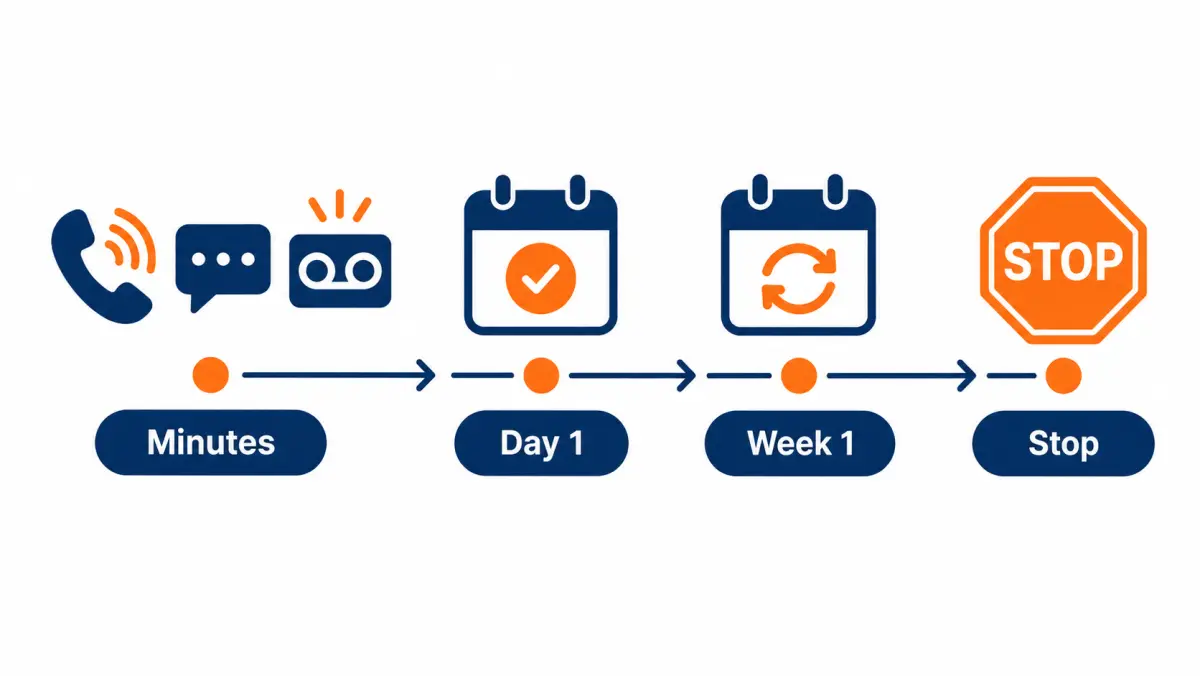
Day 1 attempts
Day one is where most contact happens. A sample day-one cadence:
| Attempt | Timing | Channel |
|---|---|---|
| 1 | Within 5 minutes | Call, then voicemail and text if no answer |
| 2 | Within 5 to 10 minutes | Call |
| 3 | About 1 hour later | Call |
| 4 | Late afternoon or early evening (within allowed hours) | Call, second text if no reply to the first |
Space calls so they do not feel like harassment, and check state rules on call frequency; some states limit how many times you can call about the same subject in a day. Your counsel should sign off on the final cadence.
Day 2 to 7
After day one, slow down but stay visible:
| Day | Action |
|---|---|
| 2 | Call at a different time of day than day 1 attempts; email with a short explainer |
| 3 | Call; text with a simple question ("Still interested in seeing solar options for your home?") |
| 4 | Call |
| 5 | Call; email with a relevant local photo or project story (no unverifiable claims) |
| 6 | Rest day |
| 7 | Final call in the active sequence; text letting them know you'll check back later |
Vary times. Homeowners who work days answer evenings; retirees answer mid-morning. Your dialer data will show which windows connect best in your territory.
When to stop
Stop immediately when the homeowner asks you to stop, by any channel. Log it and suppress the number across every system.
Otherwise, move the lead out of the active cadence when:
- You have completed the sequence without contact.
- The homeowner said they are not interested.
- The number is disconnected or belongs to someone else (and report it to your vendor; these are usually refundable).
Leads that never answered can move to a light nurture track: an occasional email or text, within the scope of their consent, every few weeks. Do not keep calling a dead lead daily; it wastes setter time and creates complaint risk.
Worked example: auditing your cadence against what actually happened
A written cadence is only useful if reps follow it, and the fastest way to check is a short audit of real leads. This illustrative walk-through shows how to run one in under an hour using data already in your CRM or dialer.
Step 1: pull a sample. Export the last 50 leads from one source, with every call, text and email timestamp attached.
Step 2: measure four gaps for each lead.
- Time from lead arrival to first call attempt.
- Time from first attempt to second attempt.
- Number of attempts in the first 48 hours.
- Days until the last attempt before the lead went quiet.
Step 3: compare against your cadence. If your plan says first call within five minutes, three attempts on day one and touches through day 14, mark each lead as on plan or off plan for each gap.
Step 4: look for patterns. Common findings include:
- Leads arriving after hours or at weekends waiting until the next morning.
- A strong first attempt followed by a long gap before the second.
- Texts sent but no voicemail left, or the reverse.
- Follow-up stopping around day three even though the cadence runs longer.
Step 5: fix the biggest gap first. If evening leads wait overnight, add an automated text and an early-morning call queue. If second attempts lag, schedule them automatically in the dialer rather than relying on reps to remember.
Step 6: re-audit in 30 days with a fresh sample from the same source, and compare contact and appointment rates before and after the change.
Keep each audit in a shared sheet with the date, sample and fixes made. Over a few months that record shows which changes improved contact rates on your own leads, which is more reliable than any general benchmark. Delivery timing for leads in your territory can be discussed on a call at book a call.
What staffing options handle solar speed to lead?
Your main options are an in-house setter team, an outsourced appointment-setting firm, AI-assisted tools for after-hours responses, or buying a product where someone else already made contact, such as live transfers or booked appointments. The right choice depends on lead volume, budget and how much control you want over the first conversation.

In-house setter
In-house setters give you the most control over tone, scripts and quality. They also cost the most fixed money: salary or hourly pay, commissions, dialer seats, training and management time. They work best when lead volume is steady enough to keep them busy and you have someone to coach them.
Here is an illustrative example of the coverage math. If leads arrive across 12 hours a day, 6 days a week, one setter on an 8-hour shift cannot cover every lead within five minutes. You either stagger shifts, accept slower response in some hours, or add after-hours coverage.
Outsourced setter
Outsourced appointment-setting firms provide trained callers who work your leads under your brand or theirs. Ask them for:
- Who answers, where they are based and how they are trained
- Scripts and whether you approve them
- Response-time reporting by lead
- Call recordings
- How they handle consent, DNC and opt-outs (they are calling on your behalf, so their compliance is your concern)
Outsourcing trades control for coverage. Audit recordings weekly for the first month.
AI assistants (vendor claims flagged)
Many vendors now sell AI tools that text or call new leads instantly, qualify them and book appointments. Some publish large claimed improvements in contact or booking rates. We have not seen independent, solar-specific data to support those figures, so treat them as vendor claims and test them like any other source.
Two cautions. First, the FCC ruled in 2024 that AI-generated voices count as artificial voices under the TCPA, so AI calling generally requires prior express written consent; involve counsel before you launch. Second, an AI text that sounds like a person but is not can damage trust if homeowners feel misled. Disclose clearly and keep a human ready to take over.
Buy appointments or transfers instead
If you cannot staff speed to lead, consider buying a product where the speed problem is already solved:
| Product | Who makes first contact | What you receive | Speed burden on you |
|---|---|---|---|
| Raw web lead | You | Contact details and consent record | High |
| Live transfer | Vendor's call center | A homeowner on the phone, bridged to your rep | You must answer live |
| Booked appointment | Vendor's setters | A confirmed meeting on your calendar | Low; confirm and show up |
Live transfers suit teams with closers ready to take calls during set hours. Appointments suit teams that want to focus on in-home or virtual meetings. See our pages on pay per call solar and solar appointments. Availability for your territory is confirmed on the call.
How do you compare your contact rate with vendor promises?
Compare contact rate by pulling dialer and CRM reports that show, for each lead source, how many leads produced a two-way conversation, and how quickly you dialed them. Then compare those numbers with what the vendor said to expect. Without your own response-time data, you cannot tell whether a low contact rate is the vendor's fault or your team's.
Compare dialer reports to promises
Pull these per vendor, per week:
- Leads delivered
- Median time from delivery to first dial
- Dial attempts per lead
- Leads with at least one two-way conversation (contact rate)
- Wrong numbers and disconnects
If your median time to first dial is over an hour, fix that before blaming the vendor. If you are dialing within minutes, making a full cadence, and contact is still poor, raise it with the vendor with data in hand, and request credits for the bad numbers covered by their refund policy. Ours covers "disconnected numbers, wrong contact details, or leads outside your filters."
Source attribution
Attribution breaks easily. Make sure:
- Every lead carries a source tag from arrival.
- Leads that are re-entered manually do not lose their source.
- Duplicate leads from two vendors are flagged so neither gets double credit.
- Appointments and sales link back to the original lead record.
With clean attribution, you can choose between vendors on cost per sale, not gut feel. Our guide on choosing a solar lead provider includes a full scorecard.
What are honest solar lead conversion benchmarks?
Honest solar lead conversion benchmarks are hard to find because most published figures come from vendors or agencies with something to sell, use inconsistent definitions and are rarely dated or sourced. Rather than adopt someone else's number, define each funnel stage clearly and build your own baseline by source over at least one full sales cycle.
Ranges by source, dated
We are not publishing conversion ranges here, because we have not found independent, recent, solar-specific data we can verify. Many figures in circulation trace back to marketing blogs that cite each other. If a vendor gives you a conversion range, ask: from what data, which year, which lead type, which definition of conversion?
What we can say from the mechanics: exclusive real-time leads worked fast tend to convert better than shared or aged leads worked slowly, and booked appointments convert to sales at a higher rate than raw leads because some of the qualifying work is already done. The size of those gaps varies by market, team and season.
Definitions
Agree on definitions before comparing anything:
| Term | Definition to use |
|---|---|
| Contact rate | Leads with at least one two-way conversation ÷ leads delivered |
| Appointment rate | Appointments set ÷ leads delivered |
| Sit rate | Appointments held ÷ appointments set |
| Close rate | Signed contracts ÷ appointments held |
| Lead-to-sale rate | Signed contracts ÷ leads delivered |
| Cost per sale | Total lead spend ÷ signed contracts |
Use the same definitions for every vendor and every month. Then use our solar lead cost calculator to see how each rate change moves cost per sale.
What voicemail, text and email templates work for solar follow-up?
Good solar follow-up templates are short, name your company, remind the homeowner they asked, give one clear next step and include an opt-out where required. Write a small set for each stage of the cadence so setters do not improvise, and have your compliance lead review them. The templates below are starting points to adapt, not tested results.
Voicemail templates
First voicemail (within minutes):
Hi Dana, this is Chris with [Company]. You asked about solar for your home a few minutes ago, so I'm calling to help. I'll try you again shortly, or you can reach me at [number]. Again, Chris at [Company], [number]. Thanks.
Day 3 voicemail:
Hi Dana, Chris with [Company] following up on your solar request. The quickest way to see if solar makes sense is a look at your electric bill, which takes about fifteen minutes. Call or text me at [number] whenever it suits you.
Keep voicemails under 30 seconds, say the number twice and never leave a prerecorded marketing message without proper consent.
Text templates
First text:
Hi Dana, this is Chris with [Company] about the solar quote you requested. Is now a good time for a quick call, or is later today better? Reply STOP to opt out.
Day 3 text:
Hi Dana, Chris at [Company] again. Still want to see solar options for your home? I can set up a short visit this week. Reply STOP to opt out.
Day 7 text:
Hi Dana, I'll stop reaching out for now so I'm not a bother. If you'd like to revisit solar later, just reply here. Reply STOP to opt out.
The day 7 "closing the loop" message often prompts a reply from homeowners who meant to respond.
Email templates
Day 2 email subject: Your solar request with [Company]
Hi Dana, thanks for asking about solar. To give you real numbers rather than a generic estimate, our consultant looks at three things: your recent electric bills, your roof, and how you'd prefer to pay (own it outright, finance it, or a monthly plan with little or nothing upfront). If you reply with a good time, we'll set up a short visit or video call. Chris, [Company], [number]
Avoid savings promises, tax credit claims and urgency tricks. They damage trust and can create consumer-protection problems.
How should you nurture solar leads after the first week?
After the first week, move uncontacted and not-ready leads to a slow nurture track: a useful email or text every few weeks, within the scope of their consent, plus a re-engagement call when something relevant changes, such as a new financing option or a seasonal bill spike. Nurture keeps the lead you paid for alive without burning setter time.
A simple nurture schedule
| Timing after active cadence | Channel | Content |
|---|---|---|
| Week 2 | Short explainer: owning vs monthly plan options | |
| Week 4 | Text | Check-in question, with opt-out |
| Week 8 | Local install photo and what the process looks like | |
| Week 12 | Call | Re-engagement attempt around a seasonal bill change |
| Quarterly after | Brief update; remove after a set period without engagement |
Respect consent scope and opt-outs throughout, and remove leads from nurture when the homeowner asks or after a defined period without engagement.
Which leads deserve nurture
Not every lead is worth nurturing. Prioritize:
- Homeowners who spoke with you and said "not now" with a reason (moving roof replacement, waiting on a bonus, spouse needs to agree)
- Leads with high bills in your best territories
- Leads who opened emails or replied to texts but did not book
Deprioritize leads with disconnected numbers (request credits), leads who said they are not interested, and leads outside your filters.
What are the most common speed-to-lead mistakes?
The most common speed-to-lead mistakes are manual lead assignment that adds hours of delay, calling once and giving up, sending texts without matching consent, ignoring after-hours leads until the next afternoon, and measuring dials instead of conversations. Each one quietly raises cost per sale, and most are cheap to fix.
- Manual routing. A manager assigns leads when they get to it. Fix: automatic round-robin to available setters.
- One and done. A single call, then the lead sits. Fix: a written cadence with CRM tasks.
- Robotic texts. Messages that read like spam get ignored or reported. Fix: plain, specific texts that name the company and the request.
- No local caller ID. Unknown or flagged numbers go unanswered. Fix: registered local numbers and monitoring of spam labels.
- After-hours blind spot. Evening leads wait until mid-morning. Fix: autoresponder plus an opening-hour priority queue.
- Measuring activity, not outcomes. Dials look great while appointments fall. Fix: report contact and appointment rates by source and setter.
- Speed without qualification. Setters book anyone who answers. Fix: confirm homeownership and bill before booking, so closers sit with real buyers.
- Blaming the vendor first. Poor contact gets blamed on lead quality when response time is the real problem. Fix: check your response-time buckets before escalating.
How do texting and compliance fit into solar lead follow-up?
Texting is one of the fastest ways to reach a new solar lead, but it must match the consent you have, respect quiet hours, identify your company and honor opt-outs from any reply. Automated texts face the same TCPA consent analysis as automated calls. Get counsel to review your texting setup before you scale it.
Practical rules for speed-to-lead texting:
- Confirm the lead's consent covers texts from your company.
- Send texts only between 8 a.m. and 9 p.m. in the homeowner's local time, or within stricter state windows.
- Start with your company name and the reason: "This is Chris with [Company] about the solar quote you requested."
- Include an opt-out line: "Reply STOP to opt out."
- Process opt-outs immediately across dialer, texting tool and CRM.
- Register your business texting with carriers (10DLC) so messages are delivered.
- Keep texts informational and honest; do not promise savings or credits.
Our TCPA compliance guide goes into consent records, quiet hours and opt-out handling in more depth. This is not legal advice; confirm with counsel.
How do you handle shared-lead competition with speed?
When a lead is shared, the first installer to have a real conversation usually sets the frame for every call that follows, so speed is your main edge. Answer within minutes, be the most helpful voice, and book a firm appointment. If speed is not possible for your team, shared leads are likely the wrong product, and exclusive leads or appointments may cost less per sale.
On a shared lead, the homeowner may get several calls in a short window. The ones who connect first and book a time often win, because later callers hear "I already have someone coming out." Tactics that help:
- Instant routing: no manual assignment step for new leads.
- Recognizable caller ID: a local number, registered and not flagged as spam.
- A different opening: acknowledge they may be hearing from several companies and offer a simple, no-pressure next step.
- A firm booking: a specific time, a confirmation text, and a reminder.
If you cannot answer within minutes, a shared lead is a race you will mostly lose. That is the core of the exclusive vs shared decision.
How should you handle solar leads that arrive after hours?
Handle after-hours solar leads with an immediate automated acknowledgment that respects quiet hours, a human or answering service to cover evenings and weekends where your volume justifies it, and a first call as soon as calling hours open. Many leads arrive in the evening when homeowners are at home looking at bills, so after-hours handling affects a real share of your spend.
Answering services
A live answering service can take inbound calls from homeowners returning your voicemail and book appointments into your calendar. Ask for script control, recorded calls, and direct calendar access. It costs less than staffing your own night shift and prevents callbacks from going to voicemail.
Autoresponders
An automated email or text acknowledgment can go out the moment a lead arrives, as long as it respects quiet hours for texts and matches the homeowner's consent. Keep it simple:
Thanks for requesting a solar quote from [Company]. We'll call you at [opening hour] tomorrow. Prefer a different time? Reply with a time that works. Reply STOP to opt out.
Then make sure the first call actually happens at opening. A promise in an autoresponder that nobody keeps is worse than no message.
First thing in the morning
Queue after-hours leads to the top of the dialer at opening, ahead of older follow-ups. A lead from 10 p.m. last night is still one of the freshest leads you have at 8 a.m.
How do you run a speed-to-lead audit on your own solar team?
A speed-to-lead audit compares when each lead arrived with when someone first dialed and first spoke to the homeowner, for every lead over a set period. Pull four weeks of CRM and dialer timestamps, bucket them by response time, then look for the hours, sources and people where the gaps cluster. Most teams find one or two fixable gaps.
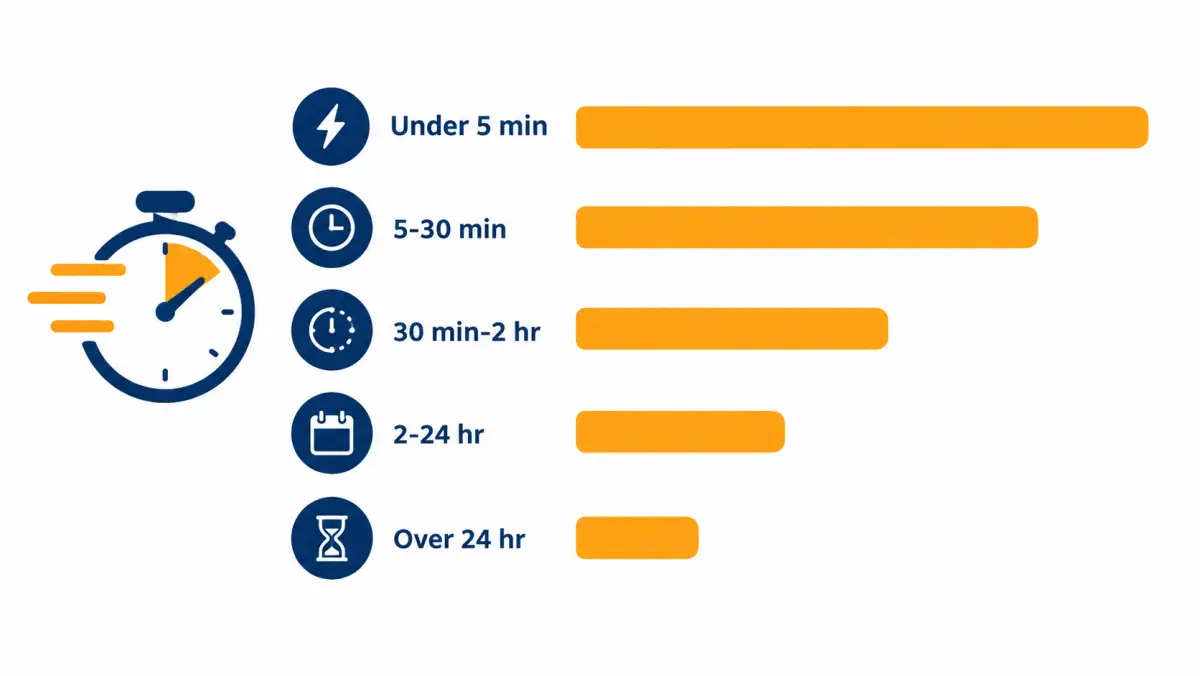
The audit is the single most useful thing you can do before changing staff, software or lead vendors. It turns "we're pretty fast" into a number, and it usually shows that the average hides a long tail of leads nobody touched for hours.
Step 1: Export the right timestamps
You need five fields for every lead delivered in the audit window. Most CRMs and dialers store them, though they may sit in different tables.
| Field | Where it usually lives | Why it matters |
|---|---|---|
| Lead created time | CRM record, or the vendor's delivery log | The clock starts here, not when someone opens the email |
| First dial time | Dialer call log, matched by phone number | Measures how fast you tried |
| First two-way conversation time | Dialer disposition ("contacted", "spoke") or call duration over a threshold | Measures how fast you reached a person |
| Appointment set time and date | CRM opportunity or calendar | Lets you connect speed to outcomes |
| Lead source and assigned setter | CRM fields | Lets you split the results |
Two traps show up in almost every export. First, the "created" time in your CRM may be the time a nightly import ran, not the time the homeowner hit submit. Check the vendor's delivery log against a handful of CRM records. If they differ by more than a minute or two, use the vendor's time. Second, time zones. If your CRM stores UTC and your dialer stores local time, every lead will look either hours fast or hours slow. Convert everything to the homeowner's local time before you bucket anything.
Step 2: Bucket and count
Use the same five buckets from the measurement section above: under 5 minutes, 5 to 30 minutes, 30 minutes to 2 hours, 2 to 24 hours, and over 24 hours. Add a sixth row for leads that were never dialed. Then build this table:
| Time to first dial | Leads | Contacted | Contact rate | Appointments set | Appointment rate |
|---|---|---|---|---|---|
| Under 5 min | |||||
| 5 to 30 min | |||||
| 30 min to 2 hr | |||||
| 2 to 24 hr | |||||
| Over 24 hr | |||||
| Never dialed | |||||
| Total |
Do not skip the "never dialed" row. In audits, it is common to find leads that were delivered, landed in a shared inbox, and were never assigned. Every one of those is money spent with no attempt made.
Step 3: Slice by hour, day, source and setter
The totals tell you whether you have a speed problem. The slices tell you where it lives. Build the same table four more times:
- By hour of day the lead arrived. Look for the lunch dip, the end-of-day cliff and the early-morning backlog from overnight leads.
- By day of week. Saturday and Sunday leads often wait until Monday. If weekends are a big share of your volume, that is a staffing decision, not a vendor problem.
- By lead source. Some vendors deliver in batches rather than in real time. If one source always shows a long gap between the homeowner's submit time and delivery, your speed cannot fix that, and you should ask the vendor about it. Our own delivery terms read: "Real-time delivery to your CRM, dialer, email, or SMS."
- By setter. One person who leaves leads sitting during the afternoon can drag the team median down. This is a coaching conversation, not a disciplinary one, at least the first time.
Step 4: Find the gap worth fixing first
Rank your gaps by how many leads fall into them, not by how bad they look. An illustrative example: an installer finds that 6% of leads arrive between 7 p.m. and 9 p.m. and wait until morning, while 18% arrive between noon and 1:30 p.m. and wait 40 minutes because both setters take lunch at the same time. The evening gap feels worse, but the lunch gap touches three times as many leads and costs nothing to fix: stagger the breaks.
Step 5: Re-run in 30 days
After you make one change, re-run the same audit with the same buckets. You are looking for two things: did the share of leads dialed inside five minutes go up, and did contact and appointment rates in the affected hours go up with it? If speed improved and appointments did not, the gap was not your bottleneck. Look at lead quality, scripts or show rates next.
Key takeaway: An audit beats a debate. Four weeks of timestamps, bucketed honestly, will tell you which hour of the day is costing you the most appointments.
An illustrative audit walkthrough
To make the steps concrete, here is a worked example. The numbers are invented for illustration and are not benchmarks.
A three-setter installer in a single metro bought 400 exclusive leads over four weeks. The owner believed the team responded "within a few minutes." The audit showed:
| Time to first dial | Leads | Share of leads |
|---|---|---|
| Under 5 min | 148 | 37% |
| 5 to 30 min | 96 | 24% |
| 30 min to 2 hr | 72 | 18% |
| 2 to 24 hr | 56 | 14% |
| Over 24 hr | 16 | 4% |
| Never dialed | 12 | 3% |
The median was inside 15 minutes, which sounded fine. The tail was the problem: 84 leads, about one in five, waited two hours or longer or were never called. Slicing by hour showed that most of the 2-to-24-hour bucket came from leads arriving after 6 p.m., when nobody was on the phones, and that the 12 never-dialed leads all came from one vendor whose leads arrived by email rather than straight into the dialer.
The owner made two changes. Leads from the email-only vendor were routed into the CRM with a parser so they hit the dialer queue automatically, and one setter moved to a 11 a.m. to 8 p.m. shift. The next month's audit showed the never-dialed row at zero and the evening backlog cut sharply. Whether that was worth it came down to the appointment rate in those buckets, which the owner now had a way to measure.
How should solar leads be routed so the fastest person gets them?
Solar leads should be routed automatically from the vendor into your CRM and dialer, then pushed to the next available setter by round-robin or availability, with an alert that escalates if nobody dials within a few minutes. Manual routing through a shared inbox is the most common cause of slow response, because nobody owns the lead until someone notices it.
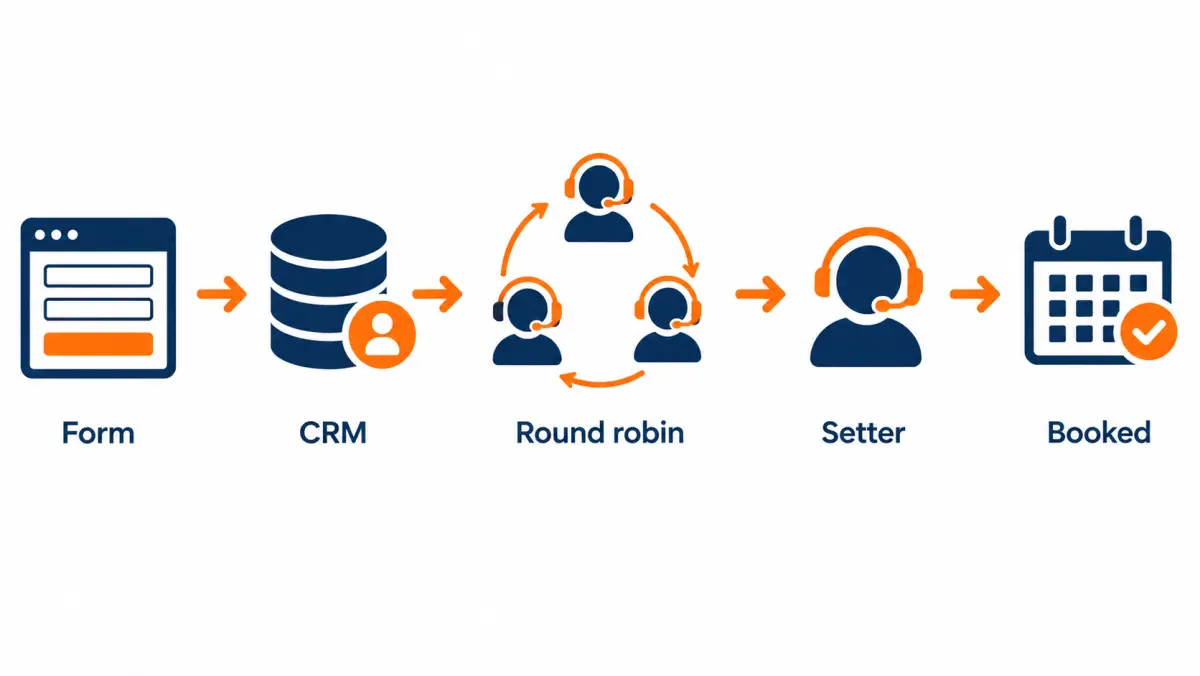
The four routing models
| Model | How it works | Best for | Main risk |
|---|---|---|---|
| Shared inbox | Leads arrive by email; whoever sees them first claims them | Owner-operators with very low volume | Leads sit unseen; two people call the same homeowner |
| Round-robin | Each new lead goes to the next setter in a fixed order | Teams of two to ten setters with similar skills | A setter who is on a call or away still gets the next lead |
| Availability-based | Leads go to whichever setter is logged in and not on a call | Busy teams with uneven call lengths | Needs a dialer that tracks status in real time |
| Skills or territory-based | Leads go to the setter assigned to that state, language or lead type | Multi-state or bilingual teams | Narrow pools mean longer waits when the one right person is busy |
Most growing installers end up with a hybrid: availability-based routing with a fallback. If the assigned setter has not dialed in three minutes, the lead goes to the whole team, and if nobody dials in five, the sales manager gets a text.
Delivery method matters more than people think
How the lead reaches you sets the floor on your speed. If a vendor emails leads and your setters check email every twenty minutes, your best possible median is about ten minutes, no matter how good the team is. Here is how delivery methods compare:
| Delivery method | Typical delay before a setter sees it | Notes |
|---|---|---|
| Direct post to CRM or dialer (API or webhook) | Seconds | Best option; the lead can enter a call queue immediately |
| SMS alert to the setter's phone | Seconds | Good backup; easy to miss when on another call |
| Email to a monitored inbox | Minutes to hours | Depends entirely on who is watching |
| Vendor portal you log into | Minutes to hours | Worst for speed; use only for aged or batch leads |
When you are evaluating vendors, ask exactly how leads are delivered, and ask for a test lead you can time end to end. Our guide on how to vet solar lead providers covers the rest of that checklist.
Setting up escalation alerts
Escalation is the safety net that keeps the tail short. A simple setup that works in most CRMs:
- Minute 0. Lead arrives, is assigned to the next available setter, and enters their dialer queue with a sound alert.
- Minute 3. If no dial is logged, the lead is unassigned and shown to all setters as "open."
- Minute 5. If still no dial, the sales manager or owner gets a text with the homeowner's first name and ZIP.
- Minute 15. If still no dial, the lead is flagged on the daily scorecard as a miss.
The point of step 4 is not blame. It gives you a list to review on Friday so you can see the pattern behind the misses.
Routing for live transfers and appointments
If you buy live transfers, routing is about answering the phone, not dialing out. The transfer line must ring to someone who is free, every time, during the hours you have agreed with the vendor. A transfer that rings out is usually a lost conversation because the homeowner was told they were about to speak with an installer. Set up a hunt group that rings several phones, and keep a backup number on file with the vendor.
For booked appointments, the routing question shifts from speed to confirmation. The appointment lands on a calendar; your job is to confirm it, prepare for it, and send the right person. Speed still matters for the confirmation call, which should happen soon after the appointment is booked while the homeowner still remembers saying yes.
What does speed to lead look like for each type of solar lead?
Speed rules change by lead type. Exclusive real-time leads reward a call within minutes; shared leads demand it because other installers are dialing too; aged leads are not a speed game at all; live transfers need someone free to answer; and booked appointments need a fast confirmation call rather than a fast first call.
Speed priorities by product
| Lead type | What "fast" means | Why | Main speed lever |
|---|---|---|---|
| Exclusive real-time web lead | Dial within 5 minutes | Homeowner just asked and may still be on their phone | Automatic routing and staffing |
| Shared real-time web lead | Dial within 1 to 2 minutes | You are racing other buyers of the same lead | Instant routing, dialer auto-call, preview dialing |
| Aged lead | Work within the same day you load the batch | The homeowner's request is old; speed of a few hours changes little | Batch planning and a different script |
| Live transfer | Answer the transfer line on the first ring or two | Homeowner is on hold expecting you | Hunt groups, coverage schedule |
| Booked appointment | Confirmation call within a few hours of booking | Shows depend on the homeowner remembering and committing | Confirmation workflow and reminders |
| Commercial inquiry | Same business day, with a prepared, senior caller | Decision process is longer; first impression matters more than seconds | Right person, right preparation |
Exclusive real-time leads
These are the leads where the five-minute rule earns its keep. The homeowner submitted a form, the lead was sold only to you, and you have a window before their attention moves on. Our exclusivity terms read: "Each exclusive lead is sold to one company. It is never resold, recycled or sold later as an aged lead." That removes the race against competitors on that lead, but not the race against the homeowner's attention. A homeowner who filled out a form at 8:10 p.m. and gets a call the next morning has often forgotten which company was which. For more on the product itself, see exclusive solar leads.
Shared real-time leads
With shared leads, the first installer to hold a real conversation usually sets the frame. The second and third callers often hear "someone already called me" or reach a homeowner who has stopped answering unknown numbers. If you buy shared leads, an auto-dial on arrival is close to mandatory, and you should measure your contact rate on shared leads separately from exclusive ones. If your team cannot hit those times reliably, read the exclusive vs shared comparison before your next order.
Aged leads
Aged leads are older inquiries sold at a lower price because the first window has passed. Speed to lead in the usual sense does not apply: the homeowner asked weeks or months ago. What matters is working the whole batch promptly once you buy it, using a script that acknowledges the time gap, and following your compliance process for the consent that came with those leads. See aged solar leads for how the category works; availability for your territory is confirmed on the call.
A practical batch rule: load a batch only when you have setter hours to work it that week. A batch that sits in the CRM for a month is a batch that ages twice.
Live transfers
A live transfer is a homeowner who has been screened by a call center and passed to your phone while they are still on the line. Speed here means pickup. Ask the vendor what happens when your line does not answer: do they try a second number, hold the homeowner, or move on? Agree on business hours in writing, and staff to them. More detail is in our solar live transfer leads guide.
Booked appointments
When you buy appointments, the vendor has already done the first-contact work. Your speed task is the confirmation call. Call the homeowner the same day the appointment is booked to introduce the person who will visit, confirm the address and decision-makers, and ask for a recent electric bill. Our appointment terms read: "If a confirmed appointment doesn't sit because the prospect no-shows or doesn't match your filters, report it within 7 days of the scheduled time and we replace it." Track no-shows promptly so they can be reported inside that window.
Commercial solar inquiries
A business owner or facilities manager who asks about solar is usually earlier in a longer process. A five-minute call from a junior setter reading a residential script can do more harm than a well-prepared call two hours later from someone who can talk about demand charges, roof condition and ownership structures. Respond the same business day, acknowledge the inquiry right away by email or text, and send the right person. See commercial solar leads for the differences in qualifying.
What changes in speed to lead by state and market?
Speed to lead rules are mostly the same nationwide, but state calling-hour limits, state telemarketing and texting laws, time zones, utility rate structures and local competition change how you execute them. Multi-state installers should set dialer windows by the homeowner's local time and keep a state rule library reviewed by counsel.
This section describes practical differences, not legal requirements. Calling and texting rules vary by state and change often. Confirm with counsel before setting your dialer windows, and see our solar leads TCPA compliance guide for the federal picture as of October 2026.
Time zones and calling windows
A lead that arrives at 8:45 p.m. Eastern from a homeowner in Florida is a different decision from one that arrives at 8:45 p.m. Eastern from a homeowner in California. If your dialer windows are set by your office's time zone, you will call some homeowners too late and miss others who would happily take a call. Set windows by the homeowner's time zone, using the ZIP or area code on the lead, and when in doubt, use the more conservative of the two.
Competitive density
In mature solar markets with many active installers, homeowners often get several calls after submitting a form, especially for shared leads. Speed and a clear, helpful first call matter more there. In thinner markets, a homeowner may only hear from one or two companies, so the cost of being slow is lower but the cost of a weak first conversation is the same.
| Market type | Speed pressure | Practical emphasis |
|---|---|---|
| Dense, competitive metro | High | Instant routing, strong first-call script, fast booking |
| Suburban or mid-size market | Medium | Five-minute target, solid day-one cadence |
| Rural or low-density | Lower | Reliable follow-up across the week matters as much as the first five minutes |
| New or recovering market (for example after a policy change) | Varies | Education-heavy calls; homeowners have more questions |
Utility rate structure and the first call
Speed gets you the conversation. What you say in it should fit the local utility. A homeowner on a time-of-use plan, or in a utility area that changed its net metering rules, will have specific questions. Your setters should know the two or three biggest utilities in your territory and the general shape of their rate plans, so the first call does not stall on "I'll have the consultant explain that." The U.S. Energy Information Administration publishes state electricity profiles that are a good starting point for training material.
After the 25D credit
As of October 2026, the federal Section 25D residential clean energy credit is no longer available for homeowner systems placed in service after 2025. Many homeowners have not caught up with that change, and some will ask about "the 30% credit" on the first call. A fast call that gives a wrong or confused answer is worse than a slightly slower one that handles it well. Train setters on a short, accurate answer, and route detailed tax questions to the homeowner's tax adviser. Our solar leads after 25D guide covers the market shift, and the IRS keeps its residential clean energy credit page up to date.
A sample setter answer:
Homeowner: Do I still get the 30% tax credit?
Setter: Good question. The federal homeowner credit ended for systems placed in service after 2025, so we don't build our numbers around it. What we look at is your bill and what you'd pay with solar, including financing or lease options. Your tax adviser is the right person for anything about your own taxes. Can I ask roughly what your electric bill runs in summer?
How should installers of different sizes build a speed-to-lead system?
The right speed-to-lead system depends on how many leads you buy and who is free to answer. Owner-operators should lean on automation and answering help, small teams on staggered shifts and routing rules, mid-size teams on dialers and dashboards, and multi-state operations on local-time windows, state rule libraries and a dedicated speed owner.
The table in the scorecard section below gives a one-line fix for each size. This section goes deeper, with an illustrative week for each profile. The volumes and outcomes are invented to show the mechanics and are not benchmarks.
Owner-operator: one person, one truck, one phone

The owner-operator's problem is simple: the person who answers leads is also the person on the roof, at the permit office, or meeting a homeowner. Speed to lead competes with the work that pays today.
Illustrative week. An owner buys 10 exclusive leads a week. Leads arrive at random times across the day. On install days, the owner checks the phone at breaks, roughly every two hours. Median response is around an hour; evening leads wait until morning.
What to change, in order:
- Instant text acknowledgment. Set the CRM to send a text the moment a lead arrives (if your consent and compliance review allow it): "Hi Dana, this is Chris with [Company]. Got your solar request. I'm on a job right now and will call you by [time]. Reply with a better time if that doesn't work." This is not a substitute for a call, but it tells the homeowner a real company is on it.
- Protected call blocks. Two or three fixed 20-minute blocks a day where the owner works only the lead queue: before the crew starts, at lunch, and right after leaving the job site.
- Answering help for peak hours. A part-time setter for a few evening hours, a virtual assistant, or a solar-trained answering service can take the first call and book a time for the owner. The handoff has to be clean: the owner needs the homeowner's bill amount, roof notes and agreed time in one message.
- Consider a different product. If install work will always come first, buying booked appointments shifts the first-contact work to someone else. Compare the cost per held appointment, not the cost per lead, using the solar lead cost calculator.
What not to do: buy more leads to make up for slow follow-up. If half the leads go cold before you call, doubling volume doubles the waste.
Small team: one or two setters plus the owner
A small team has enough people to cover the phone during business hours but not enough to cover every hour. The gaps are predictable: lunch, the last hour of the day, and weekends.
Illustrative week. Two setters work 9 to 5, Monday to Friday, and take lunch together. The installer buys 40 exclusive leads a week. About a quarter arrive outside 9 to 5 or during lunch.
What to change, in order:
- Stagger shifts. Move one setter to 8 to 4 and the other to 11 to 7. That single change covers the early morning and the evening peak when many homeowners are home and filling out forms.
- Stagger breaks. Never let both setters be off the phone at the same time during staffed hours.
- Weekend coverage. Decide on purpose. Options: a Saturday rotation, an answering service, or a clear Monday-morning callback queue that is worked first thing.
- Automatic routing. If leads still come in by email, fix that first. Direct posting into the CRM and dialer removes minutes from every lead.
- A shared, visible queue. One screen that shows every open, undialed lead and how long it has waited. When a number turns red, someone picks it up.
Coverage math (illustrative). If leads arrive from 7 a.m. to 9 p.m., that is 14 hours a day. Two 8-hour shifts with a 2-hour overlap cover exactly 14 hours. Add a third person or an answering service and you can cover weekends and absences.
Mid-size team: three to ten setters
Mid-size teams usually have the people. Their speed problems come from handoffs, uneven workloads and visibility.
Illustrative week. Six setters across two shifts, one sales manager, 150 leads a week from three vendors. The average response is quick, but the slowest 10% of leads wait over an hour, and one vendor's leads are consistently slower.
What to change, in order:
- Availability-based routing with escalation. Round-robin breaks down when call lengths vary. Route to whoever is free, and escalate to the whole floor after three minutes.
- A live dashboard. Open leads, time waiting, setters available. Put it on a wall screen or a pinned browser tab.
- Per-setter speed metrics. Share median and slowest-10% response times weekly, without shaming. Pair slower setters with faster ones for a day.
- Source-level delivery checks. If one vendor's leads are slower to arrive, measure the gap between submit time and delivery time, and raise it with the vendor using data.
- A speed owner. One person, often a team lead, whose job includes watching the queue during peak hours and stepping in when it backs up.
Multi-state operation: several markets, several time zones
For large installers, speed problems come from scale: time zones, state rules, multiple offices, different lead products and vendors, and managers who only see summaries.
What to build:
- Dialer windows by homeowner local time, set per state and reviewed with counsel.
- A state rule library that the dialer and texting platform enforce automatically, rather than relying on each setter to remember.
- Market-level scorecards so a slow office cannot hide inside a good company average.
- Follow-the-sun coverage if you span several time zones: an office in an earlier time zone can cover the morning backlog of a later one.
- Separate queues by product. Live transfers, real-time exclusive leads, shared leads and aged batches each need their own speed targets.
- Regular audits. Run the speed-to-lead audit in every market each quarter.
Summary by size
| Size | Biggest speed risk | First fix | Second fix |
|---|---|---|---|
| Owner-operator | Owner unavailable during jobs | Instant acknowledgment text plus protected call blocks | Part-time setter, answering service or appointments |
| Small team | Lunch, evening and weekend gaps | Staggered shifts and breaks | Direct lead posting and a visible queue |
| Mid-size | Uneven workload and slow handoffs | Availability-based routing with escalation | Live dashboard and per-setter metrics |
| Multi-state | Time zones, state rules, hidden slow offices | Local-time dialer windows and state rule library | Market-level scorecards and quarterly audits |
What should setters say when homeowners push back on the first call?
When homeowners push back on the first call, setters should acknowledge the concern, answer it briefly and honestly, and steer back to the one thing that moves the process forward: a look at the electric bill and a booked next step. Short, truthful answers beat clever rebuttals, and a polite exit beats a forced booking.

Fast calls run into objections that slower calls never hear, because the homeowner is still deciding whether they want to talk at all. The scripts below are starting points. Adjust the wording to sound like your team, and never promise savings, prices, incentives or approvals you cannot confirm.
"I just filled that out a minute ago. How did you call so fast?"
Setter: You did, and I'm sorry if it felt sudden. When someone asks about solar, we try to call right away so you're not waiting around. Is now an okay time for two minutes, or would later today work better?
Why it works: it explains speed as service, offers control back to the homeowner, and moves straight to a time.
"I was just looking. I'm not ready to buy."
Setter: That's completely fine. Most people start exactly there. All we'd do at this point is look at your electric bill and your roof to see if solar even makes sense for your home. If it doesn't, we'll tell you. What does your bill run in summer, roughly?
"How much does it cost?"
Setter: It depends on your roof, your usage and how you'd pay for it, so I don't want to guess and be wrong. What I can do is have [consultant] look at your bill and give you real numbers. Could you do Thursday at 6 or Saturday morning?
Do not quote a price range on the first call unless your company has an approved, current range and a policy for sharing it. A number said in the first two minutes becomes the number the homeowner remembers.
"I already talked to another company."
Setter: Good, it's smart to compare. We're happy to be a second opinion. If you have their proposal, we can even look at it with you. Would it help to see a second set of numbers this week?
This is common with shared leads. Stay helpful; do not criticize the other company.
"Is this a scam? I get a lot of these calls."
Setter: I understand, there are a lot of calls out there. We're [Company], a local installer based in [city]. You filled out a request on [source or form description] a few minutes ago, which is why I'm calling. You can look us up at [website] and call me back on this number. Would you rather I text you our details first?
Tell the truth about where the request came from. If you cannot say which site the homeowner used, you have a lead-source problem worth raising with the vendor.
"My spouse handles this."
Setter: Makes sense. Solar is a decision for everyone on the title, so we'd want you both there anyway. When are you both usually home? Evenings or weekends?
"Do I still get the tax credit?"
Use the 25D answer from the state and market section above. Keep it short, accurate and dated, and send tax questions to the homeowner's tax adviser.
"I'm renting" or "I'm selling the house soon."
Setter: Thanks for telling me, that saves us both time. Solar usually works best for owners planning to stay a while, so it may not be the right fit right now. I'll make a note and won't keep calling.
If the lead fails your filters, such as non-homeowners where your order required homeowners, record the reason and request a credit if your vendor's terms cover it. Ours lists "leads outside your filters" among the covered reasons, with a 7-day window.
"Stop calling me."
Setter: Understood, I'll take you off our list right now. Sorry to bother you.
Then actually do it, in the system, during the call. Opt-outs must be honored promptly; confirm your internal timeline with counsel.
Objection quick-reference
| Objection | Core move | Next step to ask for |
|---|---|---|
| Called too fast | Explain speed as service | Now or a set time today |
| Just looking | Normalize, lower the stakes | Summer bill amount |
| Price | Decline to guess, offer real numbers | Specific appointment time |
| Talked to another company | Offer a second opinion | Appointment this week |
| Scam worry | Name the company and the request source | Text details, call back |
| Spouse decides | Agree, include them | Time when both are home |
| Tax credit | Short, accurate, dated answer | Bill amount |
| Renting or moving | Thank them, exit politely | Note the reason, check credit eligibility |
| Stop calling | Comply immediately | None |
What does a first call sound like from start to finish?
A good first call takes five to eight minutes. The setter introduces themselves and the reason for the call, confirms ownership and interest, learns the bill amount and roof basics, explains what happens next, books a specific time with all decision-makers, and confirms by text. The full walkthrough below is illustrative and should be adapted to your process.

The call, stage by stage
| Stage | Time | Goal | Example line |
|---|---|---|---|
| Opener | 0:00 to 0:20 | Identify yourself and why you're calling | "Hi, is this Dana? Chris with [Company]. You asked about solar a few minutes ago." |
| Permission | 0:20 to 0:30 | Get a yes to keep talking | "Do you have two minutes now?" |
| Ownership and fit | 0:30 to 1:30 | Confirm they own the home and plan to stay | "Just to check, you own the home at [street]?" |
| Bill | 1:30 to 3:00 | Anchor the conversation on real money | "What does your electric bill run in summer? And in winter?" |
| Roof and home | 3:00 to 4:00 | Spot obvious blockers | "How old is the roof, roughly? Any big trees shading it?" |
| Motivation | 4:00 to 5:00 | Learn why they asked | "What got you thinking about solar now?" |
| Next step | 5:00 to 6:30 | Book a specific time with all decision-makers | "Could you and [spouse] do Thursday at 6 or Saturday at 10?" |
| Confirm | 6:30 to 7:30 | Lock in details | "I'll text you a confirmation now. Could you send a photo of a recent bill?" |
Illustrative full transcript
Setter: Hi, is this Dana?
Homeowner: Yes.
Setter: Hi Dana, this is Chris with [Company], a solar installer here in [city]. You asked about solar for your home a few minutes ago, so I'm calling to help. Do you have two minutes?
Homeowner: Sure, I guess.
Setter: Great. First, just to make sure I have it right, you own the home on Maple Street?
Homeowner: Yes, we've been here about six years.
Setter: Perfect. What does your electric bill usually run in the summer?
Homeowner: Summer's bad. Maybe two-fifty, sometimes more.
Setter: And winter?
Homeowner: Lower. Maybe a hundred.
Setter: Got it. How old is the roof, roughly?
Homeowner: We replaced it when we moved in.
Setter: That helps a lot. Anything big shading it, like tall trees?
Homeowner: One tree in the back, but the front is open.
Setter: Good. What got you thinking about solar now?
Homeowner: The bills keep going up and a neighbor just got panels.
Setter: That's the most common reason we hear. Here's what happens next. [Consultant] comes out, looks at the roof, goes through your actual bills, and shows you what solar would look like for your home, including payment options. It takes about an hour, and there's no obligation. Is anyone else on the title who'd want to be there?
Homeowner: My husband.
Setter: Great. Could you both do Thursday at 6, or is Saturday at 10 better?
Homeowner: Saturday's better.
Setter: Saturday at 10 it is. I'm texting you a confirmation now with [consultant]'s name. If you can, reply with a photo of a recent electric bill so we can prepare. Anything you'd like us to bring or look at?
Homeowner: No, that's it.
Setter: Thanks, Dana. You'll get a reminder Friday. See you Saturday.
What the setter logs before hanging up
The call is not done until the CRM is complete. A fast call with a sloppy record slows down everyone after it.
- Homeowner name, address confirmed, and ownership confirmed
- Summer and winter bill estimates, and utility name
- Roof age and shading notes
- Motivation in the homeowner's words
- All decision-makers and whether they will attend
- Appointment date, time and assigned consultant
- Consent or opt-out notes as required by your compliance process
- Lead source, for attribution
What tools does a solar team need for fast lead response?
A fast-response stack needs four things: a way for leads to post straight into your CRM, a dialer that can call new leads automatically or from a priority queue, compliant texting tied to the same record, and reporting that shows time to first dial. Extra features help only after those four work reliably every day.
You do not need an expensive platform to respond within minutes. Plenty of small installers do it with a basic CRM, a phone app and discipline. But as volume grows, the tools carry more of the load.
Core features and why they matter
| Feature | What it does | Speed impact | Must-have at what size |
|---|---|---|---|
| Direct lead posting (API or webhook) | Vendor sends the lead straight into your CRM | Removes manual entry and inbox lag | Everyone buying real-time leads |
| Instant lead alert | Sound, push notification or SMS when a lead lands | Makes sure someone notices | Everyone |
| Auto-dial on arrival ("speed-to-lead dialing") | Calls the setter first, then connects to the homeowner | Gets the first dial out in seconds | Teams buying shared leads or high volume |
| Priority call queue | New leads jump ahead of follow-up calls | Stops follow-ups from blocking new leads | Teams of 3+ setters |
| Routing rules and escalation | Assigns leads and escalates if not dialed | Shortens the slow tail | Teams of 2+ |
| Two-way texting in the CRM | Texts sent and received on the lead record | Keeps context; lets anyone pick up the thread | Everyone, subject to compliance review |
| Call recording | Records calls for coaching | Improves first-call quality, not speed itself | Teams with a manager |
| Time-to-first-dial reporting | Measures the gap per lead | Lets you manage speed at all | Everyone |
| Opt-out handling | Stops calls and texts when the homeowner asks | Protects you while working fast | Everyone |
Questions to ask a CRM or dialer vendor
- Can leads from our vendors post directly into your system, and how fast do they appear?
- Can a new lead trigger a call automatically, and can we limit that to certain hours and states?
- How do you report time from lead creation to first dial and first conversation?
- How are opt-outs captured from calls and texts, and how fast do they take effect across all channels?
- Can we set calling and texting windows by the homeowner's time zone?
- What happens to a lead if the assigned setter is on another call?
- How do you handle caller ID registration and number reputation?
Caller ID and spam labels
Speed does little if the homeowner's phone labels your call as spam. Major US carriers use call-analytics systems that can tag numbers that make many short calls. You cannot control those systems, but you can avoid behaviors that tend to trigger them:
- Register your outbound numbers with the free carrier and analytics registration portals your phone provider points you to.
- Keep a consistent business name in your caller ID (CNAM) where your provider supports it.
- Avoid rotating through large pools of numbers just to dodge labels.
- Watch answer rates per number. A sudden drop on one number is a warning sign.
- Text before or after the call so the homeowner knows who is calling.
The FCC's call blocking and robocall resources explain how carriers approach unwanted calls and the STIR/SHAKEN caller authentication framework. Ask your phone provider how your numbers are signed and what attestation level they receive.
Local presence
Some dialers show a local area code to the homeowner. A local number may be answered more often, but it does not fix a weak first call, and some homeowners distrust a local number from a company they do not know. If you use local numbers, make sure they are real numbers you own, that they ring back to your team, and that your texts and voicemails name the company clearly. Measure answer rates with and without it before deciding.
AI tools and autoresponders
Software that answers or texts leads automatically is common in 2026. Treat vendor claims about conversion lift as claims, not facts, until you test them on your own leads. Questions to ask:
- Does the tool clearly identify itself and your company?
- How does it handle opt-outs and questions it cannot answer?
- Can it hand off to a person mid-conversation, and how fast?
- What consent does it rely on to call or text, and has your counsel reviewed it?
- Can you see every message it sent?
A reasonable way to test any tool: split new leads by time or by alternating assignment, run the tool on half for a month, and compare appointment and sit rates, not reply rates.
How should you use texting in the first hour without hurting trust?
Texting in the first hour works best as support for the call, not a replacement. Send one clear text right after a missed call that names your company, the request and a way to reply, then follow your cadence. Keep messages short, specific and human, honor opt-outs immediately, and confirm your texting process with counsel.
Text messaging rules are tightly tied to consent, and the details depend on how the lead was collected, the technology used to send texts, and state law. Note that the FCC's one-to-one consent rule was vacated by the Eleventh Circuit on January 24, 2025, but that does not remove other federal and state requirements. Read our TCPA compliance guide and confirm with counsel before texting leads.
First-hour text sequence
| When | Trigger | Example message |
|---|---|---|
| Right after first missed call | No answer | "Hi Dana, Chris with [Company]. You asked about solar for your home. I just tried calling. When's a good time to talk? Reply STOP to opt out." |
| After a short conversation where they asked to be texted | Homeowner request | "Thanks Dana. Here's my direct line: [number]. A photo of your electric bill helps us prepare." |
| After booking | Appointment set | "Confirmed: [Consultant] at your home Sat 10 a.m. Reply C to confirm or R to reschedule." |
| 40 to 60 minutes after first missed call, if no reply | Still no contact | "Hi Dana, Chris again from [Company]. Happy to call whenever suits you, or I can text a few questions instead." |
Texts that tend to get replies
- Name the request. "You asked about solar for your home" beats "Are you still interested?"
- Ask one question. "When's a good time?" or "What does your summer bill run?"
- Offer an easy alternative to calling. Some homeowners will text but not answer a call from a new number.
- Use a real person's name. Not "The Solar Team."
Texts to avoid
- Messages that look like a scam: links with no context, urgency ("Only 2 spots left!"), or prizes.
- Savings promises or prices.
- Mentions of tax credits that may not apply (see the 25D note above).
- Long paragraphs. If it does not fit on one phone screen, it is too long.
- Repeated texts after no reply. Follow a written cadence with a defined stop.
When a homeowner replies by text
Answer within minutes, the same way you would a new lead. A reply is a homeowner raising their hand twice. Have the setter who sent the text, or whoever is next available, respond, and move to a call when the homeowner is comfortable:
Homeowner: Can't talk now, at work.
Setter: No problem. Would a quick call after 5:30 work, or I can ask a couple of questions here?
How do you build after-hours coverage that actually books appointments?
After-hours coverage books appointments when someone, or a well-tested system, can make real contact within minutes during the evening and weekend hours when many homeowners fill out forms. Choose among extended shifts, an answering service, remote setters or a structured morning callback, then measure appointment and sit rates for after-hours leads separately.

The earlier after-hours section covers the basics: answering services, autoresponders and the morning queue. This section helps you choose between them and run the one you pick.
Comparing after-hours options
| Option | Speed after hours | Quality of first call | Cost structure | Best for |
|---|---|---|---|---|
| Extended setter shift (e.g., 11 a.m. to 8 p.m.) | Fast, same as daytime | Same as your team | Payroll hours | Teams with steady evening volume |
| Remote part-time setters | Fast if scheduled | Good if trained on your script | Hourly | Small and mid-size teams |
| Solar-trained answering service | Fast | Varies; often scripted | Per call or per minute | Owner-operators and small teams |
| Generic answering service | Fast | Often poor for solar | Per call or minute | Message-taking only |
| Autoresponder text plus morning callback | Instant acknowledgment, slow conversation | Your team, next day | Software cost only | Low after-hours volume |
| Booked appointments or live transfers with vendor hours | Depends on the vendor's hours | Vendor's team | Per appointment or transfer | Teams that cannot staff evenings |
How to decide
Use your audit numbers. Count the leads that arrive after your staffed hours over four weeks, then estimate what share might book with faster contact. If after-hours leads are a small share, an autoresponder plus a disciplined morning queue may be enough. If they are a large share, and especially if your audit shows those leads book worse than daytime leads, paying for evening coverage is likely to pay back. Run the numbers in the solar lead cost calculator with your own lead price and rates.
Running an answering service well
If you hand after-hours calls to an outside team, quality depends on what you give them:
- A one-page script with your opener, the four qualifying questions (ownership, bill, roof, decision-makers), and two booking times they can offer.
- Live calendar access so they can book real slots, not "someone will call you back."
- Clear rules on what they cannot say: no prices, no savings estimates, no tax advice.
- A handoff format: a short structured note posted into your CRM for every call, not an email summary the next morning.
- A weekly review of a sample of recorded calls.
The morning callback queue
If you choose not to staff evenings, make the morning queue a ritual:
- Overnight leads get an instant acknowledgment text (if your compliance review allows it) that promises a call at a specific time.
- At the start of the first shift, every setter works only the overnight queue until it is empty.
- The first call references the promised time: "I said I'd call first thing, so here I am."
- Track overnight leads separately on the scorecard.
What does a day-by-day follow-up calendar look like for one solar lead?
A practical calendar runs about seven days of active attempts, with heavy effort on day one, a few calls and texts on days two and three, lighter touches through day seven, then nurture by email or occasional calls. Each attempt has a purpose and changes channel or time of day so you reach the homeowner when they can talk.
The cadence section earlier gives the shape. This section shows a filled-in example for one illustrative lead, so a new setter can see exactly what "following the cadence" means.
Illustrative lead: arrived Tuesday 6:42 p.m.
| Day | Local time | Channel | Note |
|---|---|---|---|
| Tue (Day 1) | 6:43 p.m. | Call | No answer, voicemail left |
| Tue | 6:44 p.m. | Text | First-hour text sent |
| Tue | 6:50 p.m. | Call | No answer, no voicemail |
| Tue | 7:45 p.m. | Call | No answer |
| Wed (Day 2) | 9:15 a.m. | Call | No answer, second voicemail |
| Wed | 12:30 p.m. | Call | No answer |
| Wed | 5:45 p.m. | Call | Answered; homeowner busy, asked for Thursday evening |
| Thu (Day 3) | 6:00 p.m. | Call | Connected; booked Saturday 11 a.m. with both owners |
| Thu | 6:08 p.m. | Text | Appointment confirmation |
| Fri | 4:00 p.m. | Text | Reminder; homeowner confirms |
| Sat | 10:15 a.m. | Call | Consultant "on my way" call |
This lead booked on the seventh attempt. Had the setter stopped after two calls on Tuesday, the lead would have looked "bad." That is why the cadence exists, and why you should judge vendors on contact rate only after a full cadence (see the vendor comparison section above).
Varying the time of day
A homeowner who works days will not answer at 10 a.m. three days running. Spread attempts across morning, midday and evening. A simple rule: no two consecutive attempts at the same time of day.
Logging dispositions consistently
Use a short, fixed list of call outcomes so reports mean something:
| Disposition | Meaning |
|---|---|
| No answer, VM left | Rang out; voicemail left |
| No answer, no VM | Rang out; no voicemail |
| Busy or rejected | Call declined |
| Wrong number | Reached someone who did not submit the request |
| Disconnected | Number not in service |
| Contacted, callback set | Spoke; agreed a specific callback time |
| Contacted, not interested | Spoke; declined |
| Contacted, not qualified | Spoke; outside your filters (renter, roof, location) |
| Appointment set | Booked |
| Opt-out | Asked not to be contacted |
Wrong numbers, disconnected numbers and out-of-filter leads should be reported to the vendor promptly if their credit policy covers them. Ours covers "disconnected numbers, wrong contact details, or leads outside your filters" within 7 days.
How does seasonality change solar speed to lead?
Seasonality changes lead volume, the hours homeowners fill out forms and how quickly they move. Spring and early summer bring more leads and more competition, so staffing and routing must scale; winter brings fewer leads that often need longer nurture. Plan coverage by month using your own history, and adjust cadence intensity rather than your response target.
What tends to shift through the year
| Season | Common pattern | Speed implication |
|---|---|---|
| Late winter to spring | Homeowners plan home projects; tax season conversations | Volume rises; prepare staffing before the ramp |
| Early to mid summer | High bills prompt inquiries | Peak demand; protect the five-minute target with extra coverage |
| Late summer to fall | Steady but more comparison shopping | Strong first calls matter; homeowners may already have quotes |
| Holidays and winter | Lower volume, harder to reach people | Fewer leads, so speed is easier; extend nurture |
These are general patterns, not forecasts. Your territory, utility calendar and weather matter more. Pull 12 months of lead volume by week from your CRM and plan from that.
Scaling for the busy months
- Hire and train before the peak, not during it. A new setter needs a few weeks to reach full speed.
- Raise lead orders gradually while watching the share of leads dialed within five minutes. If it drops, you are buying faster than you can respond.
- Add temporary after-hours coverage during peak months only.
- Shorten admin time: templates for notes, texts and confirmations.
Running lean in slow months
Slow months are a good time to fix process: run a full audit, rewrite the SOP, train scripts and work aged leads or nurture lists with spare setter hours. Keep the response target the same. A team that relaxes to "within the hour" in winter rarely snaps back to five minutes in spring.
How should commercial and residential speed-to-lead playbooks differ?
Residential playbooks optimize for minutes, because one homeowner's attention fades fast. Commercial playbooks optimize for preparation and the right person, because business buyers run longer processes with several stakeholders. Acknowledge commercial inquiries immediately, but have a qualified rep call within the same business day with basic research done.
| Element | Residential | Commercial |
|---|---|---|
| Response target | Minutes | Same business day, acknowledgment immediately |
| First caller | Setter | Experienced commercial rep |
| Preparation | Name, ZIP, form answers | Business name, building type, rough roof size from satellite view, ownership vs. lease |
| First-call goal | Book an in-home or video consultation | Identify decision-makers and a discovery meeting |
| Key questions | Bill, roof, decision-makers | Monthly usage and demand charges, roof age and ownership, decision process, timeline |
| Cadence length | About a week, then nurture | Several weeks of planned follow-up |
| Common mistake | Waiting hours | Calling fast with a residential script |
Commercial acknowledgment email example:
Subject: Your solar inquiry for [Business name]
Hi Jordan, thanks for reaching out about solar for [Business name]. I'm [Name], and I work with commercial customers at [Company]. I'll call you today to learn about your building and energy use. If it's easier, reply with a good time, or send a recent utility bill so I can come prepared.
Read more about qualifying business buyers in our commercial solar leads guide.
What first-hour email should you send a new solar lead?
Send one short email within the first hour that repeats who you are, why you are writing, what happens next and how to reach you directly. It supports the call and text, gives the homeowner something to check you against, and catches people who will not answer unknown numbers. Keep it plain, personal and free of prices or savings promises.
Template
Subject: Your solar request, from Chris at [Company]
Hi Dana,
Thanks for asking about solar for your home on Maple Street. I tried calling a few minutes ago and will try again later today.
Here's how it works with us:
- A short call to learn about your bill and roof (about 5 minutes).
- A visit or video call with [Consultant] to go through real numbers for your home (about an hour).
- You decide. No obligation.
If it's easier, reply with a good time to call, or send a photo of a recent electric bill and we'll take it from there.
Chris [Company] | [direct number] | [website] [Physical address]
If you'd rather not hear from us, reply "stop" and we'll remove you.
Why each part is there
- Subject line with the request and a person's name: easier to recognize than a generic "Thank you for your interest."
- Mention of the call: ties channels together so the homeowner connects the missed call to a real company.
- Three steps: lowers the perceived commitment.
- Bill photo ask: a small action that signals intent.
- Physical address and opt-out: good practice for commercial email; the FTC's CAN-SPAM compliance guide explains the federal requirements.
How do you calculate what slow response costs your solar business?
To estimate what slow response costs, multiply the leads that wait past your speed target by the drop in appointment rate you measure for slow leads, then by your sit rate, close rate and average gross profit per job. Use your own audit numbers, not borrowed statistics. The worked examples below are illustrative and only show the math.
The formula
Lost appointments per month = slow leads × (appointment rate for fast leads − appointment rate for slow leads)
Lost sales per month = lost appointments × sit rate × close rate
Lost gross profit per month = lost sales × average gross profit per job
Wasted lead spend per month = slow leads × lead price × (share of slow leads that never reach a conversation)
You need four inputs from your own data: how many leads miss your target, how appointment rates differ between fast and slow buckets, your sit and close rates, and your gross profit per job.
Illustrative example 1: small residential installer
All numbers are invented for this illustration.
| Input | Value |
|---|---|
| Leads per month | 120 |
| Leads dialed after 30 minutes | 48 |
| Appointment rate, dialed within 5 minutes (from audit) | 20% |
| Appointment rate, dialed after 30 minutes (from audit) | 12% |
| Sit rate | 70% |
| Close rate on held appointments | 25% |
| Gross profit per job | $5,000 |
Lost appointments = 48 × (0.20 − 0.12) = 3.84 per month
Lost sales = 3.84 × 0.70 × 0.25 ≈ 0.67 per month
Lost gross profit ≈ 0.67 × $5,000 ≈ $3,350 per month
In this example, closing the speed gap is worth roughly one extra job every six weeks. Whether that justifies an extra part-time setter depends on what the setter costs, and you can model it in the solar lead cost calculator.
Illustrative example 2: mid-size team with a tail problem
| Input | Value |
|---|---|
| Leads per month | 600 |
| Leads dialed after 2 hours or never | 90 |
| Appointment rate, within 30 minutes | 18% |
| Appointment rate, after 2 hours | 8% |
| Sit rate | 65% |
| Close rate | 22% |
| Gross profit per job | $6,000 |
Lost appointments = 90 × 0.10 = 9 per month
Lost sales = 9 × 0.65 × 0.22 ≈ 1.3 per month
Lost gross profit ≈ $7,700 per month
Here the median response time may look fine. The cost sits entirely in the tail, which is why the scorecard tracks the slowest 10% and not just the average.
Illustrative example 3: shared leads with a slow team
For shared leads, the gap between fast and slow can be much wider, because other buyers reach the homeowner first. Suppose an installer's audit shows shared leads dialed within two minutes book at 10% and shared leads dialed after 30 minutes book at 3%. If most of the team's shared leads are dialed late, the effective cost per appointment can be far higher than the lead price suggests. The calculation often shows that fewer exclusive leads, or booked appointments, would cost less per sale. That is the core argument in our solar lead ROI guide.
What speed costs to buy
The other side of the equation is what faster response costs you:
| Speed investment | Cost type | What to measure after |
|---|---|---|
| Staggered shifts | Usually free | Share of leads dialed within 5 minutes in the affected hours |
| Extra part-time setter | Hourly payroll | Appointment rate in newly covered hours |
| Dialer with auto-call on arrival | Software subscription | Median time to first dial; contact rate |
| Answering service | Per call or per minute | Appointments booked and sit rate for after-hours leads |
| Direct lead posting setup | One-time setup time | Gap between delivery and first dial |
| Switching some volume to appointments | Higher price per unit | Cost per held appointment vs. raw leads |
Spend on speed when the audit shows the gap, the math shows the return, and you can measure the result within a month.
How do you coach setters to be fast and good on the phone?
Coach setters on speed and quality together. Review time-to-first-dial and slowest-lead metrics weekly, listen to a few recorded first calls per setter, and practice the opener, bill question and booking ask until they sound natural. Fast but sloppy calls burn leads; polished but slow calls miss them.

A weekly coaching rhythm
| Day | Activity | Time |
|---|---|---|
| Monday | Team huddle: last week's scorecard, one focus for the week | 15 minutes |
| Tuesday to Thursday | Manager listens live or to recordings, two to three first calls per setter | 30 minutes per setter per week |
| Wednesday | Role-play: one objection, everyone practices | 15 minutes |
| Friday | One-to-ones: each setter's speed stats and one call to celebrate, one to improve | 15 minutes per setter |
What to listen for on a first call
Use a simple scorecard when reviewing calls. Score each item yes or no:
- Did the setter say their name, the company and why they were calling in the first 15 seconds?
- Did they ask permission to continue?
- Did they confirm ownership?
- Did they get a bill amount?
- Did they ask about the roof and shading?
- Did they learn the homeowner's reason for asking?
- Did they ask for a specific time, offering two options?
- Did they include all decision-makers?
- Did they avoid quoting prices, savings or tax outcomes?
- Did they send a confirmation and log the record fully?
Pick one missed item per setter per week. Trying to fix everything at once fixes nothing.
Speed habits worth training
- Lead first, admin second. When a new lead alert sounds, finish the current sentence, not the current task list.
- Short wrap-up. Keep post-call notes to a template so setters are ready for the next lead quickly.
- No cherry-picking. Setters should not skip leads that look less promising. The routing system decides.
- Hands-free readiness. Headset on and dialer open during shift hours.
New setter ramp plan (illustrative)
| Week | Focus | Goal |
|---|---|---|
| 1 | Shadow live calls; learn the product, the script and the CRM | Can explain the process to a homeowner |
| 2 | Take follow-up calls and texts with supervision | Clean dispositions, correct logging |
| 3 | Take new leads during quieter hours with a manager nearby | Opener and booking ask sound natural |
| 4 | Full rotation in routing | Meets team speed target on most leads |
How do you protect show rates after a fast booking?
Protect show rates by confirming every appointment the same day it is booked, sending reminders the day before and the morning of, having the consultant call when on the way, and making sure all decision-makers will attend. A fast booking that does not sit is still a lost lead.

Speed to lead gets you the appointment. Show rate decides whether it was worth anything. Teams that push for fast bookings sometimes see more appointments and the same number of sits, because some of those bookings were soft. These steps keep the extra appointments real.
The confirmation sequence
| When | Channel | Purpose |
|---|---|---|
| At booking | Text | Date, time, consultant name, address check |
| Same day | Call or text from the consultant (optional) | Personal introduction; builds commitment |
| Day before | Text | Reminder, ask for a reply to confirm |
| Morning of | Text | "See you at 10" with consultant photo or name |
| 30 minutes before | Call from consultant | "On my way"; catches last-minute cancellations |
Questions at booking that improve show rates
- "Who else is on the title, and can they be there?"
- "Is there anything that would make this time hard to keep?"
- "Can you send a photo of a recent electric bill before we come?" A homeowner who sends a bill is more committed than one who does not.
- "Would you prefer we meet in person or by video?" Offer what your process supports.
When appointments do not sit
Log the reason every time: no-show, cancelled, rescheduled, or wrong fit. Over a month, the reasons point to fixes. Many no-shows in one time slot may mean the slot is a poor choice. Many "spouse wasn't there" outcomes mean the booking question is not being asked. For purchased appointments, report no-shows within the vendor's window. Ours reads: "If a confirmed appointment doesn't sit because the prospect no-shows or doesn't match your filters, report it within 7 days of the scheduled time and we replace it."
Rescuing a no-show
Call within 15 minutes of the missed time, not the next day:
Consultant: Hi Dana, it's Sam from [Company]. I'm outside for our 10 o'clock. Is everything all right? Happy to come back later today or another day this week.
Then text the same message. Many no-shows are simple forgetfulness and rebook on the spot.
How do you re-engage solar leads that went quiet?
Re-engage quiet leads with a planned nurture sequence: occasional, useful emails or texts where consent allows, a call at natural trigger points such as a new season or a rate change, and a clear way for the homeowner to raise their hand again. When they do, treat the reply as a brand-new lead and respond within minutes.
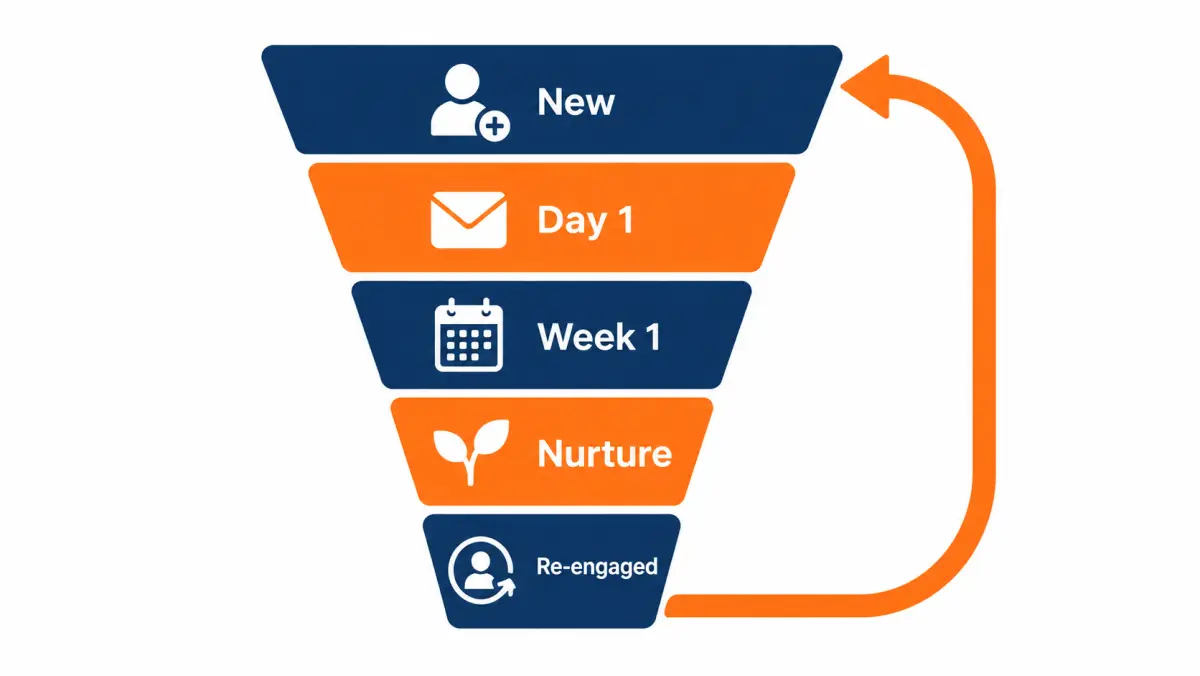
The nurture section above gives a schedule. This section covers triggers, content and how to measure re-engagement.
Trigger-based touches
Calendar-based nurture is fine, but triggers work better because they give a reason to reach out:
| Trigger | Why it works | Example message |
|---|---|---|
| Start of summer | Bills rise; solar becomes relevant again | "Summer bills start this month. Want us to check what solar would look like for your home?" |
| Utility rate change announced | Concrete, local news | "[Utility] filed a rate change. Happy to walk through what it means for your bill." |
| Neighbor installation nearby | Social proof, if allowed | Only use with care and without sharing private details |
| Homeowner opened a past email | Signal of interest | A short personal follow-up from the setter |
| Financing options changed | New way to make it work | "We have new payment options this year. Want a quick look?" |
Content that earns replies
- A short explanation of how net metering or time-of-use rates work with their utility, linked to a public source.
- A plain answer to "what changed after 25D" for homeowners, with a link to the IRS page.
- A checklist for evaluating solar quotes.
- A one-question email: "Is solar still on your list this year? Reply yes or no."
Measuring re-engagement
Track nurture separately from the first week:
| Metric | Definition |
|---|---|
| Re-engagement rate | Leads that replied or booked during nurture ÷ leads in nurture |
| Nurture appointment rate | Appointments from nurture ÷ leads in nurture |
| Time to respond to re-engaged leads | Minutes from reply to first call |
| Opt-out rate in nurture | Opt-outs ÷ messages sent |
If opt-outs rise, slow down. If re-engaged leads wait hours for a call, you are throwing away the cheapest appointments you will ever get.
How do you troubleshoot slow response and low contact rates?
Troubleshoot by finding where the time or the contact is lost: between the homeowner's submission and delivery, between delivery and first dial, or between first dial and first conversation. Each stage has different causes and fixes. Work through them in order with timestamps, and change one thing at a time so you know what worked.
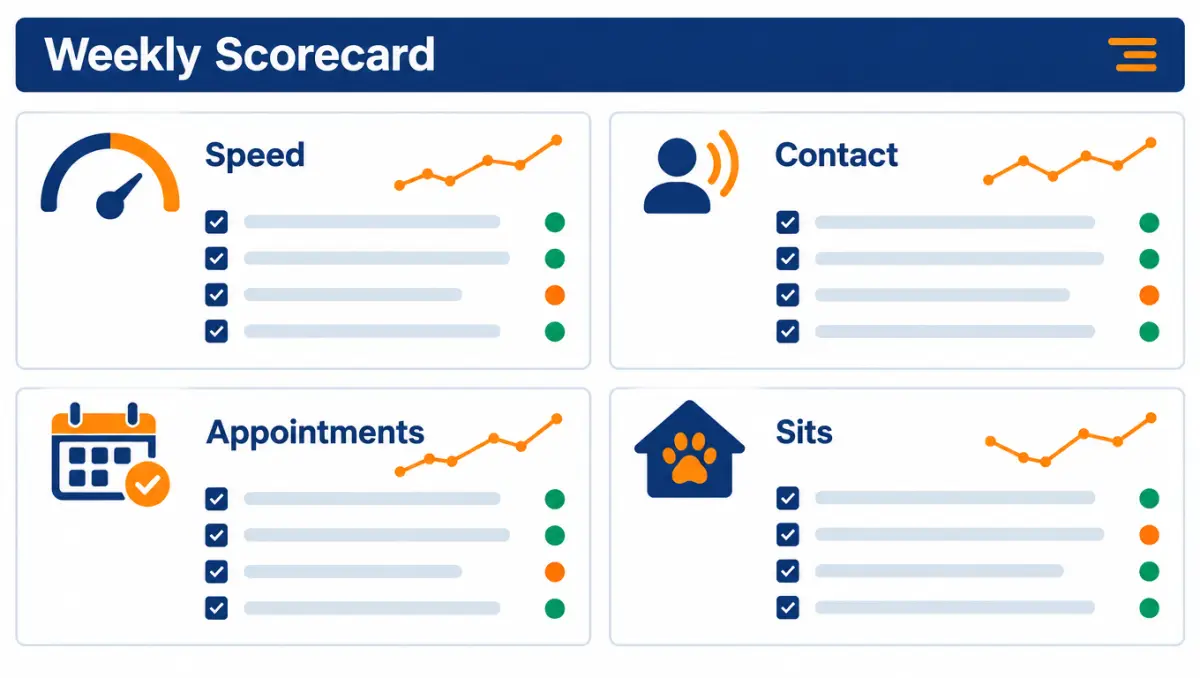
Symptom and cause table
| Symptom | Likely causes | What to check | Fix |
|---|---|---|---|
| Leads appear in CRM long after the homeowner submitted | Vendor batch delivery; import job on a schedule; email parsing delays | Compare vendor submit time to CRM created time on 20 leads | Switch to direct posting; ask vendor about real-time delivery |
| Leads in CRM but first dial is slow | No alert; manual assignment; setters busy on follow-ups | Time from created to assigned to first dial | Auto-assign; priority queue; escalation alert |
| Fast dials, but low contact | Spam labeling; wrong numbers; calling at bad times; poor lead quality | Answer rate by phone number; disposition mix; time of day | Register numbers; vary times; text after missed calls; request credits for bad data |
| Good contact, few appointments | Script; setter skill; poor fit leads; pressure tactics | Listen to 10 recorded first calls | Coaching; revise the bill question and booking ask |
| Good appointments, low sits | Soft bookings; missing decision-makers; no reminders | No-show reasons; confirmation steps completed | Confirmation sequence; booking questions |
| One setter much slower | Workload, habits, unclear expectations | Per-setter speed and call volume | One-to-one coaching; adjust routing |
| One source much worse | Lead quality, delivery delay, consent issues | Source-level audit table | Raise with vendor with data; adjust spend |
| Weekend leads perform badly | Nobody works them until Monday | Weekend bucket in audit | Weekend coverage or acknowledgment text plus Monday queue |
A five-question diagnostic
When the scorecard dips, ask these in order:
- Did lead volume change? A jump in volume with the same staff slows everyone down.
- Did delivery change? New vendor, new form, new integration, new CRM setting.
- Did staffing change? Someone out sick, a new hire ramping, a schedule shift.
- Did the phones change? New numbers, a carrier change, a spike in spam labels.
- Did the leads change? New source, new filters, new geography, a change in season.
Most dips have one cause, and it is usually one of the first three.
When to blame the leads and when to blame the process
It is tempting to blame lead quality for everything. The audit protects you from that, and it protects the vendor relationship. A fair rule:
- If you dialed within five minutes, ran the full cadence and still could not reach the homeowner, and the number was valid, that is a contact problem you should discuss with the vendor using data.
- If the number was disconnected, wrong, or the lead was outside your filters, request a credit within the window.
- If you dialed hours later and ran two attempts, the problem starts with your process.
Our guide to vetting solar lead providers covers how to run a fair test batch.
What should a speed-to-lead standard operating procedure include?
A speed-to-lead SOP should define who owns new leads during every staffed hour, the response target, the exact call-text-voicemail sequence, the cadence and stop rule, disposition codes, opt-out handling, escalation, after-hours rules and how the scorecard is reviewed. Keep it to two pages so setters actually use it.
Below is a template you can copy and fill in. Replace bracketed items with your own policy, and have counsel review anything involving calling hours, texting and consent.
SOP template
1. Purpose. Contact every new solar lead quickly and helpfully, book qualified homeowners for a consultation, and respect every opt-out.
2. Scope. All real-time leads from [vendors], website forms and inbound calls. Aged leads follow the aged-lead procedure. Live transfers follow the transfer procedure.
3. Ownership.
- During [staffed hours], new leads route automatically to the next available setter.
- If not dialed within [3] minutes, the lead opens to all setters.
- If not dialed within [5] minutes, the [sales manager] is alerted.
- After hours, [answering service / autoresponder and morning queue] applies.
4. Response target. First dial within [5] minutes of delivery during staffed hours. First dial within [15] minutes of the start of the next shift for after-hours leads.
5. First contact sequence.
- Call. If no answer, leave voicemail [template A].
- Send text [template 1], if permitted under our compliance process.
- Call again within [5 to 10] minutes.
6. Cadence. Follow the [7]-day cadence in the attached calendar. Vary time of day. Stop after [day 7] or on opt-out, then move to nurture if consent allows.
7. Dispositions. Use only the approved list. Every call gets a disposition before the next call.
8. Opt-outs. Any request to stop calls or texts is recorded during the conversation and applied across all channels immediately.
9. Credits. Report disconnected numbers, wrong contact details and out-of-filter leads to the vendor within [7] days.
10. Calling and texting windows. Set by the homeowner's local time per the state rule library maintained by [owner], reviewed by counsel [quarterly].
11. Reporting. The weekly scorecard is reviewed every [Monday]. The full audit runs [monthly].
12. Changes. Only [role] may change routing, windows or templates. Changes are logged with a date.
Handoff note template (setter to consultant)
Homeowner: Dana Smith, 14 Maple St, [city, ZIP] Owners attending: Dana and Mark Appointment: Sat 10:00 a.m., in person Bill: ~$250 summer, ~$100 winter; [utility] Roof: replaced ~6 years ago; one tree in back, front open Motivation: rising bills; neighbor installed Questions raised: asked about tax credit (gave standard answer) Bill photo: received / not received Source: [vendor], exclusive real-time Notes: prefers texts after 5 p.m.
How do you test a new lead vendor's leads for speed fairly?
Test a new vendor fairly by working its leads exactly like your existing ones: same routing, same five-minute target, same full cadence, same dispositions. Track delivery delay, contact rate, appointment rate and sit rate side by side with your current sources over at least a few weeks, and request credits for covered issues within the window.
Test plan
| Step | What to do | Why |
|---|---|---|
| 1. Agree terms in writing | Filters, delivery method, credit policy and window | Avoids disputes later |
| 2. Send a test lead | Submit one yourself or ask the vendor to send a test | Confirms the integration end to end |
| 3. Tag the source | Unique source field in CRM | Clean attribution |
| 4. Work identically | No special treatment, good or bad | Fair comparison |
| 5. Log delivery delay | Homeowner submit time vs. delivery time | Separates vendor speed from your speed |
| 6. Run the full cadence | Every lead | Contact rate is meaningless without it |
| 7. Request credits promptly | Within the stated window | Keeps costs accurate |
| 8. Compare at the end | Contact, appointment, sit and cost per held appointment | Decide with data |
Our offer for new buyers reads: "No long-term contracts. Start with a test batch, scale when the numbers work." That is the right structure for any vendor test: small enough to afford, large enough to measure, and no commitment until the numbers are in.
How many leads is enough?
There is no magic number, but very small tests swing wildly. A batch where two or three appointments decide whether the test "worked" is too small to judge. If you can, test with enough volume to see a few dozen contacts, and judge over at least two to three weeks so day-of-week and weather effects even out. Then decide whether to scale, adjust filters or stop.
Illustrative case walkthroughs: three teams fixing speed to lead
The three walkthroughs below are composite, illustrative scenarios built to show how the ideas in this guide fit together. They are not real clients, and the numbers are not results anyone should expect.
Walkthrough A: the owner who was always on the roof
Situation. A two-crew residential installer. The owner handled every new lead personally. Leads were bought weekly, but the owner spent most days on job sites.
Audit. Over four weeks, fewer than a third of leads were dialed within 30 minutes. Evening leads waited until the next morning. A handful were never called because they arrived during a busy install week.
Changes. The owner set up an instant acknowledgment text (after a compliance review), blocked out three 20-minute call windows a day, and hired a part-time evening setter working remotely from 4 to 8 p.m. The setter booked appointments directly into the owner's calendar using a shared template.
What they measured. Share of leads dialed within 30 minutes, appointment rate by bucket, and cost per held appointment.
Lesson. The owner did not need a call center. They needed one person covering the hours they could not.
Walkthrough B: the fast team with the slow tail
Situation. A mid-size team of five setters with a good median response time and a manager who believed speed was solved.
Audit. The median was strong, but roughly one lead in eight waited over two hours. Almost all of those came in during two windows: 12 to 1:30 p.m. and 5 to 6 p.m., when setters took breaks and handed off shifts.
Changes. Staggered lunches, a 30-minute shift overlap at 5 p.m., and an escalation alert to the manager at five minutes.
Lesson. The average hid the problem. The slowest-10% metric found it.
Walkthrough C: the shared-lead race
Situation. A small team bought mostly shared leads because they were cheaper per lead. The team dialed within about 20 minutes on average.
Audit. Contact rate on shared leads was far below exclusive leads, and homeowners often said another company had already called.
Changes. The owner ran the cost calculator on cost per held appointment for each product, then shifted part of the budget to exclusive leads, keeping a smaller shared order that the team could dial with an auto-call on arrival.
Lesson. If you cannot win the race, stop paying to enter it. See exclusive vs shared solar leads.
What is a 30-day plan to improve solar speed to lead?
A 30-day plan has four weekly steps: measure your current response times, fix routing and delivery, fix staffing gaps and scripts, then re-measure and lock in the changes. One focused month with a before-and-after audit usually tells you whether speed was holding back your appointments and what it is worth to keep improving.
Week 1: measure
- Export four weeks of history if you have it, or start logging today.
- Build the bucket table, plus slices by hour, day, source and setter.
- List the three biggest gaps by number of leads affected.
Week 2: fix delivery and routing
- Move every source to direct posting into the CRM and dialer if possible.
- Turn on automatic assignment and a three-minute escalation.
- Add new-lead alerts with sound on every setter's screen.
- Confirm opt-out handling works across calls and texts.
Week 3: fix people and scripts
- Stagger shifts and breaks to cover the gaps found in week 1.
- Decide on after-hours coverage.
- Train the first-call script and the objection quick-reference.
- Start the weekly scorecard review.
Week 4: re-measure and lock in
- Re-run the audit with the same buckets.
- Compare contact, appointment and sit rates in the hours you changed.
- Write or update the two-page SOP.
- Decide the next change, or decide speed is fixed and move to lead quality or close rate.
30-day checklist
- Timestamps verified and time zones aligned
- Bucket table built, including never-dialed leads
- Gaps ranked by number of leads affected
- All sources posting directly where possible
- Auto-assignment and escalation live
- Shifts and breaks staggered
- After-hours option chosen and running
- First-call script and objection guide trained
- Opt-out handling tested
- Credit requests process in place
- Weekly scorecard reviewed
- Re-audit completed and compared
- SOP written and shared
When you are ready to talk about lead products that fit how fast your team can respond, book a call. Pricing is confirmed by ZIP on your call.
Solar speed-to-lead glossary
These are the terms used throughout this guide, defined the way we use them so your reports and vendor conversations line up. Definitions are practical, not legal; for consent and compliance terms, rely on counsel and the primary sources linked in our TCPA compliance guide.
| Term | Meaning |
|---|---|
| Speed to lead | Time from when a lead is delivered to when your team first dials, and ideally first speaks to, the homeowner |
| Time to first dial | Minutes from lead creation to the first outbound call attempt |
| Time to first conversation | Minutes from lead creation to the first two-way conversation |
| Contact rate | Leads with at least one two-way conversation ÷ leads delivered |
| Appointment rate | Appointments set ÷ leads delivered |
| Sit rate (show rate) | Appointments held ÷ appointments set |
| Close rate | Signed contracts ÷ appointments held |
| Cadence | The planned sequence of calls, texts, voicemails and emails after a lead arrives |
| Disposition | The recorded outcome of a call attempt |
| Round-robin | Routing that assigns new leads to setters in a fixed rotation |
| Availability-based routing | Routing that assigns new leads to whoever is free |
| Escalation | Automatic reassignment or alert when a lead is not dialed within a set time |
| Auto-dial on arrival | Dialer feature that starts a call as soon as a new lead lands |
| Exclusive lead | A lead sold to one company only |
| Shared lead | A lead sold to more than one company |
| Aged lead | An older lead sold after its initial window, usually at a lower price |
| Live transfer | A screened homeowner connected to your phone while still on the line |
| Booked appointment | A consultation already scheduled with the homeowner by a vendor |
| Nurture | Lower-frequency follow-up after the active cadence ends |
| Credit (replacement) | A vendor's replacement for a lead that fails stated criteria within a set window |
| Answer rate | Calls answered ÷ calls placed; affected by caller ID and spam labeling |
| STIR/SHAKEN | Caller ID authentication framework used by US carriers |
| CNAM | Caller name shown on the recipient's phone where supported |
How do you hire appointment setters who respond fast?
Hire setters who are reliable during the hours your leads arrive, comfortable calling strangers within seconds of an alert, and able to hold a calm, curious five-minute conversation. Test those traits directly with a timed role-play and a schedule check, rather than relying on sales experience alone. Pay structures should reward booked appointments that sit, not raw dials.
Traits that matter for speed to lead
| Trait | Why it matters | How to test it in hiring |
|---|---|---|
| Schedule fit | Coverage gaps are the top cause of slow response | Ask for exact availability, including evenings and Saturdays |
| Comfort with immediate calls | Hesitation adds minutes to every lead | Give a mock lead alert mid-interview and ask them to "call" right away |
| Listening | The bill and motivation questions only work if they hear the answer | Role-play a homeowner who mentions a spouse and a busy week; see if they pick it up |
| Honesty under pressure | Setters asked about price or tax credits must not guess | Ask the price question in role-play; look for "I don't want to guess" |
| Clean record-keeping | Sloppy notes slow the consultant and the next call | Have them write a handoff note from the role-play |
| Resilience | Many attempts end in voicemail | Ask how they handle a long run of no-answers |
A 20-minute interview role-play
- Brief (2 minutes). Give the candidate the one-page script and a mock lead: name, ZIP, form answers.
- Alert (instant). Say "new lead" and start a timer. Note how fast they begin.
- Call (8 minutes). Play a homeowner who is busy, asks about price, and mentions a spouse.
- Handoff note (5 minutes). Candidate writes the note using your template.
- Debrief (5 minutes). Ask what they would do differently. Coachability matters more than a perfect first try.
Compensation that supports speed and quality
Pay plans shape behavior. A plan that pays only per dial rewards speed without care. A plan that pays only on closed sales punishes setters for things they do not control. Many installers use a base wage plus a bonus per appointment that actually sits, sometimes with a smaller team bonus tied to the share of leads dialed within the target. Whatever you choose, check it against your state's wage rules and have it reviewed by your accountant or counsel.
| Pay element | Encourages | Watch out for |
|---|---|---|
| Hourly base | Showing up for scheduled coverage | Little push on results by itself |
| Per appointment set | Booking | Soft bookings that do not sit |
| Per appointment held | Quality bookings and confirmations | Setter frustration over no-shows outside their control |
| Team speed bonus | Covering each other's leads | Needs fair, visible measurement |
Keeping fast setters
Turnover is a hidden speed problem: every new hire spends weeks ramping. The things that tend to keep good setters are predictable schedules, fair lead routing (no cherry-picking by favorites), visible credit for appointments that close, and a manager who coaches from recordings rather than guessing. Review schedules with the team before peak season so coverage changes do not arrive as surprises.
What should a weekly speed-to-lead scorecard include?
A weekly speed-to-lead scorecard should show median and slowest response time, percentage of leads dialed within five minutes, contact rate, appointment rate, sit rate and cost per held appointment, split by lead source and setter. Review it every week with the team, fix the slowest hours first, and track whether changes move appointments, not just dials.
| Metric | Target to set (yours) | This week | Last week |
|---|---|---|---|
| Leads received | |||
| % dialed within 5 minutes | |||
| Median time to first dial | |||
| Slowest 10% time to first dial | |||
| Contact rate | |||
| Appointment rate | |||
| Sit rate | |||
| Cost per held appointment | |||
| Opt-outs and complaints | |||
| Credits requested from vendors |
Set your own targets from your baseline. Review by hour of day too: the scorecard often reveals one gap, such as lunch or evenings, that costs more than everything else combined.
Scenarios by installer size
| Installer profile | Typical speed problem | Practical fix |
|---|---|---|
| Owner-operator | Owner is on a roof when leads arrive | Answering service or booked appointments |
| Small team, one setter | Gaps at lunch, evenings and weekends | Staggered hours, after-hours autoresponder, callback queue |
| Mid-size, several setters | Leads routed manually, slow handoffs | Auto-routing, round-robin, live dashboard |
| Large, multi-state | Time zones and state rules | Dialer set to homeowner local time, state rule library, compliance review |
When the numbers say speed is the bottleneck, fix staffing before you buy more leads. When speed is fine and contact is poor, look at your sources. Ready to talk through either? Book a 30-minute call; pricing is confirmed by ZIP on your call.
FAQ
How fast should I call a solar lead?
Aim to call within five minutes of the lead arriving, and follow with a voicemail and a text if they do not answer. Older studies suggest contact odds fall quickly with delay, but they are not solar-specific, so measure your own contact rate by response time to confirm what matters in your market.
What is speed to lead?
Speed to lead is the time between a prospect submitting a request and your company making contact. For solar, it is usually measured from the moment the lead reaches your CRM to the first dial and to the first two-way conversation.
How many times should I call a solar lead?
A common approach is several attempts on day one, then roughly one attempt a day through the first week, before moving to a slower nurture track. Stop immediately if the homeowner opts out, and check state limits on call frequency with counsel.
What is a good solar close rate?
It depends on lead type, market, team and definitions, and published figures are often unsourced. Define close rate as signed contracts divided by appointments held, measure it by lead source over a full sales cycle, and compare vendors on cost per sale rather than a generic benchmark.
Should I text solar leads?
Texting can raise contact rates, but only within the consent you have: generally, automated marketing texts need prior express written consent. Identify your company, respect quiet hours, include opt-out instructions and honor every opt-out. Have counsel review your setup; this is not legal advice.
What should I say on a first solar lead call?
Introduce yourself and your company, remind them they asked about solar, ask about their monthly electric bill and whether they own the home, then offer two specific appointment times. Avoid promising savings or tax credits on the first call.
Are the five-minute speed-to-lead studies reliable?
They are useful but dated. The most-quoted five-minute figure comes from a 2007 vendor study, and the Harvard Business Review audit dates from 2011. Neither is about solar homeowners. Use them as a reason to measure your own response-time buckets.
Is it better to buy appointments if I cannot respond quickly?
Often, yes. If your team cannot reliably call within minutes, booked appointments or live transfers move the first-contact work to the vendor. Compare cost per held appointment and cost per sale across products before deciding.
Does caller ID affect solar lead contact rates?
It can. Homeowners are less likely to answer unknown or out-of-area numbers, and numbers flagged as spam by carriers or apps often go unanswered. Use registered local numbers, monitor how your numbers are labeled, and rotate or remediate numbers that get flagged rather than calling more often.
Should setters or closers make the first call?
Usually setters. A dedicated setter can respond within minutes all day, while closers are often in appointments. Closers taking first calls tends to slow response and pull them away from meetings. Smaller teams without setters should consider an answering service or booked appointments.
How long should I keep working a solar lead?
Run an active cadence for about a week, then move the lead to a slower nurture track for several months within the scope of its consent. Remove it sooner if the homeowner opts out, says they are not interested, or the number turns out to be wrong.
What is a good time to first dial for shared solar leads?
For shared leads, aim to dial within one to two minutes, ideally with an auto-dial on arrival, because other buyers are calling the same homeowner. If your team cannot do that reliably, compare cost per held appointment against exclusive leads or booked appointments before buying more shared volume.
How do I measure speed to lead in my CRM?
Record the lead created time, first dial time and first two-way conversation time for every lead, in the homeowner's local time. Bucket leads by time to first dial and compare contact and appointment rates across buckets. Include a row for leads that were never dialed.
Should an answering service handle my solar leads after hours?
It can, if the service is trained on a short solar script, can book real calendar slots and posts a structured note into your CRM. A generic message-taking service rarely books appointments. Measure after-hours appointment and sit rates separately to judge it.
Does speed to lead matter for aged solar leads?
Not in the minutes sense. Aged leads are older inquiries, so what matters is working the whole batch promptly once you buy it, with a script that acknowledges the time gap and a compliance check on the consent that came with them.
Can I improve speed to lead without hiring more people?
Often, yes. Direct lead posting into your CRM, automatic routing, escalation alerts and staggered breaks cost little and usually shorten the slow tail. Run a four-week audit first so you fix the hours where most leads actually wait, then decide whether extra staff is still needed.