How to Work Solar Leads: The Follow-Up Process, CRM Setup and Management System
How to work solar leads from delivery to signed contract: CRM setup, pipeline stages, dispositions, qualification, follow-up process, routing and reporting.
Updated · 81 min read
In this guide (36 sections)
- What does it mean to "work" a solar lead?
- What does the full lifecycle of a solar lead look like?
- How should you set up a solar CRM for leads?
- Which lead dispositions should every solar team use?
- How do you qualify a solar lead on the phone?
- How should solar leads be routed and assigned?
- What is a good solar lead follow-up process?
- How do you book solar appointments that actually sit?
- How should setters hand off leads to closers?
- What happens at the sit, and how do you track it?
- How do you nurture and recycle solar leads that are not ready?
- How do you work each type of solar lead differently?
- Who should do what on a solar lead team?
- What should a solar sales manager check every day and every week?
- How do you test a new solar lead source fairly?
- Which CRM automations save the most time for solar teams?
- How do you keep solar lead data clean?
- How does compliance fit into the daily lead process?
- What does a solar lead management process look like by installer size?
- What do solar lead conversion rates look like?
- How should setters handle objections before booking?
- How do you train new setters to work solar leads?
- What happens after a solar lead signs?
- How do you write a solar lead playbook for your team?
- How many solar leads can your team actually work?
- How should seasons change the way you work solar leads?
- What are the most common solar lead management problems, and how do you fix them?
- What does a 30-60-90 day plan to fix your lead process look like?
- What does working one solar lead look like from start to finish?
- What templates help with proposal follow-up and close-out?
- Glossary of solar lead management terms
- Should you outsource working your solar leads?
- How should you use call recordings and AI tools in lead management?
- How should you adjust lead handling for different markets?
- What is the short checklist for working solar leads?
- FAQ
Working solar leads means running every lead through the same written system: it lands in your CRM in real time, a named person contacts it fast, the result is logged with a standard disposition, qualified homeowners get booked and confirmed, and anyone not ready goes into a dated nurture track. As of October 2026, the installers who get the most from purchased leads are rarely the ones with the best scripts. They are the ones whose process does not leak. This guide covers the full solar lead management system: CRM setup, pipeline stages, dispositions, qualification, routing, appointment confirmation, post-sit follow-up, nurture, reporting, and how the playbook changes by lead type and team size.

This page is the operating manual for what happens after a lead is bought. If you are still deciding where leads come from, start with our guide to buying solar leads. For the first five minutes after a lead arrives, including first-call timing, the day-one cadence and voicemail and text templates, read solar speed to lead. We link to that page rather than repeat it here. This guide picks up the rest of the lead's life, from the first logged attempt to a signed contract or a clean close-out.
Key takeaway: A lead is an asset you paid for. Working it well means you can say, for every single lead, who owns it, what happened on each attempt, what stage it is in, and what the next dated action is. If you cannot answer those four questions from your CRM, you do not have a lead process yet.
What does it mean to "work" a solar lead?
To work a solar lead is to move it, on purpose, from raw contact record to a decision: booked appointment, signed contract, scheduled nurture, or documented dead end. Working a lead includes contact attempts, qualification, booking, confirmation, the sit, proposal follow-up and close-out. Calling a few times and giving up is not working a lead.
Most installers who say "these leads are bad" are describing a process problem at least some of the time. That is not always true. Some lead sources really are poor, and our guide to vetting solar lead providers covers how to tell. But you cannot judge a source until you have worked it consistently, because a weak process makes every source look weak.
The five jobs inside "working a lead"
Break the work into five jobs. Each one has an owner, a definition of done and a metric.
| Job | Definition of done | Typical owner | Metric to watch |
|---|---|---|---|
| Contact | Two-way conversation with the person who submitted the request | Setter or inside sales | Contact rate |
| Qualify | Ownership, bill, roof, decision makers and timeline confirmed | Setter | Qualified rate of contacted |
| Book | Appointment on the calendar with all decision makers | Setter | Set rate of qualified |
| Sit | Consultation held, needs and numbers reviewed | Closer or consultant | Show rate (sit rate) |
| Close | Signed agreement, or a dated follow-up with a reason | Closer | Close rate of sits |
When results disappoint, this table tells you where to look. A low contact rate is a speed, caller ID or data problem. A low qualified rate points at targeting or filters. A low set rate is a script or skill problem. A low show rate is a confirmation problem. A low close rate is usually a pricing, proposal or closer problem, not a lead problem.
Why a system beats talent
A great closer with no system will still lose leads. They forget to call back the homeowner who said "try me Thursday." They do not see the lead that arrived at 7:40 p.m. They keep their notes in a notebook that leaves the company when they do. A written system with a CRM behind it protects you from all three. It also lets you hire average people and get above-average results, which matters when setter turnover is high.
What this guide does not cover
To keep this page useful and avoid repeating our other guides:
- First-contact speed, day-one call timing, voicemail, text and email templates: see solar speed to lead.
- Consent records, calling hours, Do Not Call and texting rules: see solar leads and TCPA compliance.
- Cost per sale and break-even math: see solar lead ROI.
- Choosing between lead types: see exclusive vs shared solar leads, aged solar leads, solar live transfer leads and solar appointments.
What does the full lifecycle of a solar lead look like?
A solar lead moves through about eight stages: new, attempting, contacted, qualified, appointment set, sat, proposal out, and closed (won or lost), with a side path into nurture. Each stage should have an entry rule, an exit rule and a maximum age. Leads that sit in one stage past its maximum age are your biggest source of waste.
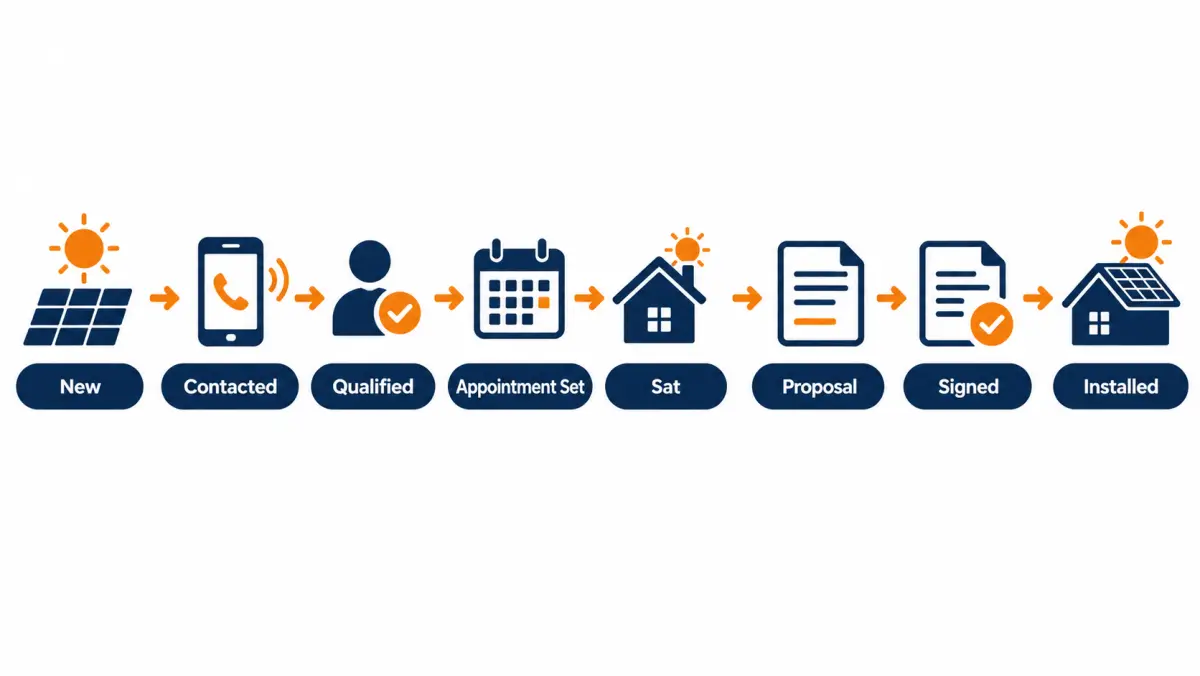
The stages, defined
Write these definitions down and put them in the CRM's stage descriptions so nobody argues about what "qualified" means.
| Stage | Enters when | Leaves when | Suggested max age |
|---|---|---|---|
| New | Lead is delivered to CRM | First dial is logged | Minutes, not hours |
| Attempting | First attempt logged, no conversation yet | Two-way conversation, or attempt plan exhausted | 7 to 10 days |
| Contacted | Real conversation with the requester | Qualified, disqualified, or nurture | 2 to 3 days |
| Qualified | Ownership, bill, roof, decision makers, timeline confirmed | Appointment booked or nurture | 1 to 2 days |
| Appointment set | Date, time, location and all decision makers confirmed | Sat, no-show, or rescheduled | Until the appointment date |
| Sat | Consultation held | Proposal delivered or closed lost | 1 to 3 days |
| Proposal out | Written proposal delivered | Signed, lost, or nurture | 14 to 30 days, set your own |
| Closed won | Agreement signed | Handed to operations | n/a |
| Closed lost | Documented reason | Archive or long nurture | n/a |
| Nurture | Not ready now, permission to follow up | Re-engaged into sales, or opted out | Review every 30 to 90 days |
The maximum ages above are starting points, not industry standards. Set your own based on your sales cycle, then report on every lead that breaks them.
Why "maximum age" matters
Leads do not usually die because someone decided to give up. They die because nobody decided anything. A lead stuck in "contacted" for three weeks has no next action, so it never gets one. Maximum ages force a decision: book it, nurture it, or close it out with a reason. A simple daily "overdue leads" view in your CRM, filtered by owner, does more for lead management than any new script.
One lead, one owner, one next action
Three rules hold the lifecycle together:
- One owner. Every open lead has exactly one named person responsible. Not "the team." When a lead moves from setter to closer, ownership changes in the CRM at the same moment.
- One next action. Every open lead has a dated task. If there is no task, the lead is either closed or broken.
- One source of truth. Notes, call recordings, texts and emails attach to the CRM record. Nothing important lives only in a rep's phone.
Illustrative example: where one lead goes missing
This is an illustrative example, not a real client.
A homeowner submits a request on a Tuesday afternoon. The setter calls within minutes and gets voicemail, texts, and calls twice more that day. Wednesday the homeowner answers, says the spouse needs to be there, and asks for a call back Friday after 5. The setter writes "call Fri" in the notes field but does not create a task. Friday the setter is out sick. Nobody else can see a task, because there isn't one. The following Tuesday the homeowner signs with a competitor who called on Friday.
Nothing here was a lead quality problem. A dated task assigned to the setter, with a rule that sick-day tasks are reassigned each morning, would have kept that lead alive. That is what "working the lead" means in practice.
How should you set up a solar CRM for leads?
A solar CRM for leads needs five things before anything else: real-time lead intake with source tagging, defined pipeline stages, required disposition codes, dated tasks with owners, and reporting by source. Brand matters less than configuration. A simple CRM set up well beats an expensive one where reps type free-form notes and nobody can report on anything.
Choose by workflow, not by feature list
Solar teams use a wide range of systems: general sales CRMs, solar-specific CRMs that combine sales with design and project tracking, and lighter tools built around a dialer. We are not recommending a product, and you should confirm current features and pricing with each vendor directly. Instead, test any CRM against this checklist:
| Requirement | Why it matters | How to test it in a trial |
|---|---|---|
| API or webhook lead intake | Leads must arrive in seconds, not via a daily spreadsheet | Send a test lead from your vendor and time it |
| Source and campaign fields | You cannot measure ROI by source without them | Check the fields map automatically on intake |
| Custom pipeline stages | Your stages must match your process | Build the stage table above in the trial |
| Required disposition on every call | Prevents blank, useless call logs | Try to close a call without a disposition |
| Tasks with due dates and owners | Prevents the "call Fri" failure | Create, reassign and bulk-reassign tasks |
| Click-to-call or dialer integration | Logs attempts automatically | Make five calls and check they all logged |
| Two-way texting inside the record | Keeps texts with the lead, not on a personal phone | Send and receive a text in the trial |
| Calendar booking with reminders | Supports appointment confirmation | Book a test appointment, check reminders fire |
| Opt-out handling | Compliance and list hygiene | Reply STOP to a test text and check the record |
| Reports by source, rep and stage | Lets you judge sources and people fairly | Build the weekly scorecard described later |
| Duplicate detection | Prevents two reps calling the same homeowner | Submit the same test lead twice |
| Mobile app for field closers | Closers update outcomes from the driveway | Update a sit result from a phone |
If a CRM fails the first three rows, keep looking. If it fails the rest, check whether an integration fills the gap.
The minimum field set
Keep required fields short or reps will skip them or type junk. This set covers most residential programs:
Captured at intake (from the lead vendor):
- First and last name, phone, email, street address, ZIP
- Lead source (vendor name), campaign or program, lead type (exclusive, shared, aged, transfer, appointment)
- Delivery timestamp
- Consent record or certificate ID, if your vendor supplies one
- Any self-reported answers: homeowner status, average bill, roof type, shade, credit range if collected
Captured by your team:
- Owner (setter, then closer)
- Stage
- Disposition of last attempt
- Number of attempts
- First contact timestamp
- Utility company
- Monthly bill (verified on the call)
- Decision makers (names)
- Timeline (now, 1 to 3 months, 3 to 6 months, later)
- Financing preference (cash, loan, lease or PPA, unknown)
- Appointment date and type (in-home, virtual)
- Closed reason (won or lost reason code)
Source tagging is not optional
Every lead must carry its source from the moment it lands. If you buy from two vendors and also run your own ads, you need three different source values, plus a campaign or program value under each. Without that, you cannot compare cost per sale across sources, and you cannot file accurate replacement requests. Our solar lead ROI guide shows the math that depends on these fields.
Connect delivery to the CRM directly
Ask your vendor to post leads into your CRM through an API or webhook, not to email them. Email delivery adds minutes or hours, gets buried, and breaks source tagging. Our own program offers real-time delivery to your CRM, dialer, email, or SMS; CRM or dialer delivery is the better choice for any team working more than a handful of leads a week. When you set up delivery, send one test lead end to end and confirm every field lands where you expect.
Permissions and visibility
Decide who can see what:
- Setters see the leads assigned to them plus a shared "unassigned" queue.
- Closers see their appointments and the full history of each lead.
- Managers see everything, including the overdue view and source reports.
- Nobody can delete a lead record. Leads get closed with a reason, never deleted. Deleted leads destroy your reporting and your ability to prove contact history.
A 30-day CRM rollout plan
For a team moving from spreadsheets or a messy CRM, this sequence keeps disruption low:
| Week | Focus | Done when |
|---|---|---|
| 1 | Stages, dispositions, required fields, source values | A test lead flows from intake to closed lost with every field filled |
| 2 | Lead delivery integration, dialer or click-to-call, texting | Live leads arrive in under a minute and every call logs automatically |
| 3 | Tasks, automations for new-lead alerts and overdue alerts, calendar booking | No open lead exists without a dated task |
| 4 | Reports: daily overdue view, weekly scorecard by source and rep | Manager runs the first weekly review from the CRM, not from a spreadsheet |
Train reps at the end of week one and again at the end of week three. Keep the old system read-only for 60 days so nobody loses history.
Which lead dispositions should every solar team use?
Dispositions are the standard result codes reps choose after every attempt. A good set is short (about 12 to 18 codes), mutually exclusive, and tied to an automatic next step. They turn call logs into data you can report on, they drive follow-up tasks, and they are the evidence you need when you request replacement credits from a vendor.
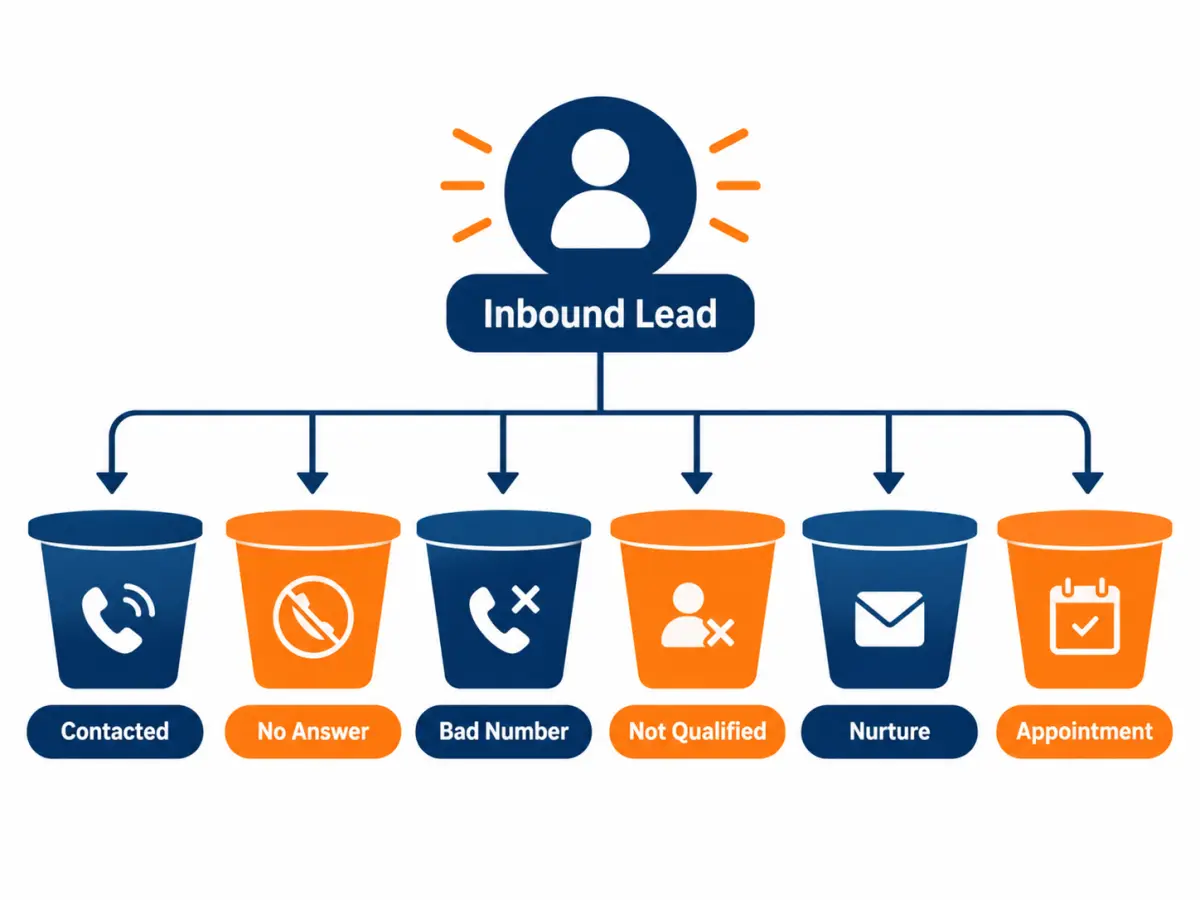
A starter disposition set
Use this as a template and adjust names to fit your CRM.
| Disposition | Meaning | Automatic next step |
|---|---|---|
| No answer, voicemail left | Rang through, voicemail left | Next attempt per cadence |
| No answer, no voicemail | Rang through, no voicemail option or full box | Next attempt per cadence, add text |
| Busy or fast busy | Line busy or network error | Retry later the same day |
| Wrong number | Person answering is not the requester | Flag for replacement review |
| Disconnected | Number not in service | Flag for replacement review |
| Contacted, call back requested | Spoke to requester, asked for a specific time | Task at the requested time |
| Contacted, not interested | Spoke to requester, declined | Close lost, reason "not interested" |
| Contacted, did not request | Says they never asked to be contacted | Stop calling, flag for vendor and compliance review |
| Not qualified, renter | Does not own the home | Close lost, flag for replacement review if outside filters |
| Not qualified, roof or shade | Roof unsuitable or heavy shade confirmed | Close lost or nurture for reroof |
| Not qualified, bill too low | Bill below your minimum | Close lost or nurture |
| Not qualified, out of area | Outside your service ZIPs | Flag for replacement review |
| Qualified, needs decision maker | Interested but spouse or co-owner not available | Task to call when both are available |
| Appointment set | Booked with date and time | Move to "appointment set," send confirmation |
| Nurture, timing | Interested but not in the next few months | Move to nurture with review date |
| Do not contact | Asked not to be contacted again | Suppress in CRM and dialer immediately |
| Duplicate | Same person already in CRM | Merge records, flag for replacement review |
Rules that keep dispositions clean
- One disposition per attempt. Every call, every time. The CRM should not let a rep end a call without one.
- No "other." If reps choose "other" often, you are missing a code. Add it.
- Reasons, not feelings. "Rude" is not a disposition. "Not interested" is.
- Do-not-contact is instant. When a homeowner asks not to be contacted, suppress the record in the CRM, the dialer and any texting tool the same day. Confirm your obligations with counsel; our TCPA guide for solar lead buyers covers the background.
- Review weekly. Look at the share of each disposition by source. A source with a jump in "did not request" or "disconnected" deserves a direct conversation with the vendor.
Dispositions and replacement credits
Most lead vendors only replace leads for specific, documentable reasons. Our own terms, for example, offer replacement credits for disconnected numbers, wrong contact details, or leads outside your filters, reported within 7 days. Not covered: a prospect who isn't interested, doesn't answer, doesn't get financing approved, or doesn't buy. To request a credit, you reply to the lead notification (or email us) with the reason, and approved credits apply to your next batch.
Whatever vendor you use, your dispositions should map directly to their replacement reasons. If the vendor replaces "disconnected" and "wrong number," those should be separate codes in your CRM so you can pull the list in seconds. Set a weekly reminder to submit replacement requests before the window closes. Teams that skip this step often leave money on the table every month.
How do you qualify a solar lead on the phone?
Qualifying a solar lead means confirming, in a short conversation, that the homeowner owns the home, has an electric bill and roof that can support solar, has the decision makers available, and has a real timeline. Qualification protects your closer's calendar. It should take five to ten minutes and feel like help, not an interrogation.
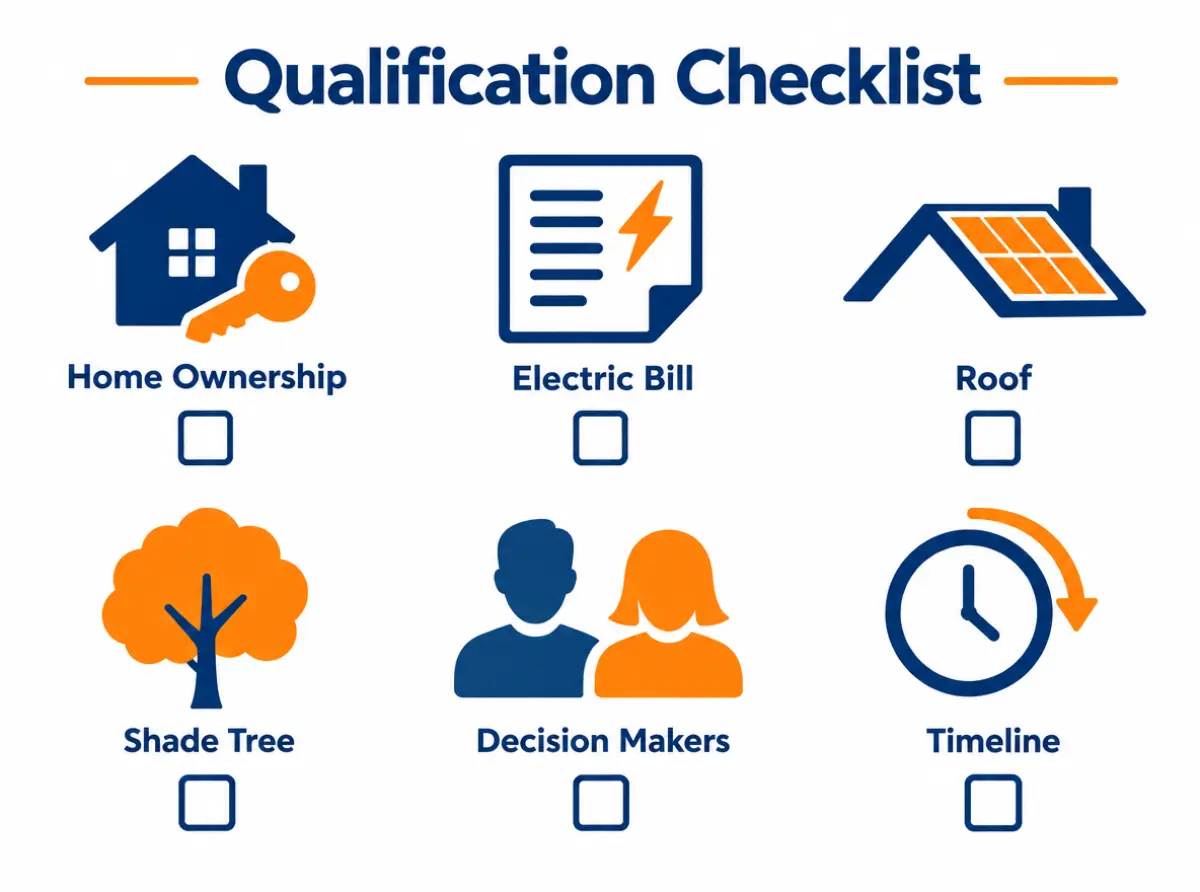
The six qualification checks
| Check | What you need to learn | Sample question |
|---|---|---|
| Ownership | They own the home and their name is on title | "Just to confirm, you own the home at [address]?" |
| Bill | Approximate monthly or seasonal electric spend, and the utility | "Roughly what does your electric bill run in a summer month? Who's your utility?" |
| Roof | Age, material, condition, any plans to replace | "How old is the roof, roughly? Any plans to redo it soon?" |
| Shade | Trees or buildings shading the main roof faces | "Is the roof mostly in sun, or are there big trees over it?" |
| Decision makers | Everyone who has to agree | "Besides you, who else would weigh in on something like this?" |
| Timeline and motive | Why now, and how soon | "What got you looking at solar right now?" |
Ask the motive question early. "What got you looking at solar?" often tells you more than every other question combined: rising bills, a new EV, a neighbor's system, a roof replacement, a battery for outages, or plain curiosity. The answer shapes everything the closer says later.
Qualification is not a credit check
Do not ask for financial account details, Social Security numbers or anything like that on a setter call. If your financing partner needs a soft credit pull, that happens later with proper disclosures and the homeowner's agreement, through the lender's own process. A setter's job is to confirm fit and interest.
Handle the "is this a sales call?" moment
Homeowners who requested information still get wary. A plain answer works best: "Yes, you asked about solar for your home, and I'm calling to see if it makes sense and set up a time to look at real numbers. If it doesn't fit, I'll tell you." Then ask the motive question.
What to do with a partial fit
Not every lead is a clean yes or no.
| Situation | Suggested handling |
|---|---|
| Roof needs replacing in the next year or two | Book if you offer reroofing; otherwise nurture with a date tied to their roof plan |
| Bill is low but they plan an EV or heat pump | Book, and ask the closer to model future load |
| Heavy shade on the main face | Ask for a satellite or photo review before booking; avoid wasting a sit |
| Renting, but owns another property | Close this lead as not qualified; if they want a quote on the property they own, start a new record for that address |
| One owner interested, spouse skeptical | Book only when both can attend; send a short info email to the skeptic first |
| Recently moved in | Ask for a few months of bills or a utility estimate; consider a virtual first meeting |
Post-25D conversations
The federal Residential Clean Energy Credit (Section 25D) does not apply to systems placed in service after 2025, as of October 2026. Homeowners still bring it up, sometimes from old articles or a neighbor's experience. Setters should not give tax advice. A simple line works: "The federal homeowner credit ended for systems installed after 2025, so we'll show you the numbers without it. For anything tax-specific, check with your tax preparer." Our guide to solar leads after the 25D credit covers how this changes targeting and messaging, and the IRS page on the Residential Clean Energy Credit is the authoritative source to point people to.
Sample qualification call flow
This is a template. Adapt it to your voice, and do not read it word for word.
- Open (15 seconds). "Hi [Name], this is [Rep] with [Company]. You asked about solar for your home on [street]. Did I catch you at an OK time?"
- Motive (30 seconds). "What got you looking into solar?"
- Bill and utility (1 minute). "What does the bill run in summer? Winter? Who's the utility?"
- Home and roof (1 to 2 minutes). Ownership, roof age, shade, any planned projects.
- People (30 seconds). "Who else would be part of the decision?"
- Timeline (30 seconds). "If the numbers made sense, when would you want it working?"
- Bridge to booking (1 minute). "Based on that, it's worth a proper look. The consultation takes about an hour, and we'd want [spouse] there too. I have Thursday at 6 or Saturday at 10. Which is better?"
- Confirm and set expectations (1 minute). Confirm address, both names, ask them to have a recent bill handy, explain what happens next.
If the lead is not qualified, say so kindly and close it with the right disposition. "Thanks for being straight with me. With the shade you're describing, I don't think solar would pay off for you, and I'd rather not waste your evening." Honest disqualification protects your reputation in the neighborhood.
How should solar leads be routed and assigned?
Route solar leads by rules, not by whoever grabs them first. Good routing sends each new lead to one available person within seconds, based on territory, lead type, language and capacity, and reassigns it automatically if nobody acts within a few minutes. Routing rules should live in the CRM so they keep working when the manager is busy.
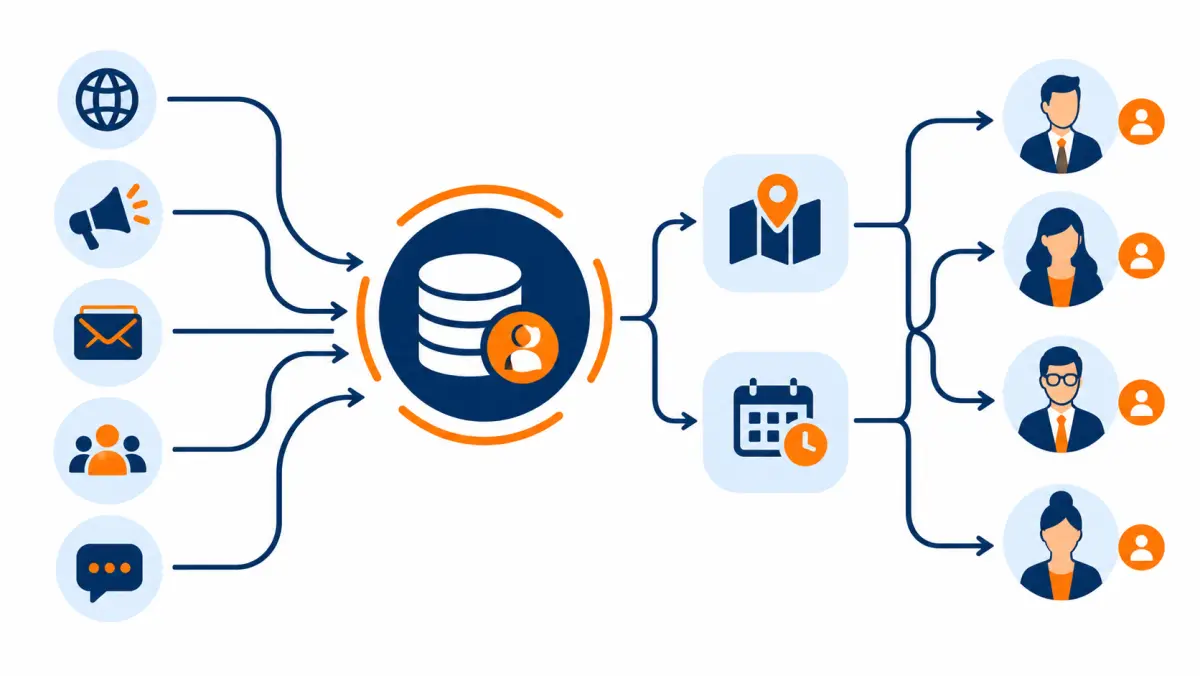
Common routing models
| Model | How it works | Best for | Watch out for |
|---|---|---|---|
| Round robin | Next lead goes to next rep in rotation | Small teams with similar skill | Sends leads to reps who are off shift unless availability is checked |
| Territory | Lead goes to the rep who covers that ZIP or county | Field-heavy teams, wide service areas | Uneven volume between territories |
| Skills-based | Language, commercial vs residential, battery specialists | Mixed lead types | More rules to maintain |
| Shark tank (first to claim) | Lead posted to a group, first to claim owns it | Very fast teams, high volume | Encourages cherry-picking; slow reps starve |
| Setter pool to closer calendar | Setters work all leads, book onto closers' calendars | Teams with a setter/closer split | Calendar must be accurate |
| Weighted | Better performers get a larger share | Teams with clear performance data | Must be reviewed so new reps get a fair chance |
Most installers with fewer than ten salespeople do well with a setter pool booking onto closer calendars, or with simple round robin plus availability. Larger teams usually move to territory plus weighted routing.
Reassignment rules
Routing without reassignment just moves the problem. Set rules like these:
- If a new lead has no logged attempt within a few minutes, alert the owner and the manager.
- If still no attempt shortly after, reassign to the next available rep.
- If a rep is marked out (sick, vacation, off shift), their open tasks move to a backup each morning.
- When a rep leaves the company, all their open leads are reassigned the same day, with notes intact.
Pick the exact minutes based on your staffing. The point is that someone always owns the next action.
After-hours and weekend routing
Leads arrive when homeowners have free time, which is often evenings and weekends. Decide in writing what happens to a lead that arrives at 8:30 p.m. on a Saturday: an on-call setter, an answering service, or a first-thing-Monday rule. Our speed-to-lead guide covers after-hours options in detail, including calling-hour limits you must respect.
Lead type affects routing
Different lead types need different handling at the routing step:
- Exclusive leads can go to your standard setter queue.
- Shared leads need the fastest available person every time, because other installers are calling too. See exclusive vs shared solar leads.
- Aged leads suit a dedicated re-engagement queue, often worked in focused blocks by setters who are comfortable with a lower contact rate. See aged solar leads.
- Live transfers must route to a person who is ready to talk the moment the call connects. See solar live transfer leads.
- Booked appointments skip setting and route straight to a closer's calendar plus a confirmation step. See solar appointments.
- Commercial leads route to someone who can speak with a facilities manager or owner about demand charges and longer timelines. See commercial solar leads.
What is a good solar lead follow-up process?
A good solar lead follow-up process is a written sequence that covers every stage, not just first contact: attempts before contact, callbacks after contact, confirmation before the sit, follow-up after the proposal, and nurture for the not-ready. Each step is a dated CRM task triggered by a disposition, so follow-up happens because the system asks for it, not because someone remembered.
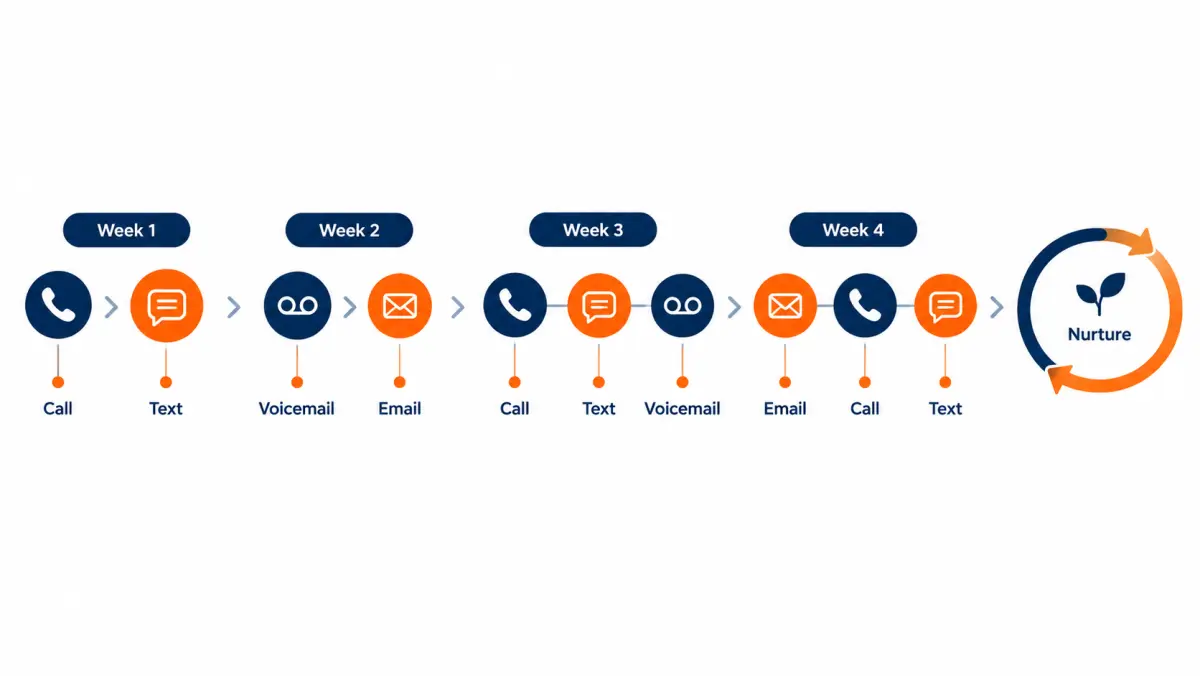
Most articles on solar follow-up stop at the first week of call attempts. That week matters a lot, and our speed-to-lead guide lays out a day-one and day-two-to-seven cadence with templates. But a lead that gets contacted on day two still has weeks of follow-up ahead of it, and that is where many teams lose deals they had already earned.
The five follow-up tracks
Think of follow-up as five separate tracks, each started by a specific disposition or stage change.
| Track | Starts when | Goal | Typical length |
|---|---|---|---|
| Attempt track | Lead is new, no contact yet | First conversation | About a week (see speed-to-lead guide) |
| Callback track | Contacted, call back requested or needs decision maker | Qualify and book | Until booked, or 2 to 3 missed callbacks |
| Confirmation track | Appointment set | Homeowner shows up, all decision makers present | From booking to appointment time |
| Proposal track | Proposal delivered | Signed agreement or clear no | 2 to 4 weeks, then nurture |
| Nurture track | Not ready, but open to future contact | Re-engage when timing changes | Months |
Callback track rules
The callback track is where small habits pay off:
- Book callbacks like appointments. If a homeowner says "call me Thursday after 5," create a task for Thursday at 5:15 and tell them, "I'll call you Thursday at 5:15." Specific times get answered more often than vague ones.
- Send a short text confirming the callback if they agreed to texts. "Thanks [Name], I'll call Thursday around 5:15 like we said. [Rep], [Company]."
- Missed callback, same day retry. If they miss the agreed time, try once more that evening and then follow your attempt rules.
- Two missed callbacks, change channel. Send an email summarizing what you discussed and offering two booking times.
- Decision maker missing? Ask for the best time when both are home, and offer a virtual meeting if schedules are hard.
Proposal track rules
Proposal follow-up is the most neglected part of working solar leads, and often the most expensive to neglect, because you have already paid for the lead and the closer's time.
| Day after proposal | Action | Owner |
|---|---|---|
| Same day | Short thank-you message with the proposal link and one clear next step | Closer |
| Day 1 or 2 | Call to answer questions; ask "what would you need to see to move forward?" | Closer |
| Day 4 or 5 | Share one useful item tied to their concern (financing explainer, production estimate method, warranty summary) | Closer |
| Day 7 to 10 | Call to check status and surface objections; offer to meet again with the other decision maker | Closer |
| Day 14 | Direct question: "Is this still something you want to pursue this season?" | Closer |
| Day 21 to 30 | Close out as lost with a reason, or move to nurture with a review date | Closer and manager |
Managers should review every open proposal older than 14 days each week. Ask the closer one question: "What is the next dated action and why will it move this forward?"
Common reasons proposals stall, and what to do
| Stall reason | What it usually means | Next step |
|---|---|---|
| "We need to think about it" | Unanswered objection, often price or trust | Ask which part they're unsure about; offer a short call to go through it |
| "We're getting other quotes" | Normal comparison shopping | Offer to review competitor quotes side by side on equipment, warranty and terms |
| "Waiting on financing" | Approval, rate or paperwork pending | Track with the lender; set a dated follow-up |
| "My spouse isn't sure" | Second decision maker not sold | Book a short meeting with both |
| "Want to wait for the tax credit" | Misunderstanding about 25D, as of October 2026 | Explain it ended for systems placed in service after 2025; suggest they confirm with a tax pro |
| "Roof first" | Real timing issue | Nurture tied to their roof timeline |
| Silence | Lost interest, overwhelmed, or chose someone else | Run the full track, then close out politely |
Follow-up content that helps
Follow-up is easier when each touch carries something useful. Build a small library your closers can send:
- A one-page explanation of how you estimate production, with a link to the public NREL PVWatts calculator so homeowners can sanity-check estimates.
- A plain-English comparison of cash, loan, lease and PPA. Keep it general and factual.
- A warranty summary for the equipment you install.
- A short "what installation week looks like" explainer with photos.
- Answers to the five questions your closers hear most.
Avoid sending anything that promises savings you cannot support for that specific home.
How do you book solar appointments that actually sit?
Appointments sit when they are booked with all decision makers, at a specific time the homeowner chose, with clear expectations, and then confirmed more than once before the meeting. Show rate is mostly a confirmation process, not luck. Every booked appointment should trigger an automatic confirmation sequence plus at least one live confirmation call from a person.

What makes a booking strong
| Element | Weak booking | Strong booking |
|---|---|---|
| Time | "Sometime Thursday" | "Thursday at 6:00 p.m." chosen by the homeowner from two options |
| People | Only the person on the phone | Both owners confirmed by name |
| Purpose | "Someone will come by" | "We'll look at your roof and bills and show you real numbers. About an hour." |
| Preparation | Nothing | "Please have a recent electric bill handy, or log in to your utility account" |
| Format | Unclear | In-home or video call, agreed explicitly |
| Contact | Only one phone number | Both phones and email confirmed, texting permission noted |
A confirmation sequence
Adapt the timing to how far out the appointment is booked. Keep every message short and personal.
| When | Channel | Content |
|---|---|---|
| Right after booking | Text or email | Date, time, closer's name and photo if possible, what to have ready |
| Day before | Live call from setter or coordinator | Confirm time, confirm both decision makers will be there, answer questions |
| Morning of | Text | Friendly reminder with closer's name |
| An hour or two before | Text from the closer | "On my way at [time]" or the video link |
If the confirmation call reveals the second decision maker cannot attend, reschedule. A sit with one of two owners often turns into a second appointment anyway, and it costs a closer an evening.
Handling no-shows
When a homeowner no-shows:
- The closer waits a reasonable period and calls once from the driveway or the video room.
- Leave a friendly voicemail and text: "Sorry we missed each other. Want to pick a new time?"
- Disposition as "no-show," and the setter takes the lead back into the callback track.
- Track no-shows by setter and by source. A pattern points at either booking quality or lead quality.
If you buy booked appointments, check the vendor's no-show policy carefully. Our appointment program, for example, states: if a confirmed appointment doesn't sit because the prospect no-shows or doesn't match your filters, report it within 7 days of the scheduled time and we replace it. Log no-shows with the same rigor you log disconnected numbers so you can use whatever policy your vendor offers.
In-home vs virtual first meetings
Both work. Choose by market and closer capacity:
| Factor | In-home | Virtual |
|---|---|---|
| Rapport | Easier to build | Takes more skill |
| Roof and electrical check | Can look in person | Relies on satellite and photos |
| Closer capacity | Fewer sits per day due to driving | More sits per day |
| Rural or wide territories | Costly travel | Strong fit |
| Decision makers | Both usually home together | Easier to join from two places |
| Homeowner preference | Some prefer meeting in person | Some prefer no visit at first |
Many teams offer both and let the homeowner choose. Track close rate by format so you know what works in your market.
How should setters hand off leads to closers?
A clean handoff gives the closer everything the setter learned, in a standard format, before they meet the homeowner. The closer should never ask a question the setter already answered. Use a short handoff note template in the CRM, make it required to book an appointment, and have closers rate handoff quality so setters get feedback.
The handoff note template
Make these fields required at the "appointment set" stage:
- Motive: Why they are looking now, in their own words.
- Bill and utility: Summer and winter estimates, utility name.
- Home: Ownership confirmed, years in home, roof age and material, shade notes.
- People: Names of all decision makers and who seems most and least interested.
- Timeline: When they want it working, if the numbers make sense.
- Concerns raised: Anything they worried about (price, roof leaks, HOA, resale, past bad experience).
- Competitors: Any other installers they have spoken with.
- Format and logistics: In-home or virtual, parking or gate notes, pets, accessibility needs.
- Prep requested: "Has bill ready," "will log in to utility portal."
Closer feedback loop
After each sit, the closer rates the handoff on a simple scale and adds one line of feedback. Managers review these weekly. This gives setters useful coaching and stops closers from blaming "bad leads" without specifics.
| Rating | Meaning |
|---|---|
| Accurate | Everything matched what the setter recorded |
| Minor gaps | Small details missing, no effect on the sit |
| Major gaps | Missing decision maker, wrong bill, or unqualified homeowner |
One team or two?
Not every installer needs separate setters and closers. Small teams often have one person doing both. The handoff note still matters, because it is how you will remember details two weeks later during proposal follow-up, and it is how a manager can cover if that person is out.
What happens at the sit, and how do you track it?
At the sit, the closer confirms what the setter learned, reviews the roof and bills, explains options, and either presents a proposal or sets a specific next step. For lead management, the important part is what gets recorded afterward: outcome, reason, proposal details and next dated action, entered the same day.

Sit outcome codes
| Outcome | Meaning | Next step |
|---|---|---|
| Signed at sit | Agreement signed during the meeting | Closed won, hand to operations |
| Proposal presented, thinking | Homeowner has the numbers, no decision | Proposal track |
| Second meeting set | Needs another meeting (often for another decision maker) | Appointment set, new date |
| Not a fit, site | Roof, shade or electrical rules it out | Closed lost, reason "site" |
| Not a fit, financial | Numbers do not work for them | Closed lost or nurture |
| Not interested after sit | Decided against | Closed lost with reason |
| No-show | Homeowner was not there | Back to setter callback track |
What to record after every sit
- Outcome code (from the table above)
- System size and price proposed, if a proposal was presented
- Financing type discussed
- Main objection, in one line
- Competitor quotes mentioned
- Next action, with date
Do this the same day. Closers who batch their notes on Friday forget details, and managers lose a week of visibility.
Why sit data matters for lead buying
Sit data is how you tell a lead problem from a sales problem. If a source produces good show rates and closers report qualified, interested homeowners, but close rates are low, the issue is probably in the proposal or pricing, not the source. If closers report many unqualified homeowners at sits, look at setter qualification first, then at the source's filters. Our solar lead ROI guide explains how these rates combine into cost per sale.
How do you nurture and recycle solar leads that are not ready?
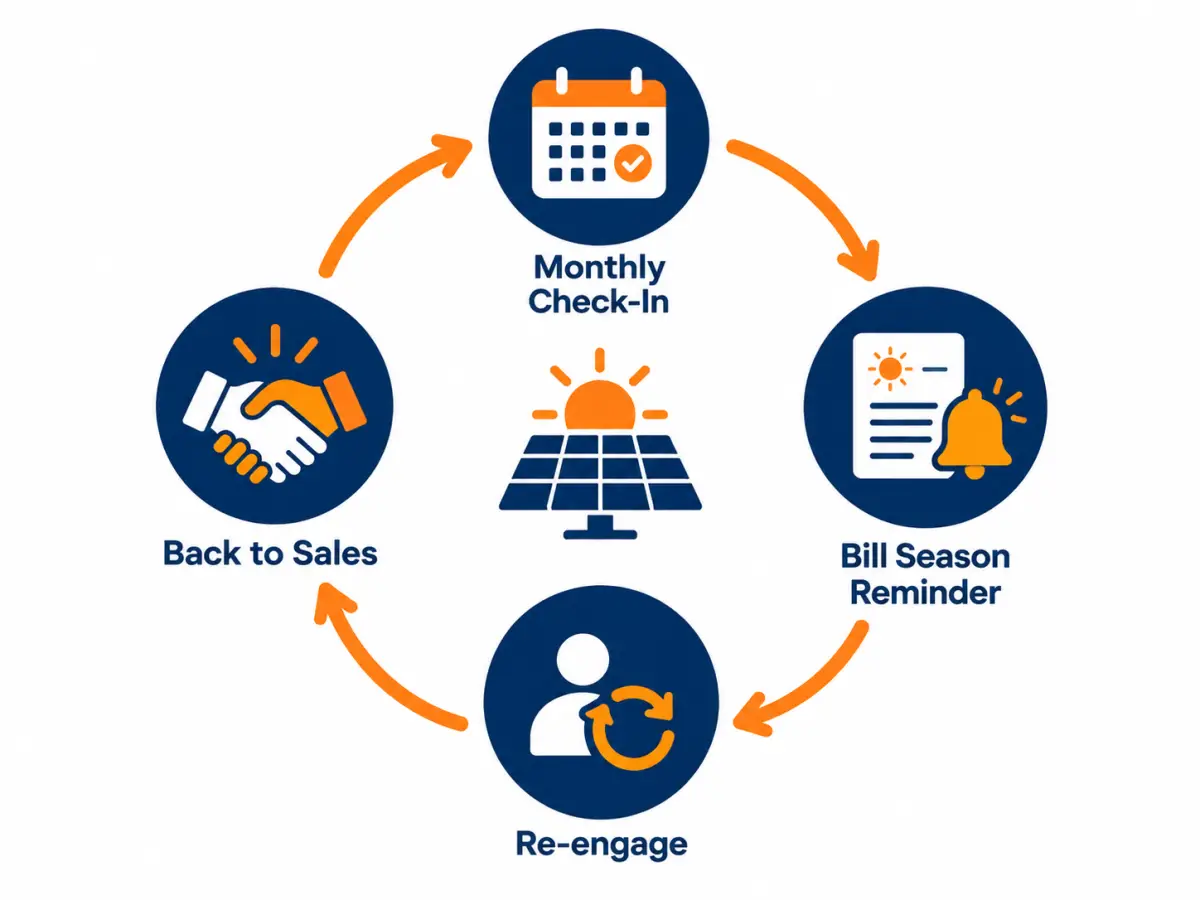
Nurture means keeping in polite, permission-based contact with homeowners who are interested but not ready, and bringing them back into sales when their timing changes. Recycling means reworking older leads in your own CRM that never converted. Both can produce sales from leads you already paid for, as long as you respect opt-outs and calling rules.
Who belongs in nurture
| Belongs in nurture | Does not belong in nurture |
|---|---|
| Interested, timeline more than a few months away | Asked not to be contacted |
| Waiting on a roof replacement | Renters with no owned property |
| Planning a move, EV or home addition | Disconnected or wrong numbers |
| Had a proposal, chose to wait | Clearly hostile or said they never asked |
| Liked the numbers but needs to save or refinance | Outside your service area |
A nurture rhythm
Our speed-to-lead guide includes a simple short-term nurture schedule. For longer-term nurture, keep the rhythm light and tied to real reasons to reach out:
| Interval | Touch | Purpose |
|---|---|---|
| Monthly | Short email with one useful item | Stay familiar without pressure |
| Quarterly | Personal check-in call or text, if permission allows | Ask whether timing has changed |
| Seasonal | Message ahead of high-bill months in your market | Bills are a natural trigger |
| Event-based | Their stated trigger date (roof done, moved in, EV arriving) | Return when they told you to |
| Annual | "Still interested?" message with an easy opt-out | Keep the list clean |
Recycling your own old leads
Recycling is different from buying aged leads. It means going back through leads in your CRM that were never contacted, went quiet, or closed lost for timing reasons.
- Pull the list. Filter for leads with no contact, or contacted with timing-based lost reasons, older than a set age.
- Remove anything you must not call. Suppress do-not-contact records, opt-outs, disconnected numbers and anyone outside your area. Check consent and calling rules with counsel before calling older leads; our TCPA guide covers why.
- Write a recycle script. Acknowledge time has passed: "You asked about solar a while back. A lot of people we talked to then are taking another look now. Is that something you're still thinking about?"
- Work it in blocks. Recycling suits focused one- or two-hour blocks, not mixed in with fresh leads.
- Track separately. Give recycled leads their own source value, such as "recycle, original source X," so they do not distort fresh-lead reporting.
Buying aged leads vs recycling your own
| Factor | Recycling your own leads | Buying aged leads |
|---|---|---|
| Cost | Already paid for | Lower price per lead than fresh, as a rule |
| Familiarity | They may remember your company | They likely heard from other companies |
| Data | Your own notes and history | Only what the vendor provides |
| Volume | Limited to your history | Can scale |
| Consent | Your own records | Depends on the vendor's records, so check them |
Our aged solar leads guide covers how to buy and work purchased aged lists. Note that our exclusive leads are never resold, recycled or sold later as an aged lead, so if you buy exclusive leads from us, your own recycle list is the only place those homeowners appear again.
How do you work each type of solar lead differently?
Each lead type needs its own playbook. Exclusive leads reward thorough qualification, shared leads reward speed and differentiation, aged leads reward persistence and a re-engagement script, live transfers reward instant availability, booked appointments reward confirmation and closing skill, and commercial leads reward patience with a longer, multi-person sale.
The table below is the short version. Each lead type then gets its own playbook.
| Lead type | First priority | Expected contact pattern | Biggest risk | Key metric |
|---|---|---|---|---|
| Exclusive web leads | Fast, thorough first call | Moderate, improves with speed | Slow follow-up wastes the exclusivity | Set rate |
| Shared leads | Be first and be different | Competitive, homeowner gets multiple calls | Price race with other installers | Contact rate in first hour |
| Aged leads | Volume and persistence | Lower, spread over more attempts | Rep burnout, compliance checks | Appointments per hour worked |
| Live transfers | Someone answers instantly | Homeowner already on the line | Missed transfers, unprepared reps | Transfer-to-appointment rate |
| Booked appointments | Confirm and close | Already booked | No-shows, unqualified sits | Sit rate and close rate |
| Commercial leads | Find the real decision maker | Slower, more stakeholders | Treating it like residential | Proposal-to-close time |
Playbook: exclusive solar leads
Exclusive leads are sold to one company, so you are not racing other installers for that specific request (though the homeowner may still have contacted others on their own). The advantage you paid for is time to have a proper conversation. Use it.
What to do:
- Call quickly anyway. Exclusivity does not mean the homeowner will wait, and interest fades. The speed-to-lead guide has the first-hour plan.
- Run the full qualification flow. You can afford a ten-minute call that ends with a strong booking.
- Book both decision makers at a homeowner-chosen time.
- Work the full attempt cadence before closing a lead as unreachable.
- File replacement requests promptly for any lead with a disconnected number, wrong contact details, or a mismatch with your filters.
What to measure: contact rate, set rate, sit rate, close rate and cost per sale by source. Our exclusive solar leads page covers how these leads are generated and checked.
Common mistake: treating exclusive leads like they will keep. They will not. Exclusivity protects you from competing for that lead with other buyers of the same lead; it does not stop the homeowner from calling a competitor they found themselves.
Playbook: shared solar leads
Shared leads are sold to more than one installer. The homeowner may get several calls within minutes. Working them well comes down to two things: speed, and saying something different from the other callers.
What to do:
- Route shared leads to your fastest available person, every time.
- Open with something specific to the homeowner, not a generic pitch. Their street, their utility, or their motive if the form captured it.
- Acknowledge the reality: "You may hear from a few companies. Here's how we're different, and I'll keep it short."
- Book quickly and confirm heavily. The homeowner may book with others too.
- Expect more price comparison at the sit. Prepare closers to compare equipment, warranties, install timelines and reviews rather than cut price.
What to measure: contact rate within the first hour, set rate, and close rate against competing quotes. Our exclusive vs shared solar leads guide runs the cost per sale comparison between the two.
Common mistake: working shared leads with the same patient pace as exclusive ones. By the time a slow rep calls, the homeowner may have booked two other installers and stopped answering.
Playbook: aged solar leads
Aged leads are older leads, sold at a lower price because they are no longer fresh. They usually take more attempts per contact, and many homeowners have already spoken to other installers or lost interest. They can still work well for teams that run them as a dedicated process.
What to do:
- Before calling, confirm what consent record comes with the lead and check calling rules with counsel. Our aged solar leads page explains what to ask vendors.
- Scrub the list against your own CRM (to avoid calling your existing customers or open leads) and against do-not-contact records.
- Use a re-engagement opener that admits time has passed.
- Work in focused blocks with a dialer, if your compliance setup allows it.
- Expect a lower contact rate and judge results by appointments per hour worked and cost per sale, not by contact rate alone.
- Put contacted-but-not-ready aged leads into nurture. Some will come back later.
Sample aged lead opener (template): "Hi [Name], this is [Rep] with [Company]. A while ago you looked into solar for your home on [street]. I'm following up because a lot of homeowners are taking a second look this year. Are you still curious what it would look like for your house?"
What to measure: attempts per contact, appointments per hour, sit rate, close rate and cost per sale. Aged lead availability for your territory is confirmed on the call.
Common mistake: handing aged leads to your best closer's evenings. Use setters in focused blocks, and only pass booked, qualified appointments to closers.
Playbook: solar live transfers
A live transfer is a homeowner connected to your team by phone after a vendor's screening call. The homeowner is already on the line, so the main job is to answer instantly and continue the conversation smoothly.
What to do:
- Staff transfer lines during the hours you buy them. A missed transfer is wasted money and a bad first impression.
- Give reps a short "warm pickup" opener: "Hi [Name], thanks for holding. I understand you're looking at solar for your home on [street]. I'm [Rep]. Can I ask a couple of quick questions so I don't waste your time?"
- Confirm everything the screener captured. Screening scripts vary.
- Book the appointment on the call if the homeowner qualifies.
- Log the call's start time, duration and outcome so you can match it to the vendor's records for any billing questions.
What to measure: answer rate on transfers, transfer-to-appointment rate, sit rate and cost per sale. Our solar live transfer leads page covers how transfers are screened and how to evaluate them. Live transfer availability for your territory is confirmed on the call.
Common mistake: routing transfers to a general line or a rep who is already on another call. Transfers need a dedicated, available person.
Playbook: booked solar appointments
Booked appointments arrive with a date and time already set. You skip the setter step, but you take on two jobs: confirming the appointment and making sure your closer's time is well used.
What to do:
- Review the appointment details as soon as they arrive. Check the address, decision makers and any notes.
- Call the homeowner to introduce the closer and confirm. This is often the first time they hear from your company directly.
- Run your normal confirmation sequence.
- After the sit, record the outcome and the reason the same day.
- Report no-shows and filter mismatches to the vendor within their stated window. Our appointment program asks for reports within 7 days of the scheduled time.
What to measure: sit rate, close rate, and cost per sale. The solar appointments page explains how appointments are set and how to judge them.
Common mistake: assuming a booked appointment needs no confirmation. Confirmation by your own team is what turns a vendor's booking into a sit.
Playbook: commercial solar leads
Commercial leads involve businesses, nonprofits, farms or property owners with larger loads. The sale is slower, involves more people and depends on details like demand charges, roof condition, ownership structure and financing.
What to do:
- Identify the decision maker and the process. The person who filled out the form may be an office manager, not the owner.
- Ask for 12 months of utility bills early, including demand charges, so your designer can size properly.
- Learn the building situation: owned or leased, roof age, any planned renovations.
- Expect several meetings, site visits and a formal proposal review.
- Keep a longer proposal track, often months rather than weeks, with clear dated next steps.
What to measure: time from first contact to site visit, site visit to proposal, and proposal to close. Our commercial solar leads guide covers this sale in depth.
Common mistake: running commercial leads through a residential setter script. Commercial buyers expect a consultative, numbers-first conversation with someone who understands their operation.
Playbook: your own inbound and referral leads
Most installers also get leads from their website, reviews, referrals and yard signs. Work them with the same system, and tag them carefully.
- Give each organic channel its own source value: website form, phone call, referral, yard sign, event.
- Referrals deserve the fastest response of all. A referred homeowner already trusts you, and a slow response reflects on the customer who referred them.
- Thank the referring customer when a referral books, and again if it closes, in whatever way your referral program allows.
- Compare organic close rates with purchased sources. They are often different, and knowing the gap helps you plan how many purchased leads you need.
Who should do what on a solar lead team?
Solar lead management works best when each job has one clear owner: someone who sets, someone who closes, someone who confirms, and someone who watches the numbers. On small teams one person may hold several roles, but the roles still need to be named, and the CRM should show who owns each lead at every stage.
Core roles
| Role | Main responsibilities | Key numbers they own |
|---|---|---|
| Setter (inside sales, appointment setter) | Contact, qualify, book, hand off | Contact rate, set rate, handoff quality |
| Closer (consultant, energy advisor) | Sit, present, follow up on proposals, close | Sit-to-proposal rate, close rate, proposal age |
| Coordinator (often part-time or shared) | Confirmations, rescheduling, calendar health | Show rate, reschedule rate |
| Sales manager | Routing, coaching, daily overdue review, weekly scorecard | Cost per sale by source, pipeline age |
| Owner or GM | Lead budget, vendor decisions, pricing, hiring | Cost per sale, revenue per lead dollar |
| Operations handoff contact | Receives signed deals, starts site survey and permitting | Time from signature to site survey |
Role combinations by team size
| Team size | Typical setup | What to protect |
|---|---|---|
| Owner-operator (1 person) | Owner sets, closes and installs or subcontracts | Use automation for alerts and confirmations; block calling time daily |
| Small (2 to 5 sales) | Closers set their own leads, or one setter for all | Shared overdue view; written cadence |
| Mid-size (6 to 20 sales) | Dedicated setters, closers, a coordinator | Routing rules, handoff notes, weekly source review |
| Large (20+ sales) | Setter teams by shift, closers by territory, sales ops or RevOps role | Data quality, attribution, rep-level coaching at scale |
Compensation and behavior
How you pay people shapes how they work leads. We are not prescribing a comp plan, but watch for these patterns:
- Setters paid only on booked appointments may book weak appointments. Pay at least part on appointments that sit, or on qualified sits as confirmed by closers.
- Closers paid only on signed deals may neglect proposal follow-up on harder deals. Review proposal age weekly.
- No accountability for disposition accuracy leads to messy data. Spot-check call recordings against dispositions.
- Shark-tank routing plus commission-only pay can lead to cherry-picking. Track how many leads each rep claims but does not work.
What should a solar sales manager check every day and every week?
A sales manager should spend about 15 to 30 minutes each morning on the overdue view, unworked new leads and today's appointments, and about an hour each week on the full-funnel scorecard by source and by rep. Daily checks catch leaks. Weekly reviews decide what to change: routing, coaching, scripts, or which lead sources to scale or cut.

The daily checklist
| Check | What you are looking for | Action |
|---|---|---|
| Leads with no first attempt | Any new lead that has not been dialed | Reassign now |
| Overdue tasks by owner | Callbacks, proposal follow-ups past due | Message the owner, reassign if out |
| Today's appointments | All confirmed? Both decision makers? | Coordinator calls any unconfirmed |
| Yesterday's sits | Outcomes recorded? | Ask closers for missing outcomes |
| Stage age violations | Leads past max age in any stage | Decide: book, nurture or close |
| Do-not-contact requests | Logged and suppressed everywhere | Confirm suppression |
| Replacement candidates | Disconnected, wrong number, out of filter | Queue for vendor submission |
The morning huddle
Keep it short, about 10 to 15 minutes, standing up if you can:
- Yesterday's numbers: leads in, contacts, sets, sits, closes.
- Today's appointments and any confirmation risks.
- One coaching point, ideally from a call recording.
- Any lead source issues (spike in bad numbers, delivery delays).
- Who is covering what if someone is out.
The weekly scorecard
Our speed-to-lead guide includes a weekly speed scorecard focused on response time and contact. The scorecard below covers the full funnel, by source and by rep. Run it from the CRM, not a hand-built spreadsheet.
By source (one row per vendor or channel):
| Metric | How to calculate |
|---|---|
| Leads delivered | Count of leads with that source in the period |
| Lead spend | What you paid for those leads |
| Contact rate | Leads with a two-way conversation ÷ leads delivered |
| Qualified rate | Qualified leads ÷ contacted leads |
| Set rate | Appointments set ÷ contacted leads |
| Sit rate | Appointments held ÷ appointments set |
| Close rate | Signed deals ÷ appointments held |
| Cost per appointment | Lead spend ÷ appointments set |
| Cost per sit | Lead spend ÷ appointments held |
| Cost per sale | Lead spend ÷ signed deals |
| Replacement requests | Count and share of leads submitted for credit |
By rep (one row per setter or closer):
| Metric | Setters | Closers |
|---|---|---|
| Leads worked | Yes | |
| Average attempts per lead before close-out | Yes | |
| Contact rate | Yes | |
| Set rate | Yes | |
| Sit rate of their bookings | Yes | |
| Handoff quality rating | Yes | |
| Sits held | Yes | |
| Proposal rate | Yes | |
| Close rate | Yes | |
| Average proposal age | Yes | |
| Sit outcomes recorded same day | Yes |
Read the scorecard with time lags in mind
Solar sales take weeks. A lead delivered this week may not close for a month or more. Two habits help:
- Cohort reporting. Group leads by the week or month they were delivered, and track that cohort's results over time. This shows the real cost per sale of a source, instead of mixing this month's spend with last month's closes.
- Leading indicators. In the first two weeks of testing a source, judge it by contact rate, qualified rate and set rate. Wait for sits and closes before deciding on cost per sale.
Our solar lead ROI guide walks through how to set break-even targets, and the solar lead cost calculator lets you plug in your own rates.
Illustrative weekly review conversation
This is an illustrative example, not a real client.
A manager sees that Source A has a contact rate in line with other sources but a set rate well below them. Looking at dispositions, there is a cluster of "not qualified, bill too low." That suggests the source's filters do not match the installer's minimum bill. The manager checks the filters agreed with the vendor, finds the bill minimum was never set, and asks for it to be added. That is a fixable targeting issue, not a reason to cancel the source.
Meanwhile Source B has a strong set rate but a low sit rate, and most no-shows were booked by one setter. That is a coaching issue for that setter's booking habits, not a source problem. Without dispositions and owner fields, both issues would look like "bad leads."
How do you test a new solar lead source fairly?
Test a new lead source with a defined batch, the same process you use for your existing sources, a fixed time window, and success criteria written down before the first lead arrives. Track it as its own source value in your CRM. Judge it on cohort results, not on how the first few calls felt.
A test plan template
| Item | Example |
|---|---|
| Source and program | Vendor name, lead type, filters agreed |
| Batch size | Enough leads to see a pattern; agree with the vendor |
| Territory | Specific ZIPs or counties |
| Owner | Named setter(s) and manager |
| Process | Same cadence, scripts and dispositions as other sources |
| Leading targets | Contact, qualified and set rate targets after two weeks |
| Lagging targets | Sit rate, close rate and cost per sale targets after the cohort matures |
| Replacement handling | Who files requests, how often, within the vendor's window |
| Decision date | When you will decide to scale, adjust or stop |
Our own program is built for this: no long-term contracts, start with a test batch, scale when the numbers work. Whatever vendor you test, set your success criteria in advance so the decision is based on numbers rather than one rep's mood.
Keep the test clean
- Same process. Do not give test leads to your best rep only, or to a new rep only. Split them like other leads, or note clearly who worked them.
- Same speed. A test lead called three hours late is a test of your process, not the vendor.
- Separate source value. Never mix test leads into another source's reporting.
- Document problems as they happen. Disconnected numbers, duplicates, out-of-area leads: log them with dispositions and file replacement requests on time.
Our guide to vetting solar lead providers covers what to check before you start a test, including consent records and filters.
Which CRM automations save the most time for solar teams?
The most useful solar CRM automations are the boring ones: instant new-lead alerts, automatic task creation from dispositions, appointment confirmations, overdue alerts, stage-age warnings, and suppression when someone opts out. Automate reminders and record-keeping. Keep judgment calls, like qualifying and closing, with people.
Automation recipes
Build these one at a time and test each with a dummy lead.
| Trigger | Automation | Why |
|---|---|---|
| New lead created | Alert assigned owner by app notification and text; start attempt task | Speed and ownership |
| No attempt logged within your set minutes | Alert manager; reassign if still untouched | Stops forgotten leads |
| Disposition "no answer" | Create next attempt task per cadence | Cadence runs itself |
| Disposition "call back requested" | Prompt rep for date and time; create task | Prevents "call Fri" failures |
| Disposition "wrong number" or "disconnected" | Add to replacement review list with timestamp | Captures credits before the window closes |
| Disposition "do not contact" | Suppress in CRM, dialer and texting tool; notify manager | Compliance and respect |
| Stage set to "appointment set" | Send confirmation message; create day-before confirmation call task; require handoff note | Show rate |
| Appointment time passes, no outcome | Alert closer and manager | Same-day sit data |
| Stage "proposal out" | Create proposal track tasks | Proposal follow-up |
| Lead exceeds stage max age | Add to manager's overdue view | Forces a decision |
| Lead closed lost with "timing" reason | Move to nurture with review date | Future pipeline |
| Rep marked out of office | Reassign open tasks to backup | Coverage |
| Duplicate detected at intake | Merge or flag; notify owner of existing record | Prevents double calls |
What not to automate
- Bulk texting without a compliance review. Check consent, timing and content rules with counsel before sending any automated text sequence.
- Auto-closing leads. Let the system flag leads for a decision, but have a person close them so reasons stay accurate.
- Auto-generated proposals sent without review. Production estimates and pricing should be checked by a person for each home.
- AI voice calls or texts presented as human. If you use AI tools, check current rules with counsel and be transparent with homeowners. Treat vendor performance claims for these tools as unverified until you test them yourself.
How do you keep solar lead data clean?
Clean lead data comes from a few strict habits: required fields, standard dispositions, no deleted records, duplicate checks at intake, consistent source values, and a monthly audit. Dirty data hides which sources and reps actually work, and it makes replacement requests and compliance questions harder to answer.
The monthly data audit
Once a month, a manager or ops person runs these checks:
| Check | How | Fix |
|---|---|---|
| Leads with no source | Filter source field empty | Backfill from delivery logs; fix the intake mapping |
| Open leads with no owner | Filter owner empty, stage not closed | Assign |
| Open leads with no next task | Filter task empty, stage not closed | Assign task or close |
| Duplicates | Run duplicate report by phone and address | Merge, keep full history |
| "Other" dispositions | Count by rep | Add missing codes, coach |
| Closed lost with no reason | Filter reason empty | Ask owner to fill in |
| Sits with no outcome | Appointments in the past with no outcome | Ask closer |
| Suppression check | Sample do-not-contact records | Confirm they are blocked in dialer and texting |
Naming conventions
Agree on one way to write each source and campaign, and lock picklists so reps cannot type variations. "Vendor A - Exclusive - County X" should never also appear as "vendorA excl" in another record. Small differences break reports.
Record retention
Keep lead records, call logs, consent certificates and opt-out records according to a retention policy you set with counsel. If a homeowner ever disputes whether they asked to be contacted, you will want the consent record and your contact history together. Our offer, for example, includes a timestamped consent record for every lead, sent on request, and you should store it with the lead or know how to retrieve it quickly.
How does compliance fit into the daily lead process?
Compliance belongs inside the process, not in a binder. Build calling-hour limits, do-not-contact suppression, consent record storage and opt-out handling into the CRM and dialer so reps cannot skip them. As of October 2026, the FCC's one-to-one consent rule was vacated by the Eleventh Circuit (January 24, 2025), but TCPA, state laws and Do Not Call rules still apply. Confirm your obligations with counsel.
This guide is not legal advice. Our solar leads TCPA compliance guide covers the rules in more depth, and the FTC's National Do Not Call Registry business guidance is a good starting point. Here is how compliance shows up in daily lead work:
| Process step | Built-in safeguard |
|---|---|
| Lead intake | Store consent record or certificate ID with the lead |
| Dialing | Dialer respects calling hours by the homeowner's time zone and any state rules counsel identifies |
| Texting | Only with appropriate consent; every text supports opt-out |
| Opt-out | One click suppresses the contact everywhere |
| Recycled or aged leads | Consent and calling rules reviewed before any campaign |
| "I didn't request this" | Stop contact, flag to manager and vendor, keep the record |
| Call recording | Follow notice rules counsel advises for your states |
Leads from our program are scrubbed against the National Do Not Call Registry and duplicate-checked against leads already sent to you before delivery. You still need your own internal suppression list, because homeowners can opt out directly with you.
What does a solar lead management process look like by installer size?
The core system is the same at every size, but the tools and roles change. An owner-operator needs simple automation and protected calling time. A small team needs a shared CRM and written cadence. A mid-size team needs routing rules and dedicated setters. A large team needs sales operations, cohort reporting and rep-level coaching.

The scenarios below are illustrative examples, not real companies. They show how the same principles apply at different sizes.
Scenario 1: owner-operator in a suburban market
Setup: The owner sells and manages installs, with one office assistant. They buy a small number of exclusive leads each week and get some referrals.
Process:
- CRM with mobile app, leads delivered by API with an app notification and text alert.
- Owner blocks two calling windows daily (late morning and early evening) and calls new leads between installs when possible.
- Assistant confirms appointments the day before and handles rescheduling.
- Weekly 30-minute review on Friday: leads in, sets, sits, closes by source.
What usually breaks: leads arriving during install days. Fix it with a rule: if the owner cannot call within the agreed time, the assistant makes first contact using a short script and books a callback.
Scenario 2: small team in a high-competition metro
Setup: Three closers who also set their own appointments. Mix of exclusive and shared leads.
Process:
- Round robin with availability, so off-shift closers do not get leads.
- Shared leads flagged in the CRM and routed to whoever is available right now, not round robin.
- Written cadence and dispositions, enforced by the CRM.
- One closer acts as weekly "pipeline captain," reviewing the overdue view each morning on rotation.
What usually breaks: proposal follow-up, because closers are busy setting new appointments. Fix it by blocking one afternoon a week for proposal calls and reviewing proposal age at the weekly meeting.
Scenario 3: mid-size installer across several counties
Setup: Two setters, six closers by territory, one coordinator. Buys exclusive leads and booked appointments, tests aged leads.
Process:
- Setters work all web leads and book onto closers' calendars by territory.
- Booked appointments from the vendor go straight to the coordinator for introduction and confirmation.
- Aged leads worked by one setter in two focused blocks per week, with separate source values.
- Handoff notes required at booking; closers rate handoff quality.
- Weekly scorecard by source and rep; monthly cohort review.
What usually breaks: territory imbalance, with some closers overbooked and others idle. Fix it with overflow rules that let setters book into a neighboring territory's closer when the home territory is full.
Scenario 4: large multi-state installer
Setup: Setter teams on shifts, closers in several states, a sales operations analyst. Several lead vendors plus its own marketing.
Process:
- Routing by state, language and lead type, with weighted distribution based on performance.
- Separate queues for live transfers, shared leads, exclusive leads and aged leads.
- Sales ops owns data quality, the monthly audit, replacement submissions and cohort reports.
- State-specific compliance settings in the dialer, reviewed with counsel.
- Quarterly vendor reviews using cost per sale by cohort.
What usually breaks: data consistency across teams and states. Fix it with locked picklists, required fields and a single owner for CRM configuration changes.
Scenario 5: commercial-focused developer
Setup: Two business development reps, a designer, and an owner who handles larger deals.
Process:
- Separate commercial pipeline with stages like discovery, bills received, site visit, proposal, financing, legal review, signed.
- Required fields for building ownership, utility, demand charges and decision process.
- Longer stage max ages, but still reviewed weekly.
What usually breaks: deals that stall in "proposal" with no next step. Fix it by requiring a next meeting date before any proposal is sent.
What do solar lead conversion rates look like?
Conversion rates vary widely by lead type, market, season, price and sales skill, so no single benchmark fits every installer. Rather than chase industry averages, track your own funnel by source and by cohort. Our speed-to-lead guide discusses benchmark ranges with their sources and caveats, and our ROI guide shows how to set targets.
Why your rates differ from what you read
- Definitions differ. One company counts "contact" as any answered call; another counts only a real conversation with the requester. Close rate can be per lead, per appointment or per sit.
- Lead types differ. Booked appointments and transfers start further down the funnel than web leads.
- Markets differ. Utility rates, net metering rules and competition change everything. See solar lead cost by state.
- Process differs. Speed, cadence and confirmation can change your numbers a lot.
Build your own baseline
- Use the stage definitions in this guide.
- Track at least a few months of cohorts.
- Calculate rates per source and per lead type.
- Set targets as improvements on your own baseline, not on a number from a vendor's sales page.
How should setters handle objections before booking?
Setter objections are usually about time, trust or price, and the setter's job is not to win the argument. It is to find out whether a real conversation is worth booking. Acknowledge the concern, ask one clarifying question, and offer a low-pressure next step. If the answer is a clear no, close the lead with an accurate disposition.
Our speed-to-lead guide covers the opening of the first call. The table below covers the objections that come up after the opening, when a setter is trying to book.
| Objection | What it often means | Suggested response (template) |
|---|---|---|
| "Just send me some information" | Not sure yet, or wants to avoid a pitch | "Happy to. So I send the right thing, what's your main question: cost, savings, or how it works on your roof?" Then offer a short virtual meeting. |
| "How much does it cost?" | Wants a number before investing time | "It depends on your roof and usage, so I'd be guessing. The consultation gives you a real number for your house, with no obligation." |
| "I'm just looking" | Early stage | "Totally fine. Most people start there. Would it help to see what your house could produce, so you know whether it's worth thinking about?" |
| "I need to talk to my spouse" | Real second decision maker | "Makes sense. Let's find a time you can both be there, so you only have to hear it once." |
| "I've heard solar is a scam" | Past bad experience or media stories | "That's fair, there are bad actors. Can I ask what you heard? We can go over how to check any installer, including us." |
| "I already got quotes" | Comparing | "Good, that helps. Bring them along and we'll go through them side by side on equipment and terms." |
| "We might move" | Uncertain tenure | "How soon are you thinking? If it's a few years out, it can still be worth a look; if it's soon, I'll be straight with you." |
| "I'm waiting for the tax credit" | 25D confusion | "The federal homeowner credit ended for systems installed after 2025, so there isn't one to wait for. We'll show you numbers without it. For tax questions, check with your preparer." |
| "Is this going to be a high-pressure sales pitch?" | Fear of pressure | "No. You'll get numbers and options. If it doesn't make sense, we'll say so." |
| "Call me later" | Busy right now, or brush-off | "Sure. What day and time works best? I'll put it in my calendar and call exactly then." |
Coaching notes for objection handling
- One clarifying question, then stop. Setters who stack three rebuttals push people away.
- Never promise savings, prices or approval on a setting call. Those depend on the home and on financing decisions.
- Log the objection. Add a short note so the closer knows what came up.
- Respect a clear no. "Not interested" is a disposition, not a challenge.
How do you train new setters to work solar leads?
Train new setters on the system before the script: CRM navigation, dispositions, cadence, qualification fields and compliance rules come first, then call practice, then live calls with a coach listening. A short, structured first two weeks gets new setters productive faster and keeps your data clean from day one.
A two-week onboarding plan
| Day | Focus | Done when |
|---|---|---|
| 1 | Company, products, service area, how a lead flows through the CRM | Can explain each stage in their own words |
| 2 | CRM practice with dummy leads: logging attempts, dispositions, tasks | Logs a full attempt sequence without errors |
| 3 | Compliance basics from your counsel-approved policy: calling hours, opt-outs, consent records | Passes a short internal quiz |
| 4 | Qualification fields and call flow; listen to recorded calls | Can fill every qualification field from a recorded call |
| 5 | Role-play: openers, qualification, booking | Books a role-play appointment cleanly |
| 6 to 7 | Shadow a strong setter on live calls | Writes handoff notes for shadowed calls |
| 8 to 10 | Live calls with a coach listening; feedback after each block | Coach signs off on independent calling |
| 11 to 14 | Independent calling with daily call review | Meets entry-level activity and quality targets you set |
A call review rubric
Score a few calls per setter each week. Keep it simple:
| Area | What good looks like |
|---|---|
| Opening | Clear name, company, reason for calling, permission to continue |
| Motive | Asked why they are looking, and listened |
| Qualification | All six checks covered naturally |
| Objections | Acknowledged, clarified, offered a next step |
| Booking | Two time options, both decision makers, expectations set |
| Data | Disposition, fields and handoff note match the call |
| Tone | Friendly, honest, no pressure, no promises |
Share scores with the setter and pick one thing to improve each week.
What happens after a solar lead signs?
After a homeowner signs, the lead becomes a customer and moves to operations: site survey, design, permitting, installation and interconnection. For lead management, three things still matter: a clean handoff to operations, keeping the homeowner informed, and asking for reviews and referrals once the system is working.

Sales-to-operations handoff checklist
- Signed agreement and financing documents attached to the record
- System size, equipment and any special terms
- Roof and electrical notes from the sit
- Homeowner contact preferences and best times
- HOA, permit or utility notes the closer learned
- Promised timelines, in writing, so operations knows what was said
Communication after signing
Cancellations after signing often happen when homeowners hear nothing for weeks. Set a simple communication rhythm: a welcome message, a call after the site survey, updates at permit submission and approval, the install date, and inspection and permission to operate. The DOE homeowner's guide to going solar is a useful neutral resource to share with customers who want to understand the steps.
Reviews and referrals
Once the system is running and the homeowner is happy, ask for a review and a referral. Referrals then enter your CRM as their own source, worked with the fastest response of any lead type. Track referral leads by referring customer, so you can thank them properly.
How do you write a solar lead playbook for your team?
A solar lead playbook is a short written document, often 5 to 10 pages, that tells every rep exactly how leads are handled: stages, dispositions, cadence, scripts, routing, confirmation, compliance rules and reporting. It should match how your CRM is configured, live somewhere everyone can find it, and get reviewed every quarter.
Playbook outline you can copy
- Purpose and owner. Who maintains this document and how to suggest changes.
- Lead sources. Every source, its source value in the CRM, lead type, filters and replacement terms.
- Stages. The stage table with entry rules, exit rules and max ages.
- Dispositions. The full list with meanings and automatic next steps.
- Routing. Who gets which leads, reassignment rules, after-hours rules.
- First contact. Link to your speed-to-lead standards.
- Qualification. The six checks, call flow and partial-fit guidance.
- Booking and confirmation. Booking standards, confirmation sequence, no-show handling.
- Handoff. Required handoff note fields and closer feedback.
- Sit and proposal. Outcome codes, same-day recording rule, proposal track.
- Nurture and recycle. Who goes into nurture, rhythm, recycle rules.
- Compliance. Counsel-approved rules for calling hours, consent, texting, opt-outs and recording.
- Data hygiene. Required fields, naming conventions, monthly audit.
- Reporting. Daily checks, weekly scorecard, monthly cohort review.
- Change log. Date and summary of each change.
Keep it alive
- Review the playbook with the team every quarter.
- Update it whenever you change the CRM configuration.
- When a rep finds a better way to handle something, test it, then add it.
- Archive old versions instead of deleting them.
How many solar leads can your team actually work?
Your team can work as many leads as it has hours for proper attempts, qualification, confirmation and sits. Buying more leads than your team can work fast and fully raises your cost per sale, because extra leads sit untouched. Estimate capacity from hours available and time per task, then buy to that number and scale with staffing.
A capacity worksheet
The numbers below are an illustrative example to show the method. Replace every value with your own data.
| Input | Illustrative value | Your value |
|---|---|---|
| Setter calling hours per week | 30 | |
| Average minutes per lead across all attempts and the qualification call | 25 | |
| Leads one setter can fully work per week | 30 × 60 ÷ 25 = 72 | |
| Number of setters | 2 | |
| Setter capacity (leads per week) | 144 | |
| Closer sits per week each | 10 | |
| Number of closers | 4 | |
| Closer capacity (sits per week) | 40 |
In this illustrative example, if your set rate and sit rate mean that 144 leads produce more than 40 sits a week, closers become the bottleneck. If they produce far fewer, setters or lead volume are the limit. Matching lead volume to the tighter constraint keeps leads from going stale.
Signs you are buying more than you can work
- New leads sit for hours before the first attempt.
- Average attempts per lead drop as volume rises.
- The overdue task list grows every week.
- Closers' calendars are full two weeks out, and appointments booked that far ahead no-show more.
- Replacement requests are missed because nobody has time to file them.
If you see these, slow purchases or add staff before buying more. Our guide on how much solar leads cost can help you budget for the volume you can actually handle.
Signs you can work more
- New leads are called almost immediately, and the full cadence is completed.
- Setters run out of fresh leads before their shift ends.
- Closers have open evening slots most weeks.
- Cost per sale is at or below target across your sources.
That is a good time to raise volume with a source that is already working, or test a new one.
How should seasons change the way you work solar leads?
Solar interest often follows the calendar: bills, weather, daylight and holidays all shape when homeowners answer and when crews can install. Adjust calling windows, nurture timing, confirmation intensity and lead volume by season, and use your own historical data to plan, because patterns differ by market.
| Season pattern | What tends to change | How to adapt |
|---|---|---|
| High-bill months in your market | Homeowners notice energy costs | Time nurture messages and recycle campaigns before and during these months |
| Holidays | Lower answer rates, more reschedules | Increase confirmation touches; book fewer far-out appointments |
| Daylight saving changes | Evening availability shifts | Adjust calling windows and appointment slots |
| Weather that delays installs | Backlog grows, signed homeowners wait longer | Increase post-sale communication; be honest about timelines |
| Utility rate or policy changes | Spikes in interest or confusion | Prepare short, accurate explanations; link to official sources |
The U.S. Energy Information Administration publishes electricity price data by state, which can help you understand when bills tend to rise in your market. Pair that with your own CRM data on when leads answer and convert.
What are the most common solar lead management problems, and how do you fix them?
Most solar lead management problems trace back to one of five causes: slow or missing first contact, no owner or next action, weak qualification, poor confirmation, or no proposal follow-up. Diagnose by finding the funnel stage where your rates drop, then check the process for that stage before blaming the lead source.
Troubleshooting table
| Symptom | Likely causes | Checks | Fixes |
|---|---|---|---|
| Low contact rate | Slow first call, wrong times, caller ID issues, bad data | Response times, attempt counts, disconnected share by source | Faster routing, full cadence, check caller ID reputation, file replacements |
| Many contacts but few qualified | Filters not matching your criteria, setter skipping checks | Disqualification reasons by source and setter | Align filters with vendor, retrain on qualification |
| Qualified but few booked | Weak booking skills, no clear next step offered | Call recordings at the booking moment | Two-option booking, coach on bridging to an appointment |
| Booked but low sit rate | Weak confirmation, missing decision makers, far-out bookings | No-show reasons, days from booking to appointment | Confirmation sequence, book sooner, require both decision makers |
| Sat but low close rate | Pricing, proposal quality, closer skill, competition | Sit outcomes, objections logged, competitor mentions | Proposal review, closer coaching, competitive comparisons |
| Proposals stall | No proposal follow-up | Average proposal age, tasks on proposals | Proposal track, weekly proposal review |
| Leads with no activity | No owner, routing gaps, rep left | Open leads with no task or owner | Reassignment rules, daily overdue view |
| Duplicates and double calls | No duplicate check, multiple sources | Duplicate report | Duplicate detection at intake, merge rules |
| Reps say "these leads are bad" | Mix of real source issues and process gaps | Dispositions by source and rep | Look at data before deciding; compare reps on the same source |
| Homeowners say they never asked | Source consent issues, or wrong person answered | Consent record, disposition notes | Stop contact, escalate to vendor, review with counsel |
| Replacement credits missed | No process for filing | Count of eligible dispositions vs requests filed | Weekly replacement submission task |
| Cost per sale rising | Any of the above, or market change | Funnel by cohort, by source | Fix the stage with the biggest drop first |
Diagnose before you switch vendors
Switching lead sources is sometimes the right move. But if your process has a leak, the new source will leak too. Before you cancel a source, compare the same rep on two sources, and the same source across two reps. If one rep does well on a source and another does poorly, it is probably not the source.
What does a 30-60-90 day plan to fix your lead process look like?
A 30-60-90 day plan fixes the basics first (CRM, stages, dispositions, ownership), then follow-up and confirmation, then reporting and source decisions. Trying to fix everything at once usually fails. Each phase should end with a measurable change you can see in your CRM.
Days 1 to 30: foundation
- Define stages, max ages and dispositions; configure them in the CRM.
- Connect every lead source by API or webhook with source values.
- Set routing and reassignment rules.
- Turn on new-lead alerts and overdue alerts.
- Start the daily overdue review.
- Begin weekly replacement submissions.
Measure: share of new leads with a first attempt within your target time; share of open leads with an owner and a next task.
Days 31 to 60: follow-up and confirmation
- Roll out the qualification call flow and handoff note template.
- Launch the confirmation sequence for every booked appointment.
- Start the proposal track and weekly proposal review.
- Set up nurture with review dates.
- Begin call reviews with the rubric.
Measure: set rate, sit rate, average proposal age.
Days 61 to 90: reporting and decisions
- Run the weekly scorecard by source and rep from the CRM.
- Start cohort reporting by delivery month.
- Run the first monthly data audit.
- Write or update the lead playbook.
- Make the first source decisions: scale, adjust filters, or stop, based on cohort data.
Measure: cost per appointment and, as cohorts mature, cost per sale by source.
If you want help mapping lead volume and lead types to the team you have, you can book a call. Pricing is confirmed by ZIP on your call, and territory availability is confirmed by ZIP code on your call.
Illustrative example: running the first two weeks of the plan at a six-person team
Consider a residential installer with two setters, two closers, a sales manager and an office coordinator. They buy a mix of exclusive and shared leads and track everything in a shared spreadsheet. The owner wants to use the plan above but worries it will stall daily selling. Here is how the first two weeks could look. All details are illustrative.
Days 1 to 3. The coordinator exports the spreadsheet and the manager tags each row with one of the standard dispositions. Rows with no status at all go into a "needs review" view. Setters keep calling new leads as usual; nobody pauses fresh speed-to-lead work for cleanup.
Days 4 to 6. The team picks a CRM and imports only open leads first. Closed and dead records come later. The manager builds three required fields before anything else: source, lead type and disposition. Without those three, no report later in the plan will be trustworthy.
Days 7 to 9. Routing rules go live. Exclusive leads go to whichever setter is available within minutes; shared leads go to the setter with the strongest first-call record, since speed and the opening line matter most when other companies are also calling. Aged leads wait in a separate queue worked in the afternoon block.
Days 10 to 12. The manager writes the follow-up cadence into the CRM as tasks, so setters stop keeping private lists. Each setter listens to two of their own recorded calls and picks one thing to change.
Days 13 to 14. First review. The manager checks contact rate, booked appointments and how many leads are still missing a disposition. The goal at this stage is clean data, not better numbers.
What usually goes wrong. Teams try to import years of history on day one, or they add too many custom fields that no one fills in. Start small, enforce the three required fields, and expand once the team trusts the system.
Checklist before moving to the next phase: every open lead has a source, type and disposition; routing is automatic; follow-up tasks are in the CRM; and the manager can pull a weekly report without editing a spreadsheet by hand.
What does working one solar lead look like from start to finish?
Following one lead through the full system shows how the pieces connect: routing, attempts, qualification, booking, confirmation, sit, proposal follow-up and close. The walkthrough below is an illustrative example, not a real homeowner or client, and the timings are examples rather than benchmarks.
Day 0, early evening: the lead arrives
An exclusive lead posts into the CRM by API with source value "Vendor A - Exclusive - County 1." The CRM assigns it by round robin to Setter Jamie, who is on shift, and fires an app alert. Jamie calls within minutes, gets voicemail, leaves a short message and sends a text (the homeowner's form included consent the company's counsel has approved for texting). Disposition: "No answer, voicemail left." The CRM creates the next attempt task.
Day 0, later that evening: contact
Jamie's second attempt connects. The homeowner, Pat, says rising summer bills and a new electric vehicle got them looking. Jamie runs the qualification flow:
- Owns the home, eight years.
- Summer bills high, winter moderate; utility noted.
- Roof about ten years old, asphalt shingle, one large tree on the back side.
- Spouse, Sam, is a co-owner and wants to be involved.
- Timeline: would like it working before next summer.
Jamie offers Thursday at 6:00 p.m. or Saturday at 10:00 a.m. Pat picks Saturday, when Sam is home. Jamie confirms both names, asks them to have a recent bill or utility login ready, and explains the consultation takes about an hour. Disposition: "Appointment set." Stage moves to "appointment set." The CRM requires the handoff note, sends a confirmation text and creates a day-before confirmation task for the coordinator.
Day 1: handoff
Closer Riley reviews the handoff note: motive (bills and EV), roof age, the tree, both owners attending, no other quotes yet. Riley pulls satellite imagery to check shade on the main roof faces before the visit.
Day 3, Friday: confirmation
The coordinator calls Pat. Both owners confirmed. Pat asks whether they need to be home for a roof inspection; the coordinator says Riley may step outside to look at the roof and electrical panel. Saturday morning, an automated reminder goes out with Riley's name. Riley texts an hour before: "Looking forward to meeting you both at 10."
Day 4, Saturday: the sit
Riley meets Pat and Sam, reviews bills, models the EV load and discusses cash and loan options. Sam is concerned about roof leaks. Riley explains the mounting and warranty approach and offers a written warranty summary. A proposal is presented. Pat and Sam want to think it over and compare with one other quote they plan to get.
Riley records the outcome the same afternoon: "Proposal presented, thinking," system size and price, financing type, main objection ("roof leak concern, comparing quotes"), next action: call Monday evening. Stage moves to "proposal out," and the proposal track tasks are created.
Days 5 to 18: proposal track
- Day 5: Riley sends a thank-you message with the proposal link and the warranty summary.
- Day 6: Riley calls. Sam has a question about production estimates. Riley explains the method and shares the public PVWatts tool so Sam can check.
- Day 10: Pat mentions the other quote is lower. Riley offers to compare them side by side. They review equipment, warranty length and the installation timeline together on a short video call.
- Day 14: Riley asks directly whether they want to move forward this season. Pat and Sam sign.
Stage moves to "closed won." The operations handoff checklist is completed, and the operations coordinator calls to welcome them.
What made the difference
Nothing in this walkthrough depended on a perfect script. The lead converted because someone owned it at every step, every action was dated, both decision makers were at the sit, the closer knew the motive before arriving, and proposal follow-up happened on schedule instead of when someone remembered.
What templates help with proposal follow-up and close-out?
Proposal follow-up and close-out messages should be short, personal and useful, with one clear next step each. These templates cover the stages after the sit. For first-contact voicemail, text and email templates, see our speed-to-lead guide. Only send texts where you have the right consent, and adapt every template to your own voice.
Proposal follow-up templates
Same-day thank-you (email):
Subject: Your solar proposal for [street]
Hi [Name] and [Name],
Thanks for your time today. Here's the proposal we went through: [link]. I've also attached the warranty summary you asked about.
I'll call [day] around [time] to answer any questions. If anything comes up before then, reply here or call me at [number].
[Closer name], [Company]
Question-answer follow-up (text):
Hi [Name], it's [Closer] from [Company]. You asked how we estimate production. Here's a one-page explainer: [link]. Happy to walk through it on a quick call this week if helpful.
Comparison offer (email):
Hi [Name],
You mentioned you're getting another quote, which is smart. If it helps, send it over or bring it to a short call, and I'll go through both side by side: equipment, warranties, timeline and total cost over time. No pressure either way.
[Closer name]
Direct check-in (call or text):
Hi [Name], it's [Closer]. I want to respect your time. Is going solar this season still on your list, or should I check back later in the year?
Close-out templates
Polite close-out (email):
Hi [Name],
I haven't been able to reach you, so I'll assume now isn't the right time. I'll stop following up. If you want to revisit solar later, just reply to this email and I'll pick it up from where we left off.
Thanks again for considering us. [Closer name]
Moving to nurture (email):
Hi [Name],
Thanks for letting me know the timing isn't right yet. I'll check in around [month/season] as you suggested. If anything changes before then, just reply here.
[Closer name]
Sample handoff note (illustrative)
Motive: Summer bills rising; EV arriving in spring. Bill/utility: Summer high, winter moderate; [utility]. Home: Owned 8 years. Asphalt shingle roof about 10 years old. One large tree on back side, front faces open. People: Pat (most interested), Sam (concerned about roof leaks). Both attending. Timeline: Wants it working before next summer. Concerns: Roof penetration and leaks. Wants to compare quotes. Competitors: None yet; plans to get one more quote. Format/logistics: In-home, Saturday 10 a.m. Dog in backyard. Panel in garage. Prep: Will have utility login ready.
Glossary of solar lead management terms
These are the terms used throughout this guide, defined the way we use them. Write your own definitions into your playbook so everyone on your team counts the same way.
| Term | Definition |
|---|---|
| Aged lead | A lead sold after it is no longer fresh, usually at a lower price |
| Appointment set | A booked consultation with a date, time and the decision makers confirmed |
| Attempt | One outreach action (call, text, voicemail or email) logged against a lead |
| Cadence | The planned sequence and timing of attempts |
| Close rate | Signed deals divided by sits held (state your denominator) |
| Cohort | A group of leads delivered in the same period, tracked together over time |
| Consent record | Documentation showing the homeowner agreed to be contacted, often a certificate with a timestamp |
| Contact rate | Leads with a two-way conversation divided by leads delivered |
| Cost per sale | Total lead spend divided by signed deals from those leads |
| Disposition | The standard result code chosen after each attempt |
| Exclusive lead | A lead sold to one company only |
| Handoff note | The setter's structured summary for the closer |
| Live transfer | A screened homeowner connected to your team by phone in real time |
| Max age | The longest a lead should stay in a stage before a decision |
| Nurture | Ongoing, permission-based contact with homeowners who are not ready yet |
| Owner | The one person responsible for a lead's next action |
| Proposal track | The follow-up sequence after a proposal is delivered |
| Recycle | Reworking your own older leads that did not convert |
| Replacement credit | A vendor credit for leads that fail specific, stated criteria |
| Routing | Rules that assign each new lead to a person |
| Set rate | Appointments set divided by contacted leads |
| Shared lead | A lead sold to more than one company |
| Sit | A consultation that actually takes place |
| Sit rate (show rate) | Sits held divided by appointments set |
| Source value | The CRM field identifying where a lead came from |
| Speed to lead | Time from lead delivery to first meaningful contact attempt |
| Suppression | Blocking a contact from all outreach after an opt-out or do-not-contact request |
Should you outsource working your solar leads?
Outsource lead work when you cannot staff fast, consistent first contact and confirmation in-house, and keep it in-house when you can. Outsourced setting can fill gaps in hours or capacity, but you still own the CRM, the dispositions, the reporting and the closing. Judge any partner by the same funnel metrics you use for your own team.
Options compared
| Option | What you hand off | What you keep | Fits when |
|---|---|---|---|
| In-house setters | Nothing | Everything | You can hire, train and manage setters |
| Outsourced setting service | Attempts, qualification, booking | CRM, closing, reporting, compliance oversight | You lack capacity or after-hours coverage |
| Answering service for after-hours | First touch outside business hours | All qualification and booking | Leads often arrive in evenings and weekends |
| Buy live transfers | First contact and screening | Qualification, booking, closing | You can staff a transfer line reliably |
| Buy booked appointments | Contact, screening and booking | Confirmation and closing | Closers have spare capacity and setting is the bottleneck |
Questions to ask an outsourced setting partner
- Will they work inside your CRM, with your dispositions and source values?
- How do they handle calling hours, consent and opt-outs, and will they share their compliance procedures for your counsel to review?
- Can you listen to call recordings?
- How do they define a "set" appointment, and do they confirm appointments?
- What reports will you receive, and how often?
- How are they paid, and does the pay structure reward appointments that sit, or just bookings?
If setting is your bottleneck, it may be simpler to buy a lead type that starts further down the funnel. Our solar appointments and solar live transfer leads pages explain those options, and the buy solar leads guide compares every lead type.
How should you use call recordings and AI tools in lead management?
Call recordings and AI tools are most useful for coaching, note-taking and spotting patterns, and least reliable when they replace human judgment with homeowners. Use them to review calls faster, summarize conversations into the CRM and flag missed steps. Check recording notice and AI disclosure rules with counsel, and test any vendor claim on your own leads.
Practical uses
| Use | How it helps | Caution |
|---|---|---|
| Call recording | Coaching, dispute resolution, checking dispositions | Follow notice and consent rules counsel advises for your states |
| Automatic call summaries | Faster, more complete notes | Reps should review summaries before saving |
| Keyword flags | Spot calls where "not interested" or "didn't request" came up | Review flagged calls, do not act on flags alone |
| Talk-time analysis | Find setters who talk too much or skip questions | Use as a coaching prompt, not a score by itself |
| AI-assisted scheduling | Faster booking from text replies | Confirm with a human call before the sit |
| AI voice agents | After-hours first touch | Rules are changing; confirm with counsel and be transparent with homeowners |
Vendors of AI calling and texting tools often publish performance claims. Treat those as unverified marketing until you have tested the tool on your own leads, with your own definitions, against a control group.
How should you adjust lead handling for different markets?
Market conditions change how homeowners respond, so the same process needs different settings in different places. Competitive metros need faster routing and stronger differentiation; rural territories need virtual meetings and tighter scheduling; markets with changing utility rules need clear, sourced explanations; and multilingual areas need language-based routing. Keep the core system and tune the dials.
Market types and what to tune
| Market type | What homeowners experience | What to tune in your process |
|---|---|---|
| Dense, competitive metro | Many installers advertising; frequent calls from companies | Fastest routing; specific openers; side-by-side quote comparisons at the sit |
| Suburban, moderate competition | Some installer activity; neighbors with systems | Referral and neighborhood proof; strong confirmation |
| Rural or wide territory | Fewer installers, long drives | Virtual first meetings; cluster in-home sits by area and day; satellite pre-checks |
| Market with recent utility or net metering changes | Confusion about savings | Short, accurate explainers linked to the utility or state commission; avoid guesses |
| High-bill market | Strong cost motivation | Bill-focused qualification; seasonal nurture timing |
| Moderate-bill market | Weaker cost motivation | Lead with other motives: outages, batteries, EVs, home value questions handled carefully |
| Multilingual communities | Some homeowners prefer another language | Route by language; translate confirmation messages; bilingual closers where possible |
| Heavy HOA areas | Approval questions | Add an HOA field; prepare an HOA approval explainer |
Our guide to solar lead cost by state explains how these market differences also show up in lead prices.
Battery and backup interest
In many markets, some homeowners now ask about batteries and backup power as much as panels. Add a field for "battery interest" and a disposition reason for "backup-focused," so your closers prepare the right options and you can see which sources bring battery-curious homeowners. Do not promise backup performance on the setting call; that depends on system design.
Language and accessibility
- Record each homeowner's preferred language at first contact and route by it.
- Keep confirmation templates in each language you serve, reviewed by a fluent speaker.
- Note accessibility needs in the handoff (for example, a homeowner who prefers text or email to calls because of hearing).
- Make sure opt-out instructions are clear in every language you text in.
Territory expansion checklist
When you expand into a new area, set it up as its own territory before buying leads there:
- Confirm licensing, permitting and utility interconnection processes for that area.
- Assign a closer and check driving times, or plan virtual-first meetings.
- Add the ZIPs to routing rules and lead vendor filters.
- Create a territory-specific source value so results are reported separately.
- Start with a test batch and judge it by cohort, as described above.
- Review after the first cohort matures, then scale or adjust.
Working leads across time zones
Multi-state installers often have setters in one time zone calling homeowners in another. Configure the dialer to respect the homeowner's local time, not the setter's, and to apply any state-specific calling rules counsel identifies. Schedule setter shifts to match when homeowners in each zone are most likely to answer, based on your own contact data by hour.
Seasonal staffing by market
Some markets have long selling seasons; others concentrate interest into a few months. Use your CRM's historical lead and contact data by month to plan:
- When to hire and train setters, so they are ready before peak months.
- When to raise or lower lead purchases.
- When to run recycle campaigns on older leads (with compliance review).
- When closers should take time off.
This is one more reason clean source and date fields matter: without them, you cannot see your own seasonal pattern.
What is the short checklist for working solar leads?
If you only remember one section, use this checklist. It covers the minimum system that keeps paid leads from leaking. Each line should be true for your team before you increase lead spend.
- Every lead posts to the CRM in real time with a source value.
- Every open lead has one owner and one dated next action.
- Routing and reassignment rules are written and automated.
- First-contact standards follow your speed-to-lead rules.
- Dispositions are required on every attempt and map to replacement reasons.
- Setters qualify on ownership, bill, roof, shade, decision makers and timeline.
- Appointments are booked with all decision makers and confirmed more than once.
- Handoff notes are required and rated by closers.
- Sit outcomes are recorded the same day.
- Proposals follow a dated track and are reviewed weekly.
- Not-ready homeowners go into nurture with a review date.
- Opt-outs are suppressed everywhere the same day.
- Replacement requests are filed weekly within each vendor's window.
- The weekly scorecard runs by source and rep, with cohort tracking.
- A written playbook matches the CRM and is reviewed quarterly.
When those boxes are checked, you can judge lead sources on their merits. If you want to talk through which lead types fit your team's capacity, book a call, and read the buy solar leads guide for the full comparison of lead types, prices and vetting.
FAQ
How do you work solar leads step by step?
Get the lead into your CRM in real time with a source value, assign one owner, make the first call fast, follow a written attempt cadence, qualify on six points (ownership, bill, roof, shade, decision makers, timeline), book with all decision makers, confirm before the appointment, record the sit outcome the same day, follow up on proposals on a schedule, and move not-ready homeowners into nurture with a review date.
What is the best CRM for solar leads?
There is no single best CRM for every installer. Choose one that accepts leads by API or webhook in seconds, supports custom stages and required dispositions, creates dated tasks with owners, handles two-way texting and calendar booking, and reports by source and rep. Test those functions in a trial with real leads before you commit, and confirm current features and pricing with each vendor.
How many times should you follow up with a solar lead?
Follow a written cadence of attempts over about a week before closing a lead as unreachable, then use longer tracks for contacted leads: callbacks until booked, confirmation before the sit, two to four weeks of proposal follow-up, and nurture for months if the homeowner agrees. Our speed-to-lead guide has the first-week cadence in detail.
What is a solar lead follow up process?
It is the written set of steps your team takes after every outcome: what happens after no answer, after a callback request, after booking, after a no-show, after a proposal and after a "not now." Each step is triggered by a disposition or stage change and becomes a dated CRM task, so follow-up happens consistently whoever owns the lead.
What is solar lead management?
Solar lead management is the system for handling leads from delivery to close: intake, routing, contact, qualification, booking, confirmation, sits, proposal follow-up, nurture, data hygiene and reporting by source. Its purpose is to make sure no lead you paid for is lost to a process gap, and to give you clean data for deciding which sources to scale.
Why are my solar leads not converting?
Find the funnel stage where rates drop before blaming the source. Low contact often means slow response or bad data; low qualified rates point to filters or setter skill; low sit rates point to confirmation; low close rates point to pricing, proposals or closer skill. Compare the same rep on different sources and the same source across reps to separate source problems from process problems.
Should setters or closers work new solar leads?
Either can work, as long as one person clearly owns each lead and calls fast. Dedicated setters usually respond faster and free closers for sits; closers who set their own leads keep continuity. Small teams often combine the roles. Whatever you choose, require a handoff note when a lead moves between people.
How long should I keep working a solar lead before giving up?
Close a lead as unreachable after your full attempt cadence with no contact, usually about a week. Contacted leads stay active until they book, decline or go quiet through your callback and proposal tracks. Homeowners who are interested but not ready should move to nurture with a review date rather than be closed. Anyone who asks not to be contacted should be suppressed immediately.
How do I handle solar leads that arrive after hours?
Decide in writing: an on-call setter, an answering service, or a first-call-next-morning rule, all within permitted calling hours. Set the CRM to alert the right person and create the first task automatically. Our speed-to-lead guide compares after-hours options.
What dispositions should I use for solar leads?
Use a short, clear set that covers no answer, busy, wrong number, disconnected, callback requested, not interested, did not request, not qualified (with reasons), needs decision maker, appointment set, nurture, do not contact and duplicate. Tie each to an automatic next step, and map them to your vendors' replacement reasons so credit requests are easy.
How do I get replacement credits for bad solar leads?
Log the reason with an accurate disposition when you find it, then submit within the vendor's window using their stated process. Our terms, for example, cover disconnected numbers, wrong contact details and leads outside your filters, reported within 7 days, with approved credits applied to your next batch. Leads who are not interested, do not answer or do not buy are not covered.
How do I improve my solar appointment show rate?
Book at a specific time the homeowner chose, with every decision maker confirmed, and explain what the meeting covers. Then confirm: a message right after booking, a live call the day before, a reminder the morning of, and a note from the closer before arrival. Book sooner rather than weeks out, and reschedule if a decision maker cannot attend.
Can I recycle old solar leads?
Yes, many installers rework older leads in their CRM that never converted, but check consent and calling rules with counsel first, suppress anyone who opted out, and give recycled leads their own source value. Use a re-engagement script that acknowledges time has passed, and work them in focused blocks.
How do I know if a lead source is working?
Track it as its own source value, work it with the same process as your other sources, and judge it by cohort: contact, qualified and set rates in the first couple of weeks, then sit rate, close rate and cost per sale as the cohort matures. Our solar lead ROI guide shows the math, and the solar lead cost calculator lets you plug in your numbers.
Does the end of the 25D credit change how I work solar leads?
It changes the conversation more than the process. As of October 2026, the federal Residential Clean Energy Credit does not apply to systems placed in service after 2025, so setters and closers should not promise it and should send tax questions to the homeowner's tax preparer. Expect more focus on bills, financing and long-term value. See solar leads after 25D.
What should I do if a homeowner says they never requested contact?
Stop contacting them, apologize, record a "did not request" disposition, suppress the contact, and keep the record with the consent certificate. Raise it with the vendor and review with counsel if needed. Track these by source; a pattern is a serious warning sign about that source.
How many leads should one setter handle?
It depends on calling hours, attempts per lead and the time a qualification call takes. Estimate it with a capacity worksheet using your own numbers, like the illustrative one in this guide, and watch for warning signs such as slow first attempts and growing overdue lists. Buy leads to match the capacity you have.
Should I text solar leads before calling them?
Most teams call first and text when the call is not answered, because a live conversation qualifies and books faster than a text thread. Texting is useful for confirming callbacks and appointments. Only text with the consent your counsel says you need, include opt-out instructions, and keep every text inside the CRM record rather than on a rep's personal phone.
What should a solar sales manager review every morning?
Check new leads with no first attempt, overdue tasks by owner, today's appointments and whether they are confirmed, yesterday's sits without outcomes, leads past their stage max age, new do-not-contact requests, and leads that qualify for replacement credits. This takes about 15 to 30 minutes and catches most leaks before they cost a sale.
Do I need separate pipelines for residential and commercial solar leads?
Usually yes. Commercial sales have different stages (bills received, site visit, financing, legal review), more stakeholders and longer timelines. Mixing them into a residential pipeline distorts stage ages and conversion reports. Give commercial leads their own pipeline, required fields and source values. See commercial solar leads.
How do I stop reps from cherry-picking the best leads?
Use rules-based routing instead of first-to-claim, track how many leads each rep is assigned versus fully worked, and review average attempts per lead by rep. If you use claim-based routing, cap how many open leads a rep can hold, and reassign leads that are claimed but not worked within your set time.
What is the difference between nurture and recycling?
Nurture is planned, permission-based contact with a homeowner who told you they are interested but not ready, usually on a schedule they agreed to. Recycling is a campaign to rework older leads that went quiet or never converted. Both need opt-out suppression and a compliance check, and both should carry their own source values in reporting.
How often should I update my solar lead playbook?
Review it with the team every quarter, and update it any time you change CRM stages, dispositions, routing rules, lead sources or compliance procedures. Add a dated change log entry each time. A playbook that no longer matches the CRM confuses new hires and produces inconsistent data, which makes source and rep comparisons unreliable.
What is the first thing to fix if my lead process is a mess?
Start with ownership and next actions. Make sure every open lead has one named owner and one dated task, and run a daily overdue view. That single change stops most leads from silently dying, and it gives you the visibility you need to fix qualification, confirmation and proposal follow-up next.